---
key: mechanic/trackpad--family-11
type: mechanic
id: trackpad--family-11
lang: en
title: Composite control schemes
summary: >-
Channels receive distinct roles in one task. AudioSwift’s demo plays notes on
a keyboard while a trackpad controls a two-dimensional synth parameter.
updatedAt: '2026-10-22'
status: active
url: 'https://gamemechanics.pro/en/knowledge/mechanic/trackpad--family-11/'
jsonUrl: >-
https://gamemechanics.pro/api/v1/knowledge/en/mechanic/trackpad--family-11.json
markdownUrl: 'https://gamemechanics.pro/content/knowledge/en/mechanic/trackpad--family-11.md'
aliases: []
tags:
- Trackpad interactions
- Mechanics catalog
sourceIds:
- source-0d7ed8efcd920b62
- source-8303b0f3aad42806
- source-3b576ce1cd2451ef
- source-fd215230c062deb7
sources:
- id: source-0d7ed8efcd920b62
title: macOS Gestures
url: 'https://support.apple.com/en-us/102482'
verifiedAt: null
- id: source-8303b0f3aad42806
title: 'W3C: Pointer Events'
url: 'https://www.w3.org/TR/pointerevents/'
verifiedAt: null
- id: source-3b576ce1cd2451ef
title: 'Steam Input: Surface Modes'
url: >-
https://partner.steamgames.com/doc/features/steam_controller/input_source_modes?language=english
verifiedAt: null
- id: source-fd215230c062deb7
title: AudioSwift
url: 'https://audioswiftapp.com/'
verifiedAt: null
relations: []
placements:
- catalogId: trackpad
id: family-11
title: Trackpad interactions
url: 'https://gamemechanics.pro/en/mechanics/trackpad/#family-11'
categoryIds:
- section-1
supersededBy: []
attributes:
preview:
updatedAt: '2026-10-22'
title: Composite control schemes
description: >-
Channels receive distinct roles in one task. AudioSwift’s demo plays notes
on a keyboard while a trackpad controls a two-dimensional synth parameter.
image:
src: images/mechanics/control-audioswift-3.webp
width: 1024
height: 576
game: AudioSwift
sourceUrl: 'https://audioswiftapp.com/'
originalUrl: >-
https://www.dropbox.com/scl/fi/fc2ycw35tusq9f0joj5s5/04-Core-Features-XY-Pads.mp4?rlkey=hc7s0jir9zb5du0z08f9xipon&st=nltffpdt&raw=1
sourceFrameSeconds: 3
credit: Nigel Ríos; host apps and instruments retain their respective rights
rights: >-
Imagery © Nigel Ríos; host apps and instruments retain their respective
rights. Developer-distributed screenshot or frame; all rights reserved.
Excluded from MIT and CC BY 4.0.
caption: 'AudioSwift XY: a trackpad shapes sound during keyboard performance'
alt: 'AudioSwift XY: a trackpad shapes sound during keyboard performance'
markers:
- x: 24
'y': 55
label: The XY point maps two motion axes to sound parameters
tips:
- Do not change axis or confirmation roles during an active gesture.
examples:
- title: AudioSwift
url: 'https://audioswiftapp.com/'
endsAt: null
provenance: >-
Original editorial design catalog consolidated from project discussions on
2026-10-20. Complete discussion item lists and contextual limitations are
preserved; linked primary sources support specific techniques, not the entire
classification. English translation was prepared with machine assistance and
editorial review.
license: CC-BY-4.0
codeLicense: MIT
attribution: gamemechanics.pro contributors
catalogKey: catalog/trackpad
---
# Composite control schemes
id: trackpad--family-11
type: mechanic
key: mechanic/trackpad--family-11
lang: en
status: active
url: https://gamemechanics.pro/en/knowledge/mechanic/trackpad--family-11/
Channels receive distinct roles in one task. AudioSwift’s demo plays notes on a keyboard while a trackpad controls a two-dimensional synth parameter.
## At a glance
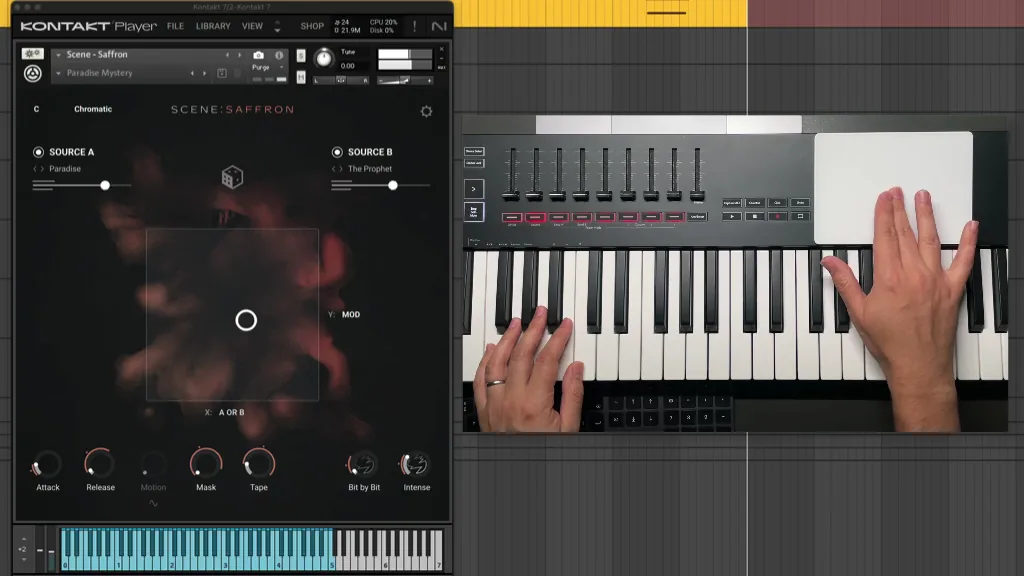
[AudioSwift](https://audioswiftapp.com/) · Imagery © Nigel Ríos; host apps and instruments retain their respective rights. Developer-distributed screenshot or frame; all rights reserved. Excluded from MIT and CC BY 4.0.
[Source recording](https://www.dropbox.com/scl/fi/fc2ycw35tusq9f0joj5s5/04-Core-Features-XY-Pads.mp4?rlkey=hc7s0jir9zb5du0z08f9xipon&st=nltffpdt&raw=1), 3 s
1. The XY point maps two motion axes to sound parameters
- Do not change axis or confirmation roles during an active gesture.
- [AudioSwift](https://audioswiftapp.com/)
## How it works
Multiple signals or axes are combined into one control rule with separate roles for accuracy, direction, and confirmation.
## Variants
### Variants and applications
- Virtual trackball. Gesture: Push to set the speed, after lifting off, continue moving with inertia. In the interface: Long-distance pointer movement, rotation of the model. In the game: Inertial chamber or rotating ball. Access level: Separate contacts; You need access to coordinates, phases and contact IDs. The presence of multitouch on the device does not guarantee this. Conditions: For accurate lift-off triggering, a contact signal or a special mode is required. Software inertia is not physical rotation of the panel.
- Continue moving at the edge. Gesture: Bring the contact to the edge and continue changing the parameter without further movement. In the interface: Scrolling or rotating without constantly moving the finger. In the game: Continuous camera rotation, tower rotation. Access level: Individual contacts; You need access to coordinates, phases and contact IDs. The presence of multitouch on the device does not guarantee this. Conditions: Separately set the speed at the edge and the stopping condition. The driver can filter edge contacts.
- Swipe from the physical edge. Gesture: Consider not only the direction, but also the beginning of the contact at the edge of the panel. In the interface: Sliding panel, an additional set of commands. In the game: Opening inventory, map or hidden panel. Access level: Individual contacts; You need access to coordinates, phases and contact IDs. The presence of multitouch on the device does not guarantee this. Conditions: The edge of the panel and the edge of the screen window are different. The OS may intercept this gesture for a global function.
- A chain of gestures. Gesture: Perform several recognizable movements in a given order. In the interface: Gesture macro or multi-step command. In the game: Combo, password, rune sequence. Access level: Cursor and buttons; The application gets the usual pointer and buttons. The physical fingers and their separation may be unknown to him. Conditions: Through P, the sequence of drags and clicks can be recognized. A chain without a button requires T; I need a clear error reset.
- Hierarchical menu with a stroke. Gesture: Use sequential directions to select a section and a nested command. In the interface: Quick commands in the marking menu after training. In the game: Select a category and a specific spell in one route. Access level: Cursor and buttons; The application gets the usual pointer and buttons. The physical fingers and their separation may be unknown to him. Conditions: A visible version of the menu is needed for training and a backup method for selecting.
- Lateral displacement accuracy. Gesture: Use one drag component to change the value, the other to adjust the sensitivity. In the interface: Precise scrubbing: horizontal time, vertical step scale. In the game: Select strength and accuracy, adjust the timing mechanism. Access level: Cursor and buttons; The application gets the usual pointer and buttons. The physical fingers and their separation may be unknown to him. Conditions: This is a software display of the cursor trajectory. Regular two-finger scrolling does not guarantee the same geometry.
## Context and limits
Author's working classification for designing games and interactions. Options can overlap and combine; the list is not a generally accepted standard or proven exhaustive list. Application examples are conditional unless a specific verifiable observation is indicated nearby. Sources support individual techniques and technical limitations.
## Connected materials
## Sources and provenance
Original editorial design catalog consolidated from project discussions on 2026-10-20. Complete discussion item lists and contextual limitations are preserved; linked primary sources support specific techniques, not the entire classification. English translation was prepared with machine assistance and editorial review.
- [macOS Gestures](https://support.apple.com/en-us/102482) (id: source-0d7ed8efcd920b62)
- [W3C: Pointer Events](https://www.w3.org/TR/pointerevents/) (id: source-8303b0f3aad42806)
- [Steam Input: Surface Modes](https://partner.steamgames.com/doc/features/steam_controller/input_source_modes?language=english) (id: source-3b576ce1cd2451ef)
- [AudioSwift](https://audioswiftapp.com/) (id: source-fd215230c062deb7)
CC-BY-4.0 · gamemechanics.pro contributors