---
key: mechanic/trackpad--family-10
type: mechanic
id: trackpad--family-10
lang: en
title: Pressure and force
summary: >-
Force Touch measures force and distinguishes a click from a firmer press.
macOS exposes click-force settings only for compatible trackpads.
updatedAt: '2026-10-22'
status: active
url: 'https://gamemechanics.pro/en/knowledge/mechanic/trackpad--family-10/'
jsonUrl: >-
https://gamemechanics.pro/api/v1/knowledge/en/mechanic/trackpad--family-10.json
markdownUrl: 'https://gamemechanics.pro/content/knowledge/en/mechanic/trackpad--family-10.md'
aliases: []
tags:
- Trackpad interactions
- Mechanics catalog
sourceIds:
- source-c1dd61a434f7ff1a
- source-907e8574d34ed44f
sources:
- id: source-c1dd61a434f7ff1a
title: Force Touch and haptic feedback
url: 'https://support.apple.com/en-us/102309'
verifiedAt: null
- id: source-907e8574d34ed44f
title: 'AppKit: pressure behavior'
url: >-
https://developer.apple.com/documentation/appkit/nsevent/pressurebehavior-swift.enum
verifiedAt: null
relations: []
placements:
- catalogId: trackpad
id: family-10
title: Trackpad interactions
url: 'https://gamemechanics.pro/en/mechanics/trackpad/#family-10'
categoryIds:
- section-1
supersededBy: []
attributes:
preview:
updatedAt: '2026-10-22'
title: Pressure and force
description: >-
Force Touch measures force and distinguishes a click from a firmer press.
macOS exposes click-force settings only for compatible trackpads.
image:
src: images/mechanics/control-macos-force-touch.webp
width: 1440
height: 1225
crop:
x: 473
'y': 598
width: 936
height: 239
game: macOS Trackpad settings
sourceUrl: 'https://support.apple.com/en-us/102309'
originalUrl: >-
https://cdsassets.apple.com/live/7WUAS350/images/macos/tahoe/macos-tahoe-26-system-settings-trackpad-point-and-click-look-up-and-data-detectors.png
credit: Apple
rights: >-
Imagery © Apple. Developer-distributed screenshot or frame; all rights
reserved. Excluded from MIT and CC BY 4.0.
caption: 'macOS: click force and Force Click activation'
alt: 'macOS: click force and Force Click activation'
markers:
- x: 79
'y': 52
label: 'Light, Medium and Firm set the required click force'
tips:
- >-
Check Force Touch support; a click or contact area is not a force
measurement.
examples:
- title: macOS Trackpad settings
url: 'https://support.apple.com/en-us/102309'
endsAt: null
provenance: >-
Original editorial design catalog consolidated from project discussions on
2026-10-20. Complete discussion item lists and contextual limitations are
preserved; linked primary sources support specific techniques, not the entire
classification. English translation was prepared with machine assistance and
editorial review.
license: CC-BY-4.0
codeLicense: MIT
attribution: gamemechanics.pro contributors
catalogKey: catalog/trackpad
---
# Pressure and force
id: trackpad--family-10
type: mechanic
key: mechanic/trackpad--family-10
lang: en
status: active
url: https://gamemechanics.pro/en/knowledge/mechanic/trackpad--family-10/
Force Touch measures force and distinguishes a click from a firmer press. macOS exposes click-force settings only for compatible trackpads.
## At a glance
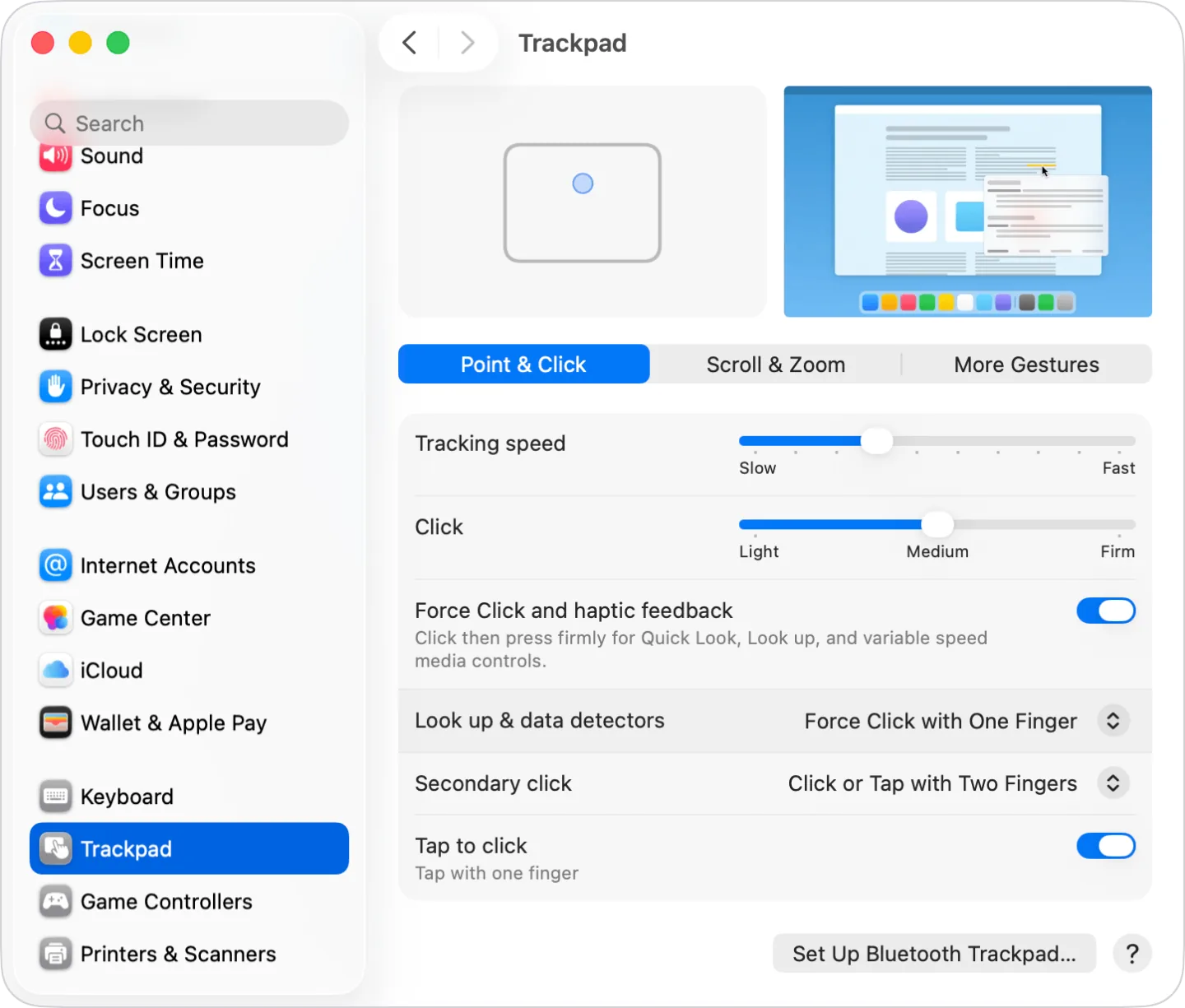
[macOS Trackpad settings](https://support.apple.com/en-us/102309) · Imagery © Apple. Developer-distributed screenshot or frame; all rights reserved. Excluded from MIT and CC BY 4.0.
1. Light, Medium and Firm set the required click force
- Check Force Touch support; a click or contact area is not a force measurement.
- [macOS Trackpad settings](https://support.apple.com/en-us/102309)
## How it works
The measured pressing force sets the value or threshold of action; normal click and contact size does not replace the force sensor.
## Variants
### Variants and applications
- Strong click. Gesture: After a normal press, move to a stronger one. In the interface: Additional contextual command or preview. In the game: Second tool action, enhanced interaction. Access level: Force sensor; Force measurement and a suitable API are needed. A simple click or a large contact area does not replace the sensor. Conditions: Supported pressure stages are required; This is not a normal long press.
- Analog power. Gesture: Continuously associate the amount of pressure with a parameter. In the interface: Effect intensity, level or force. In the game: Gas, brake, object compression, engine power. Access level: Force sensor; Force measurement and a suitable API are needed. A simple click or large contact area does not replace the sensor. Conditions: Range and noise vary by device; pressure is not necessarily measured separately for each finger.
- Charge by force with release. Gesture: Increase the force, then release the press to start. In the interface: Select intensity before confirming. In the game: Strong throw, hit, shot. Access level: Force sensor; Force measurement and a suitable API are needed. A simple click or a large contact area does not replace the sensor. Conditions: Determine in advance whether a release force, a peak force, or an accumulation over time is used.
- Several power thresholds. Gesture: Divide the measured force into program ranges. In the interface: Preview, selection, confirmation with one button. In the game: Walking, running, jerking or different instrument states. Access level: Force sensor; Force measurement and a suitable API are needed. A normal click or large contact area does not replace the sensor. Conditions: There may be fewer physically detectable clicks than software thresholds. Need hysteresis...
- Drawing with power. Gesture: Change the thickness or opacity of a stroke by pressing. In the interface: Brush, retouching, handwritten notes. In the game: Drawing runes with variable thickness, virtual engraving. Access level: Force sensor; Force measurement and a suitable API are needed. A regular click or a large contact area does not replace the sensor. Conditions: Both trajectory and pressure are needed; the finger on the trackpad is not equal to the pen on the graphics tablet...
- Strength is like speed. Gesture: Increase the rate of change of a parameter when pressing harder. In the interface: Fast rewind, scroll or adjust. In the game: Speed of the mechanism, winding or movement. Access level: Force sensor; Force measurement and a suitable API are needed. A simple click or large contact area does not replace the sensor. Conditions: Speed control is different from setting an absolute value; I need a clear zero...
- Power as a precision switch. Gesture: Press harder for slower, more precise control. In the interface: Precise editing mode without a separate key. In the game: Crosshair stabilization or careful manipulation. Access level: Force sensor; Force measurement and a suitable API are needed. A regular click or a large contact area does not replace the sensor. Conditions: Pressing itself can move the finger; Convenience needs to be checked on a real panel.
- Additional click while dragging. Gesture: During the transfer process, change the force and enable the second function. In the interface: Preview of the receiver, expand a subfolder, additional mode. In the game: Squeeze the captured object, change the grip or strength of the tool. Access level: Force sensor; Force measurement and a suitable API are needed. A regular click or a large contact area does not replace the sensor. Conditions: Pressure events must be coordinated with pointer capture and system behavior.
- Force impulses. Gesture: Strengthen and release pressure without completely lifting off. In the interface: Expressive music input, impulse control. In the game: Pump, pulsation ability, transmitting rhythm by force. Access level: Force sensor; Force measurement and a suitable API are needed. A normal click or a large contact area does not replace the sensor. Conditions: A normal click does not report such a curve; smoothing and thresholds with tolerance are required.
- Keeping strength in range. Gesture: Maintain pressure between the lower and upper boundaries. In the interface: Force dosing simulator. In the game: Fine work with a fragile object, string tension, neutralization. Access level: Force sensor; Force measurement and a suitable API are needed. A regular click or a large contact area does not replace the sensor. Conditions: This is an original gaming model; thresholds need to be calibrated, and an alternative given by time or slider.
## Context and limits
Author's working classification for designing games and interactions. Options can overlap and combine; the list is not a generally accepted standard or proven exhaustive list. Application examples are conditional unless a specific verifiable observation is indicated nearby. Sources support individual techniques and technical limitations.
## Connected materials
## Sources and provenance
Original editorial design catalog consolidated from project discussions on 2026-10-20. Complete discussion item lists and contextual limitations are preserved; linked primary sources support specific techniques, not the entire classification. English translation was prepared with machine assistance and editorial review.
- [Force Touch and haptic feedback](https://support.apple.com/en-us/102309) (id: source-c1dd61a434f7ff1a)
- [AppKit: pressure behavior](https://developer.apple.com/documentation/appkit/nsevent/pressurebehavior-swift.enum) (id: source-907e8574d34ed44f)
CC-BY-4.0 · gamemechanics.pro contributors