---
key: mechanic/trackpad--family-09
type: mechanic
id: trackpad--family-09
lang: en
title: Zones and virtual controls
summary: >-
The surface is divided into virtual controls. In AudioSwift separate vertical
zones change Expression, Dynamics, Reverb and Release.
updatedAt: '2026-10-22'
status: active
url: 'https://gamemechanics.pro/en/knowledge/mechanic/trackpad--family-09/'
jsonUrl: >-
https://gamemechanics.pro/api/v1/knowledge/en/mechanic/trackpad--family-09.json
markdownUrl: 'https://gamemechanics.pro/content/knowledge/en/mechanic/trackpad--family-09.md'
aliases: []
tags:
- Trackpad interactions
- Mechanics catalog
sourceIds:
- source-80fb36760a664f26
- source-8303b0f3aad42806
- source-3b576ce1cd2451ef
- source-fd215230c062deb7
sources:
- id: source-80fb36760a664f26
title: 'AppKit: contacts and system gestures'
url: >-
https://developer.apple.com/library/archive/documentation/Cocoa/Conceptual/EventOverview/HandlingTouchEvents/HandlingTouchEvents.html
verifiedAt: null
- id: source-8303b0f3aad42806
title: 'W3C: Pointer Events'
url: 'https://www.w3.org/TR/pointerevents/'
verifiedAt: null
- id: source-3b576ce1cd2451ef
title: 'Steam Input: Surface Modes'
url: >-
https://partner.steamgames.com/doc/features/steam_controller/input_source_modes?language=english
verifiedAt: null
- id: source-fd215230c062deb7
title: AudioSwift
url: 'https://audioswiftapp.com/'
verifiedAt: null
relations: []
placements:
- catalogId: trackpad
id: family-09
title: Trackpad interactions
url: 'https://gamemechanics.pro/en/mechanics/trackpad/#family-09'
categoryIds:
- section-1
supersededBy: []
attributes:
preview:
updatedAt: '2026-10-22'
title: Zones and virtual controls
description: >-
The surface is divided into virtual controls. In AudioSwift separate
vertical zones change Expression, Dynamics, Reverb and Release.
image:
src: images/mechanics/control-audioswift-2.webp
width: 1024
height: 576
game: AudioSwift
sourceUrl: 'https://audioswiftapp.com/'
originalUrl: >-
https://www.dropbox.com/scl/fi/01xx9msnyfkak43g0j99r/03-Core-Features-Sliders.mp4?rlkey=q5fpwrws8j8i4lglzjgfbwvsb&st=9adzkxde&raw=1
sourceFrameSeconds: 3
credit: Nigel Ríos; host apps and instruments retain their respective rights
rights: >-
Imagery © Nigel Ríos; host apps and instruments retain their respective
rights. Developer-distributed screenshot or frame; all rights reserved.
Excluded from MIT and CC BY 4.0.
caption: 'AudioSwift Slider: independent vertical trackpad controls'
alt: 'AudioSwift Slider: independent vertical trackpad controls'
markers:
- x: 59
'y': 32
label: Each zone maps to its own instrument parameter
tips:
- Show zone boundaries and check access to raw contacts.
examples:
- title: AudioSwift
url: 'https://audioswiftapp.com/'
endsAt: null
provenance: >-
Original editorial design catalog consolidated from project discussions on
2026-10-20. Complete discussion item lists and contextual limitations are
preserved; linked primary sources support specific techniques, not the entire
classification. English translation was prepared with machine assistance and
editorial review.
license: CC-BY-4.0
codeLicense: MIT
attribution: gamemechanics.pro contributors
catalogKey: catalog/trackpad
---
# Zones and virtual controls
id: trackpad--family-09
type: mechanic
key: mechanic/trackpad--family-09
lang: en
status: active
url: https://gamemechanics.pro/en/knowledge/mechanic/trackpad--family-09/
The surface is divided into virtual controls. In AudioSwift separate vertical zones change Expression, Dynamics, Reverb and Release.
## At a glance
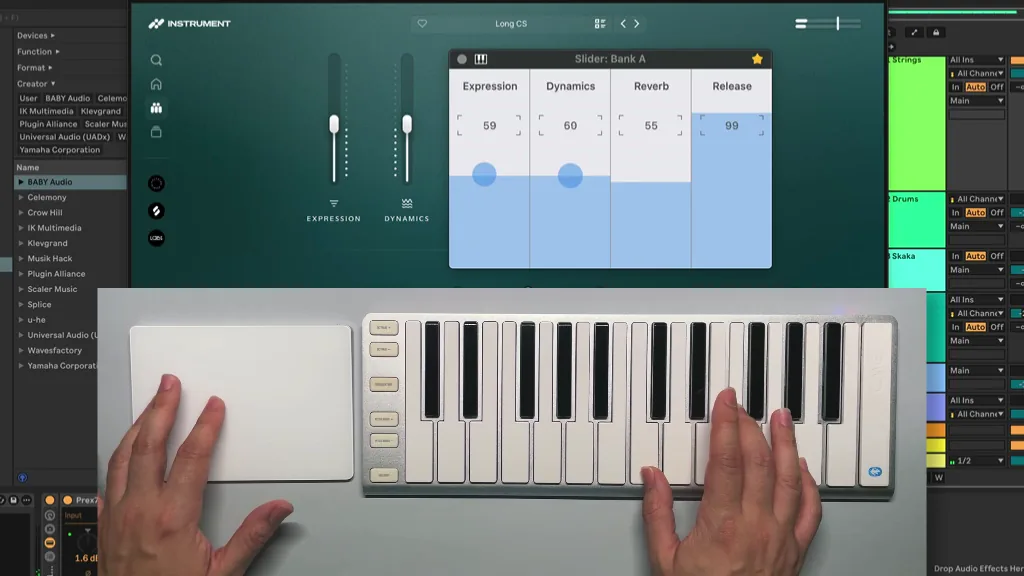
[AudioSwift](https://audioswiftapp.com/) · Imagery © Nigel Ríos; host apps and instruments retain their respective rights. Developer-distributed screenshot or frame; all rights reserved. Excluded from MIT and CC BY 4.0.
[Source recording](https://www.dropbox.com/scl/fi/01xx9msnyfkak43g0j99r/03-Core-Features-Sliders.mp4?rlkey=q5fpwrws8j8i4lglzjgfbwvsb&st=9adzkxde&raw=1), 3 s
1. Each zone maps to its own instrument parameter
- Show zone boundaries and check access to raw contacts.
- [AudioSwift](https://audioswiftapp.com/)
## How it works
Surface areas receive virtual roles: stick, wheel, button or independent control axis.
## Variants
### Variants and applications
- Grid of virtual buttons. Gesture: Divide the physical panel into cells. In the interface: Hot commands, numeric keypad, remote control. In the game: Quick slots, drum pads, abilities. Access level: Individual contacts; You need access to coordinates, phases and contact IDs. The presence of multitouch on the device does not guarantee this. Conditions: You need a screen layout and sufficiently large zones; There are no signatures on the panel.
- Virtual cross. Gesture: Center and directions work as number buttons. In the interface: Menu navigation, step-by-step shift. In the game: Walking on cells, platforming controls. Access level: Individual contacts; You need access to coordinates, phases and contact IDs. The presence of multitouch on the device does not guarantee this. Conditions: The neutral zone and the diagonal rule are set; a special driver can provide ready-made buttons.
- Two-dimensional analogue remote control. Gesture: X and Y coordinates independently set two parameters. In the interface: Panorama and volume, color and saturation, XY effect. In the game: Steering wheel and gas, two ability parameters, balance control. Access level: Separate contacts; You need access to coordinates, phases and contact IDs. The presence of multitouch on the device does not guarantee this. Conditions: These are two program parameters of one position, and not necessarily two contacts.
- Radial menu. Gesture: Open the menu, select a sector with a movement and confirm. In the interface: Tools, commands, quick selection. In the game: Wheel of weapons, spells or orders. Access level: Cursor and buttons; The application gets the usual pointer and buttons. Physical fingers and their separation may be unknown to him. Conditions: Works through the cursor and holding. The option with a physical panel center requires T or special mode.
- Outer ring as an additional command. Gesture: Go beyond a given radius relative to the center of the surface. In the interface: Accelerated mode or an expanded set of functions. In the game: Running on the outer ring, walking closer to the center. Access level: Individual contacts; You need access to coordinates, phases and contact IDs. The presence of multitouch on the device does not guarantee this. Conditions: For a regular cursor, an analogue relative to the screen center is possible; physical zone requires panel coordinates.
- Edge slider stripes. Gesture: Select edges for individual continuous parameters. In the interface: Volume, scale, transparency, time axis. In the game: Tool health, power, height, thrust. Access level: Individual contacts; You need access to coordinates, phases and contact IDs. The presence of multitouch on the device does not guarantee this. Conditions: Contacts at the edge can be filtered out by the driver. Do not confuse the edge of the panel with the edge of the screen window.
- Angles and quadrants. Gesture: Assign different commands to different corners and halves. In the interface: Four quick tools or two control groups. In the game: Left and right hits, four abilities. Access level: Individual contacts; You need access to coordinates, phases and contact IDs. The presence of multitouch on the device does not guarantee this. Conditions: This is a specific surface marking; system click zones do not guarantee arbitrary markings.
- Display in the screen area. Gesture: Link a surface to a selected part of the screen. In the interface: Control of the minimap, a specific monitor or panel. In the game: Quick order on the minimap, precise work with inventory. Access level: Individual contacts; You need access to coordinates, phases and contact IDs. The presence of multitouch on the device does not guarantee this. Conditions: The proportions and size of the area must be taken into account. Steam Input describes the Mouse Region for supported sources.
- Modifier of another device. Gesture: With a key or button, change the value of the panel movement. In the interface: Rotate instead of transfer, copy when dragging, precise input. In the game: The keyboard is responsible for movement, the panel for the camera; button changes tool. Access level: Cursor and buttons; The application gets the usual pointer and buttons. The physical fingers and their separation may be unknown to him. Conditions: Some drivers suppress the panel during printing. Collaboration needs to be checked on the device.
- Crossing zone boundaries. Gesture: Trigger an action when entering a zone or crossing a line. In the interface: Sequential selection, click-free input along a route. In the game: Strings, laser tracks, notes, connecting contacts. Access level: Individual contacts; You need access to coordinates, phases and contact IDs. The presence of multitouch on the device does not guarantee this. Conditions: For zones of the physical panel, T is required. For zones of the screen canvas, the cursor trajectory P is sufficient.
## Context and limits
Author's working classification for designing games and interactions. Options can overlap and combine; the list is not a generally accepted standard or proven exhaustive list. Application examples are conditional unless a specific verifiable observation is indicated nearby. Sources support individual techniques and technical limitations.
## Connected materials
## Sources and provenance
Original editorial design catalog consolidated from project discussions on 2026-10-20. Complete discussion item lists and contextual limitations are preserved; linked primary sources support specific techniques, not the entire classification. English translation was prepared with machine assistance and editorial review.
- [AppKit: contacts and system gestures](https://developer.apple.com/library/archive/documentation/Cocoa/Conceptual/EventOverview/HandlingTouchEvents/HandlingTouchEvents.html) (id: source-80fb36760a664f26)
- [W3C: Pointer Events](https://www.w3.org/TR/pointerevents/) (id: source-8303b0f3aad42806)
- [Steam Input: Surface Modes](https://partner.steamgames.com/doc/features/steam_controller/input_source_modes?language=english) (id: source-3b576ce1cd2451ef)
- [AudioSwift](https://audioswiftapp.com/) (id: source-fd215230c062deb7)
CC-BY-4.0 · gamemechanics.pro contributors