---
key: mechanic/trackpad--family-08
type: mechanic
id: trackpad--family-08
lang: en
title: 'Chords, roles and sequences'
summary: >-
Multiple contacts receive independent roles. AudioSwift maps trackpad zones to
notes, letting contacts combine into musical actions.
updatedAt: '2026-10-22'
status: active
url: 'https://gamemechanics.pro/en/knowledge/mechanic/trackpad--family-08/'
jsonUrl: >-
https://gamemechanics.pro/api/v1/knowledge/en/mechanic/trackpad--family-08.json
markdownUrl: 'https://gamemechanics.pro/content/knowledge/en/mechanic/trackpad--family-08.md'
aliases: []
tags:
- Trackpad interactions
- Mechanics catalog
sourceIds:
- source-80fb36760a664f26
- source-27c6b989daeb79c9
- source-fd215230c062deb7
sources:
- id: source-80fb36760a664f26
title: 'AppKit: contacts and system gestures'
url: >-
https://developer.apple.com/library/archive/documentation/Cocoa/Conceptual/EventOverview/HandlingTouchEvents/HandlingTouchEvents.html
verifiedAt: null
- id: source-27c6b989daeb79c9
title: 'libinput: swipe, pinch, hold'
url: 'https://wayland.freedesktop.org/libinput/doc/latest/gestures.html'
verifiedAt: null
- id: source-fd215230c062deb7
title: AudioSwift
url: 'https://audioswiftapp.com/'
verifiedAt: null
relations: []
placements:
- catalogId: trackpad
id: family-08
title: Trackpad interactions
url: 'https://gamemechanics.pro/en/mechanics/trackpad/#family-08'
categoryIds:
- section-1
supersededBy: []
attributes:
preview:
updatedAt: '2026-10-22'
title: 'Chords, roles and sequences'
description: >-
Multiple contacts receive independent roles. AudioSwift maps trackpad
zones to notes, letting contacts combine into musical actions.
image:
src: images/mechanics/control-audioswift-4.webp
width: 1024
height: 576
game: AudioSwift
sourceUrl: 'https://audioswiftapp.com/'
originalUrl: >-
https://www.dropbox.com/scl/fi/z7hef1ztnd56mheic3wgn/05-Core-Features-Triggers-MPE.mp4?rlkey=ao0d1fw6tnmt2sa4nsc36eccx&st=zyrj4jr0&raw=1
sourceFrameSeconds: 2.8166665
credit: Nigel Ríos; host apps and instruments retain their respective rights
rights: >-
Imagery © Nigel Ríos; host apps and instruments retain their respective
rights. Developer-distributed screenshot or frame; all rights reserved.
Excluded from MIT and CC BY 4.0.
caption: 'AudioSwift Trigger: the note grid maps to trackpad zones'
alt: 'AudioSwift Trigger: the note grid maps to trackpad zones'
markers:
- x: 36
'y': 74
label: The grid divides the surface into independently assigned zones
tips:
- Preserve contact roles as fingers join and leave the surface.
examples:
- title: AudioSwift
url: 'https://audioswiftapp.com/'
endsAt: null
provenance: >-
Original editorial design catalog consolidated from project discussions on
2026-10-20. Complete discussion item lists and contextual limitations are
preserved; linked primary sources support specific techniques, not the entire
classification. English translation was prepared with machine assistance and
editorial review.
license: CC-BY-4.0
codeLicense: MIT
attribution: gamemechanics.pro contributors
catalogKey: catalog/trackpad
---
# Chords, roles and sequences
id: trackpad--family-08
type: mechanic
key: mechanic/trackpad--family-08
lang: en
status: active
url: https://gamemechanics.pro/en/knowledge/mechanic/trackpad--family-08/
Multiple contacts receive independent roles. AudioSwift maps trackpad zones to notes, letting contacts combine into musical actions.
## At a glance
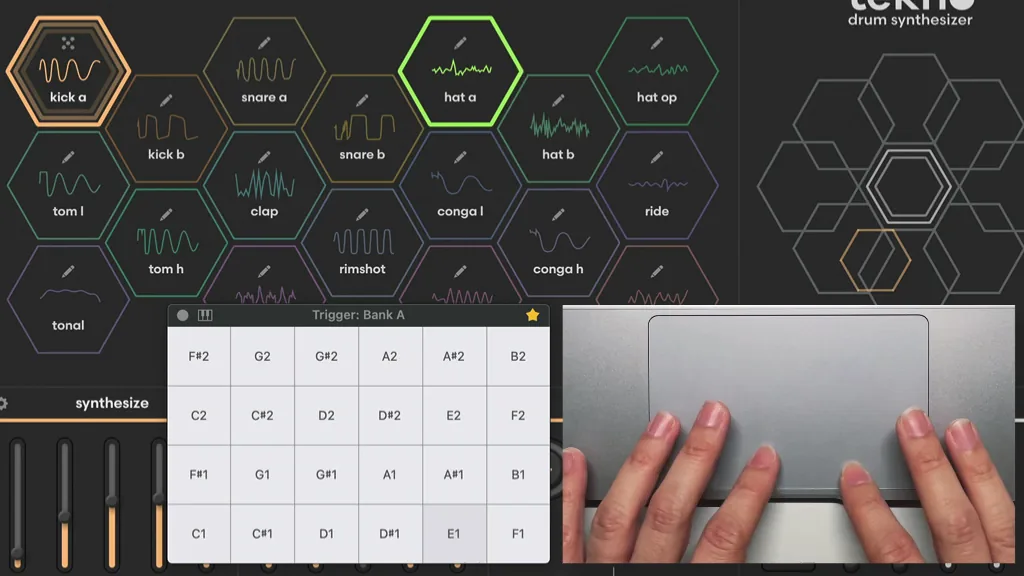
[AudioSwift](https://audioswiftapp.com/) · Imagery © Nigel Ríos; host apps and instruments retain their respective rights. Developer-distributed screenshot or frame; all rights reserved. Excluded from MIT and CC BY 4.0.
[Source recording](https://www.dropbox.com/scl/fi/z7hef1ztnd56mheic3wgn/05-Core-Features-Triggers-MPE.mp4?rlkey=ao0d1fw6tnmt2sa4nsc36eccx&st=zyrj4jr0&raw=1), 2.8166665 s
1. The grid divides the surface into independently assigned zones
- Preserve contact roles as fingers join and leave the surface.
- [AudioSwift](https://audioswiftapp.com/)
## How it works
Combinations of contacts and their order distribute roles between fingers and allow you to compose commands from several phases.
## Variants
### Variants and applications
- Number of fingers as mode. Gesture: One, two or three touches enable different functions. In the interface: One contact draws, two move, three change the tool. In the game: Change the type of action without a separate button. Access level: Separate contacts; You need access to coordinates, phases and contact IDs. The presence of multitouch on the device does not guarantee this. Conditions: The OS may already use such a grammar and not give all touches to the application.
- Spatial chord. Gesture: Touch a certain set of zones at the same time. In the interface: Command combinations, chord keyboard. In the game: Musical chords, rune combination, several valves. Access level: Individual contacts; You need access to coordinates, phases and contact IDs. The presence of multitouch on the device does not guarantee this. Conditions: The coordinates of several contacts are needed; The number of fingers in itself does not determine the chord.
- Hold plus tap. Gesture: One contact holds the state, the other briefly touches. In the interface: Temporary modifier plus command. In the game: Shield and strike, aim and shoot. Access level: Individual contacts; You need access to coordinates, phases and contact IDs. The presence of multitouch on the device does not guarantee this. Conditions: Thumb filtering may remove the reference contact.
- Hold plus movement. Gesture: The first contact fixes the mode, the second continuously moves. In the interface: Editing with a modifier, fine adjustment. In the game: Block and direction of protection, capture and rotation. Access level: Individual contacts; You need access to coordinates, phases and contact IDs. The presence of multitouch on the device does not guarantee this. Conditions: For a regular cursor, instead of a support finger, you can use a key.
- Two independent channels. Gesture: Move two contacts along two controlled values. In the interface: Two sliders, XY-control with separate roles. In the game: Two rackets, two hands, gas and brake. Access level: Separate contacts; You need access to coordinates, phases and contact IDs. The presence of multitouch on the device does not guarantee this. Conditions: One system pointer does not turn into two. Check the panel area and hand comfort.
- Alternating fingers. Gesture: Alternately touch with two tracked contacts. In the interface: Drum input, metronome, motor training. In game: Running, rowing, drumming. Access level: Individual contacts; You need access to coordinates, phases and contact IDs. The presence of multitouch on the device does not guarantee this. Conditions: Two regular clicks allow you to enter a rhythm, but do not prove the alternation of physical fingers.
- Walking contacts. Gesture: Consistently rearrange fingers while maintaining at least one support. In the interface: Navigation on a surface with continuous contact. In the game: Climbing, walking of a creature, transfer of robot supports. Access level: Individual contacts; You need access to coordinates, phases and contact IDs. The presence of multitouch on a device does not guarantee this. Conditions: The role must be assigned by contact and context, and not by guessing which finger it is.
- Staging order. Gesture: Count different sequences of appearance of contacts using different commands. In the interface: Gesture code, switching a tool. In the game: Lock, combination of actions, sequential activation of mechanisms. Access level: Individual contacts; You need access to coordinates, phases and contact IDs. The presence of multitouch on a device does not guarantee this. Conditions: The order of events does not always accurately reflect almost simultaneous touches.
- Removal procedure. Gesture: Distinguish which of the assigned contacts is released first. In the interface: Different ways to confirm and complete. In the game: Release one grab, transfer a load, end a combination. Access level: Individual contacts; You need access to coordinates, phases and contact IDs. The presence of multitouch on the device does not guarantee this. Conditions: Stable identifiers within the sequence and separate cancellation processing are needed.
- Adding or removing a finger while moving. Gesture: Switch mode while maintaining the current trajectory. In the interface: Precision mode, change tools without stopping. In the game: Switch from walking to running, change the type of impact in the swing. Access level: Separate contacts; You need access to coordinates, phases and contact IDs. The presence of multitouch on the device does not guarantee this. Conditions: The OS recognizer can end one gesture and begin another; The transition cannot be considered continuous by default.
## Context and limits
Author's working classification for designing games and interactions. Options can overlap and combine; the list is not a generally accepted standard or proven exhaustive list. Application examples are conditional unless a specific verifiable observation is indicated nearby. Sources support individual techniques and technical limitations.
## Connected materials
## Sources and provenance
Original editorial design catalog consolidated from project discussions on 2026-10-20. Complete discussion item lists and contextual limitations are preserved; linked primary sources support specific techniques, not the entire classification. English translation was prepared with machine assistance and editorial review.
- [AppKit: contacts and system gestures](https://developer.apple.com/library/archive/documentation/Cocoa/Conceptual/EventOverview/HandlingTouchEvents/HandlingTouchEvents.html) (id: source-80fb36760a664f26)
- [libinput: swipe, pinch, hold](https://wayland.freedesktop.org/libinput/doc/latest/gestures.html) (id: source-27c6b989daeb79c9)
- [AudioSwift](https://audioswiftapp.com/) (id: source-fd215230c062deb7)
CC-BY-4.0 · gamemechanics.pro contributors