---
key: mechanic/trackpad--family-05
type: mechanic
id: trackpad--family-05
lang: en
title: Scrolling and timelines
summary: >-
Two-finger scrolling moves through a document without changing its scale.
Preview uses this to navigate PDF pages and thumbnails.
updatedAt: '2026-10-22'
status: active
url: 'https://gamemechanics.pro/en/knowledge/mechanic/trackpad--family-05/'
jsonUrl: >-
https://gamemechanics.pro/api/v1/knowledge/en/mechanic/trackpad--family-05.json
markdownUrl: 'https://gamemechanics.pro/content/knowledge/en/mechanic/trackpad--family-05.md'
aliases: []
tags:
- Trackpad interactions
- Mechanics catalog
sourceIds:
- source-0d7ed8efcd920b62
- source-7641af4e83c63a96
- source-80fb36760a664f26
- source-27c6b989daeb79c9
- source-8303b0f3aad42806
- source-3b576ce1cd2451ef
- source-2aa43929eb995c4c
sources:
- id: source-0d7ed8efcd920b62
title: macOS Gestures
url: 'https://support.apple.com/en-us/102482'
verifiedAt: null
- id: source-7641af4e83c63a96
title: Windows Gestures
url: >-
https://support.microsoft.com/en-us/windows/hardware/input-devices/touch-gestures-for-windows
verifiedAt: null
- id: source-80fb36760a664f26
title: 'AppKit: contacts and system gestures'
url: >-
https://developer.apple.com/library/archive/documentation/Cocoa/Conceptual/EventOverview/HandlingTouchEvents/HandlingTouchEvents.html
verifiedAt: null
- id: source-27c6b989daeb79c9
title: 'libinput: swipe, pinch, hold'
url: 'https://wayland.freedesktop.org/libinput/doc/latest/gestures.html'
verifiedAt: null
- id: source-8303b0f3aad42806
title: 'W3C: Pointer Events'
url: 'https://www.w3.org/TR/pointerevents/'
verifiedAt: null
- id: source-3b576ce1cd2451ef
title: 'Steam Input: Surface Modes'
url: >-
https://partner.steamgames.com/doc/features/steam_controller/input_source_modes?language=english
verifiedAt: null
- id: source-2aa43929eb995c4c
title: Preview (macOS)
url: >-
https://support.apple.com/guide/preview/view-pdfs-and-images-prvw11470/11.0/mac/26
verifiedAt: null
relations: []
placements:
- catalogId: trackpad
id: family-05
title: Trackpad interactions
url: 'https://gamemechanics.pro/en/mechanics/trackpad/#family-05'
categoryIds:
- section-1
supersededBy: []
attributes:
preview:
updatedAt: '2026-10-22'
title: Scrolling and timelines
description: >-
Two-finger scrolling moves through a document without changing its scale.
Preview uses this to navigate PDF pages and thumbnails.
image:
src: images/mechanics/control-macos-preview.webp
width: 788
height: 750
game: Preview (macOS)
sourceUrl: >-
https://support.apple.com/guide/preview/view-pdfs-and-images-prvw11470/11.0/mac/26
originalUrl: >-
https://help.apple.com/assets/67DB77BFAE89A3DDC700A869/67DB77C0E2208881620C3D38/en_US/918f957676bf215f21f57328147e8435.png
credit: Apple
rights: >-
© Apple. Official support screenshot; all rights reserved. Excluded from
MIT and CC BY 4.0.
caption: 'Preview: a document page and a scrollable thumbnail sidebar'
alt: 'Preview: a document page and a scrollable thumbnail sidebar'
markers:
- x: 13
'y': 67
label: Thumbnails relate scrolling to the position in the document
tips:
- >-
Distinguish scrolling from pinching and respect OS direction and
inertia.
examples:
- title: Preview (macOS)
url: >-
https://support.apple.com/guide/preview/view-pdfs-and-images-prvw11470/11.0/mac/26
endsAt: null
provenance: >-
Original editorial design catalog consolidated from project discussions on
2026-10-20. Complete discussion item lists and contextual limitations are
preserved; linked primary sources support specific techniques, not the entire
classification. English translation was prepared with machine assistance and
editorial review.
license: CC-BY-4.0
codeLicense: MIT
attribution: gamemechanics.pro contributors
catalogKey: catalog/trackpad
---
# Scrolling and timelines
id: trackpad--family-05
type: mechanic
key: mechanic/trackpad--family-05
lang: en
status: active
url: https://gamemechanics.pro/en/knowledge/mechanic/trackpad--family-05/
Two-finger scrolling moves through a document without changing its scale. Preview uses this to navigate PDF pages and thumbnails.
## At a glance
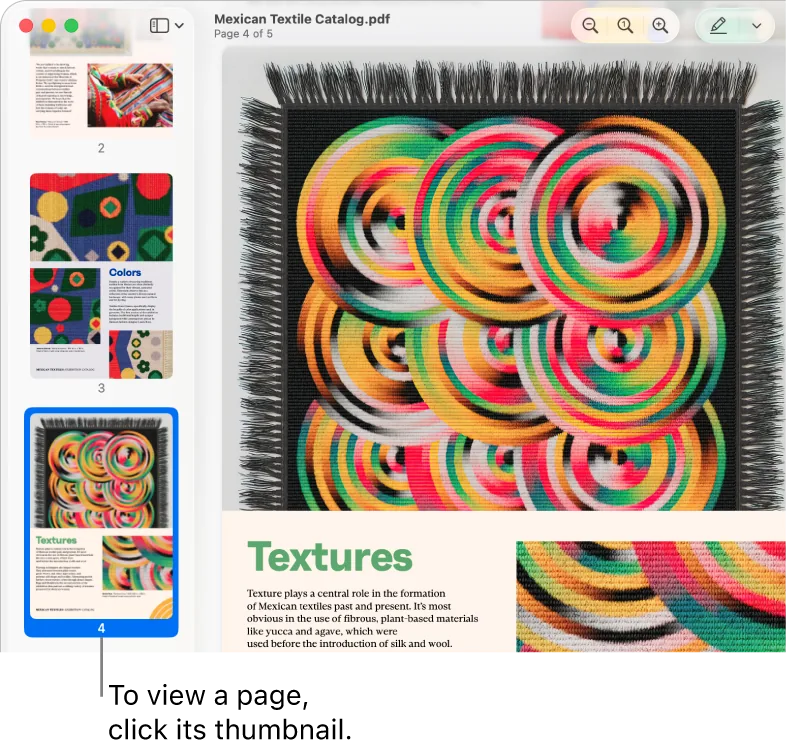
[Preview (macOS)](https://support.apple.com/guide/preview/view-pdfs-and-images-prvw11470/11.0/mac/26) · © Apple. Official support screenshot; all rights reserved. Excluded from MIT and CC BY 4.0.
1. Thumbnails relate scrolling to the position in the document
- Distinguish scrolling from pinching and respect OS direction and inertia.
- [Preview (macOS)](https://support.apple.com/guide/preview/view-pdfs-and-images-prvw11470/11.0/mac/26)
## How it works
Scrolling is converted into movement across space, a scale of values or time with an explicitly specified sensitivity.
## Variants
### Variants and applications
- Vertical scrolling. Gesture: Move two fingers up or down. In the interface: Documents, lists, change a parameter. In the game: Selecting an item, sight height, camera zoom. Access level: Ready gesture; You need a gesture transmitted by the OS or framework: scroll, zoom, rotate, swipe or hold. The set varies. Conditions: The OS can issue wheel deltas. The direction depends on the natural scrolling setting.
- Horizontal scrolling. Gesture: Move two fingers left or right. In the interface: Wide canvas, paths, table. In the game: Horizontal camera, change lane or position. Access level: Ready gesture; You need a gesture transmitted by the OS or framework: scroll, zoom, rotate, swipe or hold. The set varies. Conditions: The browser or OS can use this move to navigate back and forth.
- Free panning. Gesture: Use both scrolling components at the same time. In the interface: Map, large diagram, 2D canvas. In game: Review of the strategy or tactical map field. Access level: Ready gesture; You need a gesture transmitted by the OS or framework: scroll, zoom, rotate, swipe or hold. The set varies. Conditions: Not every stack transmits equally accurate continuous deltas.
- Inertial scrolling. Gesture: After a push, continue moving with deceleration. In the interface: Long tapes, catalogs, panoramas. In the game: Scrolling the wheel of objects, inertial view. Access level: Ready gesture; You need a gesture transmitted by the OS or framework: scroll, zoom, rotate, swipe or hold. The set varies. Conditions: Inertia can be created by the OS or application; You can't use it twice.
- Touch to stop momentum. Gesture: Place your fingers on the panel to stop movement. In the interface: Quickly stop kinetic scrolling. In game: Slow down the spinning wheel or view. Access level: Ready gesture; You need a gesture transmitted by the OS or framework: scroll, zoom, rotate, swipe or hold. The set varies. Conditions: An explicit hold/touch signal is required. libinput describes hold; The regular wheel API does not guarantee this.
- Edge scrolling. Gesture: Move one finger along the edge of the surface. In the interface: Continuous navigation, one-finger scrolling. In the game: Inventory ribbon or vertical camera movement. Access level: Individual contacts; You need access to coordinates, phases and contact IDs. The presence of multitouch on the device does not guarantee this. Conditions: Driver mode or access to the panel area is required; This is not a universal app gesture.
- Circular scrolling. Gesture: Rotate your finger in a circle, accumulating an angle. In the interface: Long list, virtual wheel, change the number. In the game: Setting up a safe, reel, flywheel. Access level: Individual contacts; You need access to coordinates, phases and contact IDs. The presence of multitouch on the device does not guarantee this. Conditions: Possible through a special surface display; alternative in the application: circular drag cursor.
- Scroll by steps. Gesture: Convert accumulated deltas into discrete switches. In the interface: Select a line, frame, division or tool. In the game: Enumerate weapons, change the bet step. Access level: Ready gesture; You need a gesture transmitted by the OS or framework: scroll, zoom, rotate, swipe or hold. The set varies. Conditions: Do not consider each wheel event as a separate stage: their frequency depends on the device.
- Scrubbing. Gesture: Scroll to continuously change position on the time axis. In the interface: Video, sound, animation, history of changes. In the game: View replay, control time rewind. Access level: Ready gesture; You need a gesture transmitted by the OS or framework: scroll, zoom, rotate, swipe or hold. The set varies. Conditions: The position value and playback speed are different displays of the same input.
- Rough and fine scrubbing. Gesture: Change the scale of time adjustment using a modifier. In the interface: Search for a scene with a transition to frame-by-frame precision. In the game: Exact stop of a repeat or time puzzle. Access level: Ready gesture; You need a gesture transmitted by the OS or framework: scroll, zoom, rotate, swipe or hold. Set varies. Conditions: A second physical axis outside of normal scrolling may require T; the modifier key is simpler.
## Context and limits
Author's working classification for designing games and interactions. Options can overlap and combine; the list is not a generally accepted standard or proven exhaustive list. Application examples are conditional unless a specific verifiable observation is indicated nearby. Sources support individual techniques and technical limitations.
## Connected materials
## Sources and provenance
Original editorial design catalog consolidated from project discussions on 2026-10-20. Complete discussion item lists and contextual limitations are preserved; linked primary sources support specific techniques, not the entire classification. English translation was prepared with machine assistance and editorial review.
- [macOS Gestures](https://support.apple.com/en-us/102482) (id: source-0d7ed8efcd920b62)
- [Windows Gestures](https://support.microsoft.com/en-us/windows/hardware/input-devices/touch-gestures-for-windows) (id: source-7641af4e83c63a96)
- [AppKit: contacts and system gestures](https://developer.apple.com/library/archive/documentation/Cocoa/Conceptual/EventOverview/HandlingTouchEvents/HandlingTouchEvents.html) (id: source-80fb36760a664f26)
- [libinput: swipe, pinch, hold](https://wayland.freedesktop.org/libinput/doc/latest/gestures.html) (id: source-27c6b989daeb79c9)
- [W3C: Pointer Events](https://www.w3.org/TR/pointerevents/) (id: source-8303b0f3aad42806)
- [Steam Input: Surface Modes](https://partner.steamgames.com/doc/features/steam_controller/input_source_modes?language=english) (id: source-3b576ce1cd2451ef)
- [Preview (macOS)](https://support.apple.com/guide/preview/view-pdfs-and-images-prvw11470/11.0/mac/26) (id: source-2aa43929eb995c4c)
CC-BY-4.0 · gamemechanics.pro contributors