---
key: mechanic/trackpad--family-03
type: mechanic
id: trackpad--family-03
lang: en
title: Hold and release
summary: >-
Touch starts a note and release can end it. AudioSwift’s separate sustain mode
can retain the sound after finger contact ends.
updatedAt: '2026-10-22'
status: active
url: 'https://gamemechanics.pro/en/knowledge/mechanic/trackpad--family-03/'
jsonUrl: >-
https://gamemechanics.pro/api/v1/knowledge/en/mechanic/trackpad--family-03.json
markdownUrl: 'https://gamemechanics.pro/content/knowledge/en/mechanic/trackpad--family-03.md'
aliases: []
tags:
- Trackpad interactions
- Mechanics catalog
sourceIds:
- source-80fb36760a664f26
- source-27c6b989daeb79c9
- source-8303b0f3aad42806
- source-fd215230c062deb7
sources:
- id: source-80fb36760a664f26
title: 'AppKit: contacts and system gestures'
url: >-
https://developer.apple.com/library/archive/documentation/Cocoa/Conceptual/EventOverview/HandlingTouchEvents/HandlingTouchEvents.html
verifiedAt: null
- id: source-27c6b989daeb79c9
title: 'libinput: swipe, pinch, hold'
url: 'https://wayland.freedesktop.org/libinput/doc/latest/gestures.html'
verifiedAt: null
- id: source-8303b0f3aad42806
title: 'W3C: Pointer Events'
url: 'https://www.w3.org/TR/pointerevents/'
verifiedAt: null
- id: source-fd215230c062deb7
title: AudioSwift
url: 'https://audioswiftapp.com/'
verifiedAt: null
relations: []
placements:
- catalogId: trackpad
id: family-03
title: Trackpad interactions
url: 'https://gamemechanics.pro/en/mechanics/trackpad/#family-03'
categoryIds:
- section-1
supersededBy: []
attributes:
preview:
updatedAt: '2026-10-22'
title: Hold and release
description: >-
Touch starts a note and release can end it. AudioSwift’s separate sustain
mode can retain the sound after finger contact ends.
image:
src: images/mechanics/control-audioswift-6.webp
width: 1024
height: 576
game: AudioSwift
sourceUrl: 'https://audioswiftapp.com/'
originalUrl: >-
https://www.dropbox.com/scl/fi/hggbp41f16g87i1mb8z5s/07-Workflow-Scale.mp4?rlkey=1i7ekbx0r5m32sudh0er3r4lb&st=byr4pjge&raw=1
sourceFrameSeconds: 3
credit: Nigel Ríos; host apps and instruments retain their respective rights
rights: >-
Imagery © Nigel Ríos; host apps and instruments retain their respective
rights. Developer-distributed screenshot or frame; all rights reserved.
Excluded from MIT and CC BY 4.0.
caption: 'AudioSwift Scale: trackpad contacts are used to play notes'
alt: 'AudioSwift Scale: trackpad contacts are used to play notes'
markers:
- x: 30
'y': 52
label: A contact appears on the instrument’s virtual surface
tips:
- Define release behavior and prevent active actions from remaining stuck.
examples:
- title: AudioSwift
url: 'https://audioswiftapp.com/'
endsAt: null
provenance: >-
Original editorial design catalog consolidated from project discussions on
2026-10-20. Complete discussion item lists and contextual limitations are
preserved; linked primary sources support specific techniques, not the entire
classification. English translation was prepared with machine assistance and
editorial review.
license: CC-BY-4.0
codeLicense: MIT
attribution: gamemechanics.pro contributors
catalogKey: catalog/trackpad
---
# Hold and release
id: trackpad--family-03
type: mechanic
key: mechanic/trackpad--family-03
lang: en
status: active
url: https://gamemechanics.pro/en/knowledge/mechanic/trackpad--family-03/
Touch starts a note and release can end it. AudioSwift’s separate sustain mode can retain the sound after finger contact ends.
## At a glance
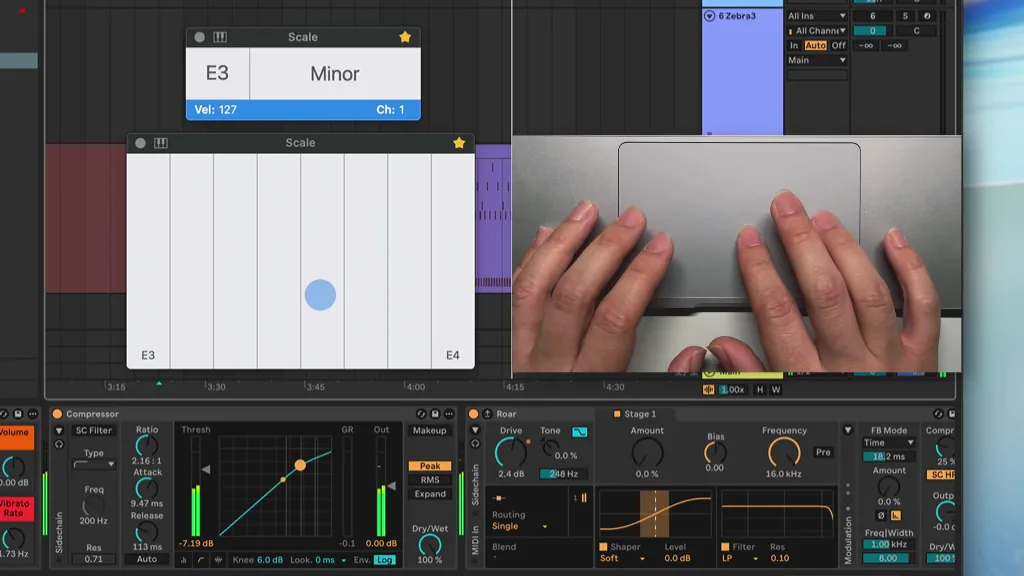
[AudioSwift](https://audioswiftapp.com/) · Imagery © Nigel Ríos; host apps and instruments retain their respective rights. Developer-distributed screenshot or frame; all rights reserved. Excluded from MIT and CC BY 4.0.
[Source recording](https://www.dropbox.com/scl/fi/hggbp41f16g87i1mb8z5s/07-Workflow-Scale.mp4?rlkey=1i7ekbx0r5m32sudh0er3r4lb&st=byr4pjge&raw=1), 3 s
1. A contact appears on the instrument’s virtual surface
- Define release behavior and prevent active actions from remaining stuck.
- [AudioSwift](https://audioswiftapp.com/)
## How it works
The duration of the contact and the moment of its completion control the charge, timing or confirmation of the action.
## Variants
### Variants and applications
- Hold the button. Gesture: Do not release the click while the action is being performed. In the interface: Temporary tool, view, continuous action. In the game: Auto-fire, block, work with the tool. Access level: Cursor and buttons; The application gets the usual pointer and buttons. The physical fingers and their separation may be unknown to him. Conditions: An exit is needed when focus is lost, canceled or released outside the element.
- Hold a contact without clicking. Gesture: Keep your finger on the surface without pressing it. In the interface: Temporary mode or touch preview. In the game: Touch turns on the shield or holds the object. Access level: Individual contacts; You need access to coordinates, phases and contact IDs. The presence of multitouch on a device does not guarantee this. Conditions: A stationary cursor is not equal to a stationary contact; regular mouse events are not enough...
- Long press. Gesture: Launch a command after a time threshold of a held click. In the interface: Contextual command, secure confirmation. In the game: Hacking, repair, interaction with the mechanism. Access level: Cursor and buttons; The application gets the usual pointer and buttons. Physical fingers and their separation may be unknown to him. Conditions: A progress indicator and cancellation during movement are needed. To hold without clicking you need T.
- Auto repeat when held. Gesture: After a delay, repeat the command at intervals. In the interface: Changing a value, paging, a set of identical elements. In the game: Serial construction, command queue. Access level: Cursor and buttons; The application gets the usual pointer and buttons. The physical fingers and their separation may be unknown to him. Conditions: The limits and acceleration of the repetition are set by the application.
- Accumulation over time. Gesture: Hold duration increases the selected value. In the interface: Adjust the intensity in the absence of a force sensor. In the game: Shot charge, jump or throw force. Access level: Cursor and buttons; The application gets the usual pointer and buttons. The physical fingers and their separation may be unknown to him. Conditions: The duration and physical force of pressing are different channels.
- Release action. Gesture: Confirm a command when releasing a held button. In the interface: Preview before final selection. In the game: Shoot a charged projectile, launch a throw. Access level: Cursor and buttons; The application gets the usual pointer and buttons. The physical fingers and their separation may be unknown to him. Conditions: Release of the button is available through P; lifting your finger without clicking requires T.
- Hold without moving. Gesture: Stay within the permissible deviation. In the interface: Stable confirmation, selection with cutting off random movement. In the game: Maintain balance, sight stabilization. Access level: Cursor and buttons; The application gets the usual pointer and buttons. The physical fingers and their separation may be unknown to him. Conditions: Allowance for natural tremor is required; physical contact without button requires T.
- Holding inside the target. Gesture: Maintain the click and position of the cursor in a given area. In the interface: Confirmation within a button or work area. In the game: Welding, grabbing, continuous target tracking. Access level: Cursor and buttons; The application gets the usual pointer and buttons. Physical fingers and their separation may be unknown to him. Conditions: The boundary and exit behavior should be clearly shown.
- Leaving the area to cancel. Gesture: Move the cursor away from the target before releasing. In the interface: Safely cancel a selection or confirmation. In game: Cancel a spell, throw or place an object. Access level: Cursor and buttons; The application gets the usual pointer and buttons. Physical fingers and their separation may be unknown to him. Conditions: Cancellation of an OS event and voluntary cancellation by the player must be processed separately.
- Switchable hold. Gesture: One click turns on the mode, the next one turns it off. In the interface: An alternative to long pressing; tool fixation. In the game: Switchable sight, capture, automatic movement. Access level: Cursor and buttons; The application gets the usual pointer and buttons. Physical fingers and their separation may be unknown to him. Conditions: The condition must be visible; This is a software fix, not a property of the sensor.
## Context and limits
Author's working classification for designing games and interactions. Options can overlap and combine; the list is not a generally accepted standard or proven exhaustive list. Application examples are conditional unless a specific verifiable observation is indicated nearby. Sources support individual techniques and technical limitations.
## Connected materials
## Sources and provenance
Original editorial design catalog consolidated from project discussions on 2026-10-20. Complete discussion item lists and contextual limitations are preserved; linked primary sources support specific techniques, not the entire classification. English translation was prepared with machine assistance and editorial review.
- [AppKit: contacts and system gestures](https://developer.apple.com/library/archive/documentation/Cocoa/Conceptual/EventOverview/HandlingTouchEvents/HandlingTouchEvents.html) (id: source-80fb36760a664f26)
- [libinput: swipe, pinch, hold](https://wayland.freedesktop.org/libinput/doc/latest/gestures.html) (id: source-27c6b989daeb79c9)
- [W3C: Pointer Events](https://www.w3.org/TR/pointerevents/) (id: source-8303b0f3aad42806)
- [AudioSwift](https://audioswiftapp.com/) (id: source-fd215230c062deb7)
CC-BY-4.0 · gamemechanics.pro contributors