---
key: mechanic/trackpad--family-01
type: mechanic
id: trackpad--family-01
lang: en
title: Pointing and control
summary: >-
Finger motion becomes pointer motion. macOS configures tracking speed
separately from click force and multi-finger gestures.
updatedAt: '2026-10-22'
status: active
url: 'https://gamemechanics.pro/en/knowledge/mechanic/trackpad--family-01/'
jsonUrl: >-
https://gamemechanics.pro/api/v1/knowledge/en/mechanic/trackpad--family-01.json
markdownUrl: 'https://gamemechanics.pro/content/knowledge/en/mechanic/trackpad--family-01.md'
aliases: []
tags:
- Trackpad interactions
- Mechanics catalog
sourceIds:
- source-80fb36760a664f26
- source-8303b0f3aad42806
- source-3b576ce1cd2451ef
- source-c1dd61a434f7ff1a
sources:
- id: source-80fb36760a664f26
title: 'AppKit: contacts and system gestures'
url: >-
https://developer.apple.com/library/archive/documentation/Cocoa/Conceptual/EventOverview/HandlingTouchEvents/HandlingTouchEvents.html
verifiedAt: null
- id: source-8303b0f3aad42806
title: 'W3C: Pointer Events'
url: 'https://www.w3.org/TR/pointerevents/'
verifiedAt: null
- id: source-3b576ce1cd2451ef
title: 'Steam Input: Surface Modes'
url: >-
https://partner.steamgames.com/doc/features/steam_controller/input_source_modes?language=english
verifiedAt: null
- id: source-c1dd61a434f7ff1a
title: macOS Trackpad settings
url: 'https://support.apple.com/en-us/102309'
verifiedAt: null
relations: []
placements:
- catalogId: trackpad
id: family-01
title: Trackpad interactions
url: 'https://gamemechanics.pro/en/mechanics/trackpad/#family-01'
categoryIds:
- section-1
supersededBy: []
attributes:
preview:
updatedAt: '2026-10-22'
title: Pointing and control
description: >-
Finger motion becomes pointer motion. macOS configures tracking speed
separately from click force and multi-finger gestures.
image:
src: images/mechanics/control-macos-force-touch.webp
width: 1440
height: 1225
crop:
x: 473
'y': 418
width: 936
height: 687
game: macOS Trackpad settings
sourceUrl: 'https://support.apple.com/en-us/102309'
originalUrl: >-
https://cdsassets.apple.com/live/7WUAS350/images/macos/tahoe/macos-tahoe-26-system-settings-trackpad-point-and-click-look-up-and-data-detectors.png
credit: Apple
rights: >-
Imagery © Apple. Developer-distributed screenshot or frame; all rights
reserved. Excluded from MIT and CC BY 4.0.
caption: 'macOS: pointer speed is separate from click force'
alt: 'macOS: pointer speed is separate from click force'
markers:
- x: 74
'y': 44
label: Tracking speed adjusts pointer motion on screen
tips:
- >-
Do not confuse cursor coordinates with finger coordinates on the
surface.
examples:
- title: macOS Trackpad settings
url: 'https://support.apple.com/en-us/102309'
endsAt: null
provenance: >-
Original editorial design catalog consolidated from project discussions on
2026-10-20. Complete discussion item lists and contextual limitations are
preserved; linked primary sources support specific techniques, not the entire
classification. English translation was prepared with machine assistance and
editorial review.
license: CC-BY-4.0
codeLicense: MIT
attribution: gamemechanics.pro contributors
catalogKey: catalog/trackpad
---
# Pointing and control
id: trackpad--family-01
type: mechanic
key: mechanic/trackpad--family-01
lang: en
status: active
url: https://gamemechanics.pro/en/knowledge/mechanic/trackpad--family-01/
Finger motion becomes pointer motion. macOS configures tracking speed separately from click force and multi-finger gestures.
## At a glance
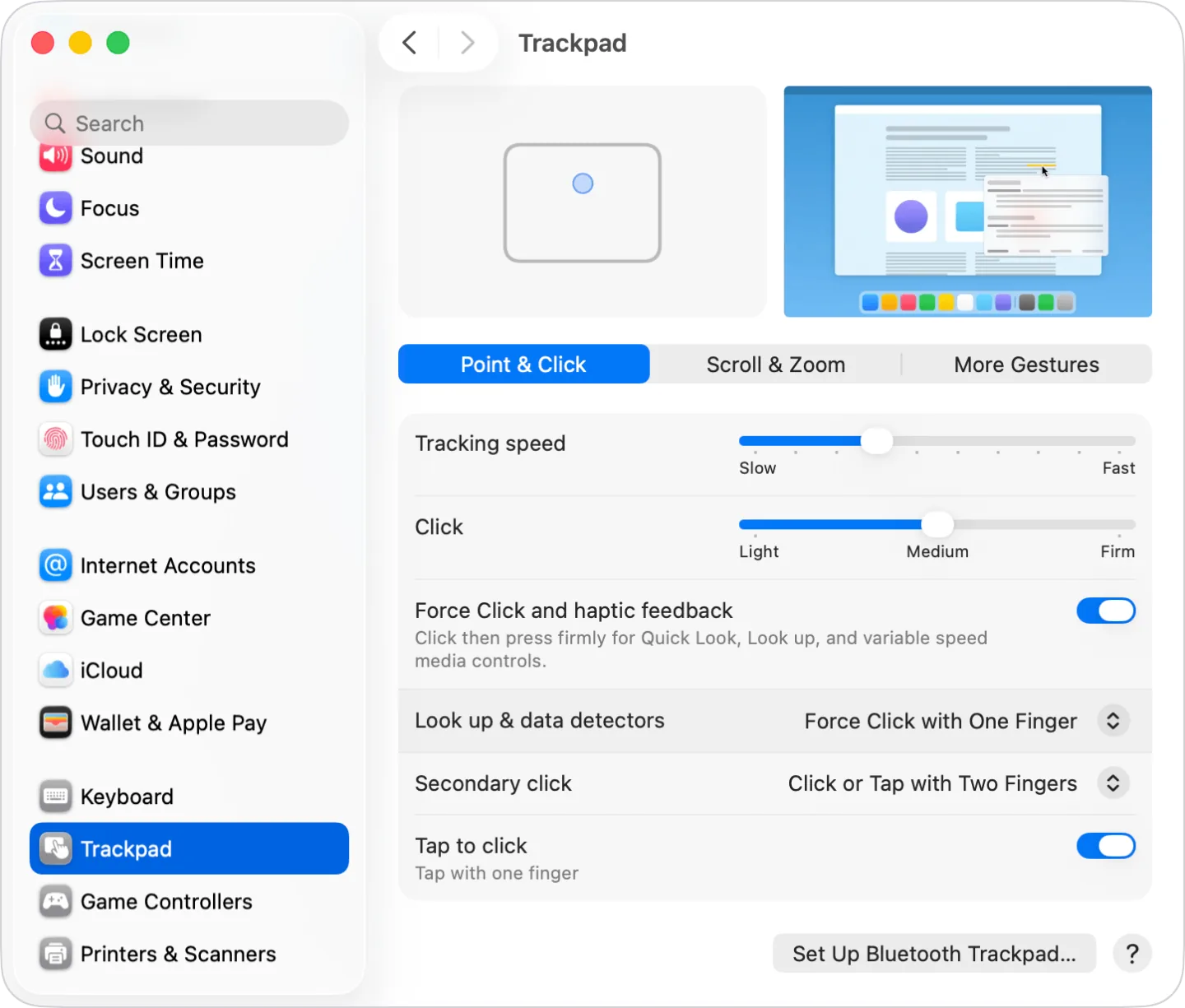
[macOS Trackpad settings](https://support.apple.com/en-us/102309) · Imagery © Apple. Developer-distributed screenshot or frame; all rights reserved. Excluded from MIT and CC BY 4.0.
1. Tracking speed adjusts pointer motion on screen
- Do not confuse cursor coordinates with finger coordinates on the surface.
- [macOS Trackpad settings](https://support.apple.com/en-us/102309)
## How it works
The position and movement of the finger determines target selection or continuous pointer control; the application can only see the processed cursor.
## Variants
### Variants and applications
- Relative movement. Gesture: Move your finger, moving the pointer relative to the current position. In the interface: Navigation, precise targeting of elements. In the game: Sight, adventure cursor, unit selection. Access level: Cursor and buttons; The application gets the usual pointer and buttons. The physical fingers and their separation may be unknown to him. Conditions: The application usually receives the already processed cursor movement, and not the millimeters of the finger path.
- Absolute positioning. Gesture: Match the position on the panel to the position in the work area. In the interface: Remote for the canvas, jump to a specific point on the map. In the game: Direct placement of a racket or marker. Access level: Individual contacts; You need access to coordinates, phases and contact IDs. The presence of multitouch on the device does not guarantee this. Conditions: The standard laptop cursor works differently. You need surface coordinates or a special driver mode.
- Speed control from the center. Gesture: Deviation from a fixed center sets the direction and speed. In the interface: Continuous panoramic view or scrolling. In the game: Virtual movement stick, gas and steering wheel. Access level: Separate contacts; You need access to coordinates, phases and contact IDs. The presence of multitouch on the device does not guarantee this. Conditions: This is a software display of coordinates; you need a center, a neutral zone and a clear way to stop...
- Floating virtual stick. Gesture: The first touch sets the center, further displacement sets the deviation. In the interface: Relative camera remote control without searching for the center of the surface. In the game: Control the character from any starting point. Access level: Individual contacts; You need access to coordinates, phases and contact IDs. The presence of multitouch on the device does not guarantee this. Conditions: The position of the finger and the beginning of the contact must be accessible to the application.
- Interception with finger rearrangement. Gesture: Raise your finger, move it and continue the relative movement. In the interface: Cross the large screen on a small panel. In the game: Continue turning the camera in several passes. Access level: Cursor and buttons; The application gets the usual pointer and buttons. The physical fingers and their separation may be unknown to him. Conditions: The OS does this for a regular cursor; the application does not necessarily see the tear itself.
- Touch is like grip. Gesture: Transmit movement only while there is contact; tearing off disables the channel. In the interface: Temporary adjustment without changing the value when rearranging. In the game: Camera or tool is active only when touched. Access level: Individual contacts; You need access to coordinates, phases and contact IDs. The presence of multitouch on the device does not guarantee this. Conditions: Stopping the pointer does not prove that the finger is raised. We need a contact phase...
- Coarse and fine adjustment. Gesture: Change the coefficient of movement by modifier or explicit mode. In the interface: Fine-tuning the slider, editing, CAD. In the game: Aiming with reduced sensitivity. Access level: Cursor and buttons; The application gets the usual pointer and buttons. The physical fingers and their separation may be unknown to him. Conditions: The physical speed of the finger cannot be reliably restored from the cursor speed. The regime must be predictable.
- Limited to one axis. Gesture: After starting the movement, fix the horizontal or vertical. In the interface: Transfer strictly along the axis, alignment, number adjustment. In the game: Movement lane, lever, rail aiming. Access level: Cursor and buttons; The application gets the usual pointer and buttons. The physical fingers and their separation may be unknown to him. Conditions: This is the application logic; An explicit indicator of the selected axis is useful.
- Linking to goals. Gesture: Move the pointer to the grid, nodes or neighboring objects. In the interface: Docking blocks, diagrams, editing. In the game: Assembling a puzzle, selecting small interactive objects. Access level: Cursor and buttons; The application gets the usual pointer and buttons. The physical fingers and their removal may be unknown to him. Conditions: Snap is not a sensor gesture. Too much gravity interferes with free movement.
- Select by cursor delay. Gesture: Leave the cursor on the target for a specified time. In the interface: Hint, preview, activation without clicking. In the game: Scanning an object, fixing the target with a gaze-like pointer. Access level: Cursor and buttons; The application gets the usual pointer and buttons. The physical fingers and their separation may be unknown to him. Conditions: This is a screen hover. A finger hover sensor over the panel is not required or implied.
## Context and limits
Author's working classification for designing games and interactions. Options can overlap and combine; the list is not a generally accepted standard or proven exhaustive list. Application examples are conditional unless a specific verifiable observation is indicated nearby. Sources support individual techniques and technical limitations.
## Connected materials
## Sources and provenance
Original editorial design catalog consolidated from project discussions on 2026-10-20. Complete discussion item lists and contextual limitations are preserved; linked primary sources support specific techniques, not the entire classification. English translation was prepared with machine assistance and editorial review.
- [AppKit: contacts and system gestures](https://developer.apple.com/library/archive/documentation/Cocoa/Conceptual/EventOverview/HandlingTouchEvents/HandlingTouchEvents.html) (id: source-80fb36760a664f26)
- [W3C: Pointer Events](https://www.w3.org/TR/pointerevents/) (id: source-8303b0f3aad42806)
- [Steam Input: Surface Modes](https://partner.steamgames.com/doc/features/steam_controller/input_source_modes?language=english) (id: source-3b576ce1cd2451ef)
- [macOS Trackpad settings](https://support.apple.com/en-us/102309) (id: source-c1dd61a434f7ff1a)
CC-BY-4.0 · gamemechanics.pro contributors