---
key: mechanic/spatial-interfaces--t306
type: mechanic
id: spatial-interfaces--t306
lang: en
title: 'Steering wheels, pedals, joysticks and cockpits'
summary: >-
A wheel and pedals supply axis input while force feedback supplements control.
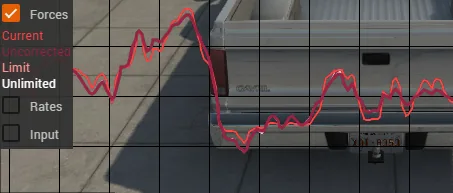
BeamNG.drive plots the force the game sends to the wheel.
updatedAt: '2026-10-22'
status: active
url: 'https://gamemechanics.pro/en/knowledge/mechanic/spatial-interfaces--t306/'
jsonUrl: >-
https://gamemechanics.pro/api/v1/knowledge/en/mechanic/spatial-interfaces--t306.json
markdownUrl: >-
https://gamemechanics.pro/content/knowledge/en/mechanic/spatial-interfaces--t306.md
aliases:
- 'Wheels, pedals, joysticks and cockpits'
tags:
- Spatial and alternative interfaces
- Mechanics and variants
sourceIds:
- source-9a110e52e07a4ab3
- source-c7dc51be86fee9b9
sources:
- id: source-9a110e52e07a4ab3
title: 'MDN: Gamepad API'
url: 'https://developer.mozilla.org/en-US/docs/Web/API/Gamepad_API'
verifiedAt: null
- id: source-c7dc51be86fee9b9
title: BeamNG.drive
url: 'https://documentation.beamng.com/support/hardware/steering_wheel_setup/'
verifiedAt: null
relations: []
placements:
- catalogId: spatial-interfaces
id: t306
title: Spatial and alternative interfaces
url: 'https://gamemechanics.pro/en/mechanics/spatial-interfaces/#t306'
categoryIds:
- mechanics
supersededBy: []
attributes:
preview:
updatedAt: '2026-10-22'
title: 'Wheels, pedals, joysticks and cockpits'
description: >-
A wheel and pedals supply axis input while force feedback supplements
control. BeamNG.drive plots the force the game sends to the wheel.
image:
src: images/mechanics/control-beamng-wheel.webp
width: 453
height: 193
game: BeamNG.drive
sourceUrl: 'https://documentation.beamng.com/support/hardware/steering_wheel_setup/'
originalUrl: >-
https://documentation.beamng.com/support/hardware/steering_wheel_setup/Beamng_ffb_app.png
credit: BeamNG GmbH
rights: >-
© BeamNG GmbH. Official documentation or publisher-distributed image;
respective rights retained. Excluded from portal MIT and CC BY 4.0.
caption: 'BeamNG.drive: a plot of steering-wheel force feedback'
alt: 'BeamNG.drive: a plot of steering-wheel force feedback'
markers:
- x: 34
'y': 22
label: The graph compares current force with the feedback limit
tips:
- >-
Calibrate axis centers and endpoints, and check force feedback for
clipping.
examples:
- title: BeamNG.drive
url: >-
https://documentation.beamng.com/support/hardware/steering_wheel_setup/
endsAt: null
provenance: >-
Original bilingual editorial overviews authored for gamemechanics.pro on
2026-10-20 and reviewed on 2026-10-21. Scenarios are hypothetical design
examples; prototype checks describe work to perform, not completed playtests.
Primary sources support the stated techniques and implementation context, not
every proposed variant.
license: CC-BY-4.0
codeLicense: MIT
attribution: gamemechanics.pro contributors
catalogKey: catalog/spatial-interfaces
---
# Steering wheels, pedals, joysticks and cockpits
id: spatial-interfaces--t306
type: mechanic
key: mechanic/spatial-interfaces--t306
lang: en
status: active
url: https://gamemechanics.pro/en/knowledge/mechanic/spatial-interfaces--t306/
A wheel and pedals supply axis input while force feedback supplements control. BeamNG.drive plots the force the game sends to the wheel.
## At a glance
[BeamNG.drive](https://documentation.beamng.com/support/hardware/steering_wheel_setup/) · © BeamNG GmbH. Official documentation or publisher-distributed image; respective rights retained. Excluded from portal MIT and CC BY 4.0.
1. The graph compares current force with the feedback limit
- Calibrate axis centers and endpoints, and check force feedback for clipping.
- [BeamNG.drive](https://documentation.beamng.com/support/hardware/steering_wheel_setup/)
## How it works
Cockpit input distributes control across axes, pedals and switches with consistent ranges and neutral states.
## Variants
### Mechanic variants
- Wheels set angles within their supported range.
- Pedals expose separate or combined values.
- Levers preserve an absolute parameter position.
- Profiles map functions to a specific device.
## Design example
A game truck uses a wheel and two pedals while buttons replace a missing third axis.
Prototype check: Test end-stop calibration, combined axes and multiple devices; force feedback needs separate capability support.
## Context and limits
Spatial and specialized input requires calibration, clear action confirmation and a way to continue after signal loss. Each overview separates player actions, state changes and alternative rules. Examples are hypothetical design scenarios, not claims about a named game. A prototype check states an observable question for the next iteration. Existing detailed references remain separately linked from the direction map.
## Connected materials
## Sources and provenance
Original bilingual editorial overviews authored for gamemechanics.pro on 2026-10-20 and reviewed on 2026-10-21. Scenarios are hypothetical design examples; prototype checks describe work to perform, not completed playtests. Primary sources support the stated techniques and implementation context, not every proposed variant.
- [MDN: Gamepad API](https://developer.mozilla.org/en-US/docs/Web/API/Gamepad_API) (id: source-9a110e52e07a4ab3)
- [BeamNG.drive](https://documentation.beamng.com/support/hardware/steering_wheel_setup/) (id: source-c7dc51be86fee9b9)
CC-BY-4.0 · gamemechanics.pro contributors