---
key: mechanic/shooting-projectiles--t022
type: mechanic
id: shooting-projectiles--t022
lang: en
title: Third-person shooters and cover
summary: >-
A camera behind the character exposes surrounding space, while cover changes
firing angles and movement options.
updatedAt: '2026-10-22'
status: active
url: 'https://gamemechanics.pro/en/knowledge/mechanic/shooting-projectiles--t022/'
jsonUrl: >-
https://gamemechanics.pro/api/v1/knowledge/en/mechanic/shooting-projectiles--t022.json
markdownUrl: >-
https://gamemechanics.pro/content/knowledge/en/mechanic/shooting-projectiles--t022.md
aliases:
- Third-person shooting and cover
tags:
- Shooting and projectiles
- Mechanics and variants
sourceIds:
- source-8a492c292e237e0e
- source-0fa300d02004d748
sources:
- id: source-8a492c292e237e0e
title: 'Godot: Ray-casting'
url: 'https://docs.godotengine.org/en/stable/tutorials/physics/ray-casting.html'
verifiedAt: null
- id: source-0fa300d02004d748
title: Tom Clancy’s The Division® 2
url: 'https://store.steampowered.com/app/2221490/'
verifiedAt: null
relations: []
placements:
- catalogId: shooting-projectiles
id: t022
title: Shooting and projectiles
url: 'https://gamemechanics.pro/en/mechanics/shooting-projectiles/#t022'
categoryIds:
- mechanics
supersededBy: []
attributes:
preview:
updatedAt: '2026-10-22'
title: Third-person shooting and cover
description: >-
A camera behind the character exposes surrounding space, while cover
changes firing angles and movement options.
image:
src: images/mechanics/priority-the-division2-09.webp
width: 1440
height: 810
game: Tom Clancy’s The Division® 2
sourceUrl: 'https://store.steampowered.com/app/2221490/'
originalUrl: >-
https://shared.akamai.steamstatic.com/store_item_assets/steam/apps/2221490/e09d80f7831b7dcacd4a3b2334d9ca6589ef25ca/ss_e09d80f7831b7dcacd4a3b2334d9ca6589ef25ca.1920x1080.jpg?t=1791884938
credit: Ubisoft
rights: >-
Game imagery © its respective rights holders. Publisher-distributed
Steam screenshot; all rights reserved. Excluded from MIT and CC BY 4.0.
caption: An agent uses a van as cover
alt: An agent uses a van as cover
markers:
- x: 35
'y': 70
label: Character at the cover edge
- x: 26
'y': 42
label: The van blocks some firing directions
tips:
- Check firing lines and cover exits separately from camera position.
examples:
- title: Tom Clancy’s The Division® 2
url: 'https://store.steampowered.com/app/2221490/'
endsAt: null
provenance: >-
Original bilingual editorial overviews authored for gamemechanics.pro on
2026-10-20 and reviewed on 2026-10-21. Scenarios are hypothetical design
examples; prototype checks describe work to perform, not completed playtests.
Primary sources support the stated techniques and implementation context, not
every proposed variant.
license: CC-BY-4.0
codeLicense: MIT
attribution: gamemechanics.pro contributors
catalogKey: catalog/shooting-projectiles
---
# Third-person shooters and cover
id: shooting-projectiles--t022
type: mechanic
key: mechanic/shooting-projectiles--t022
lang: en
status: active
url: https://gamemechanics.pro/en/knowledge/mechanic/shooting-projectiles--t022/
A camera behind the character exposes surrounding space, while cover changes firing angles and movement options.
## At a glance
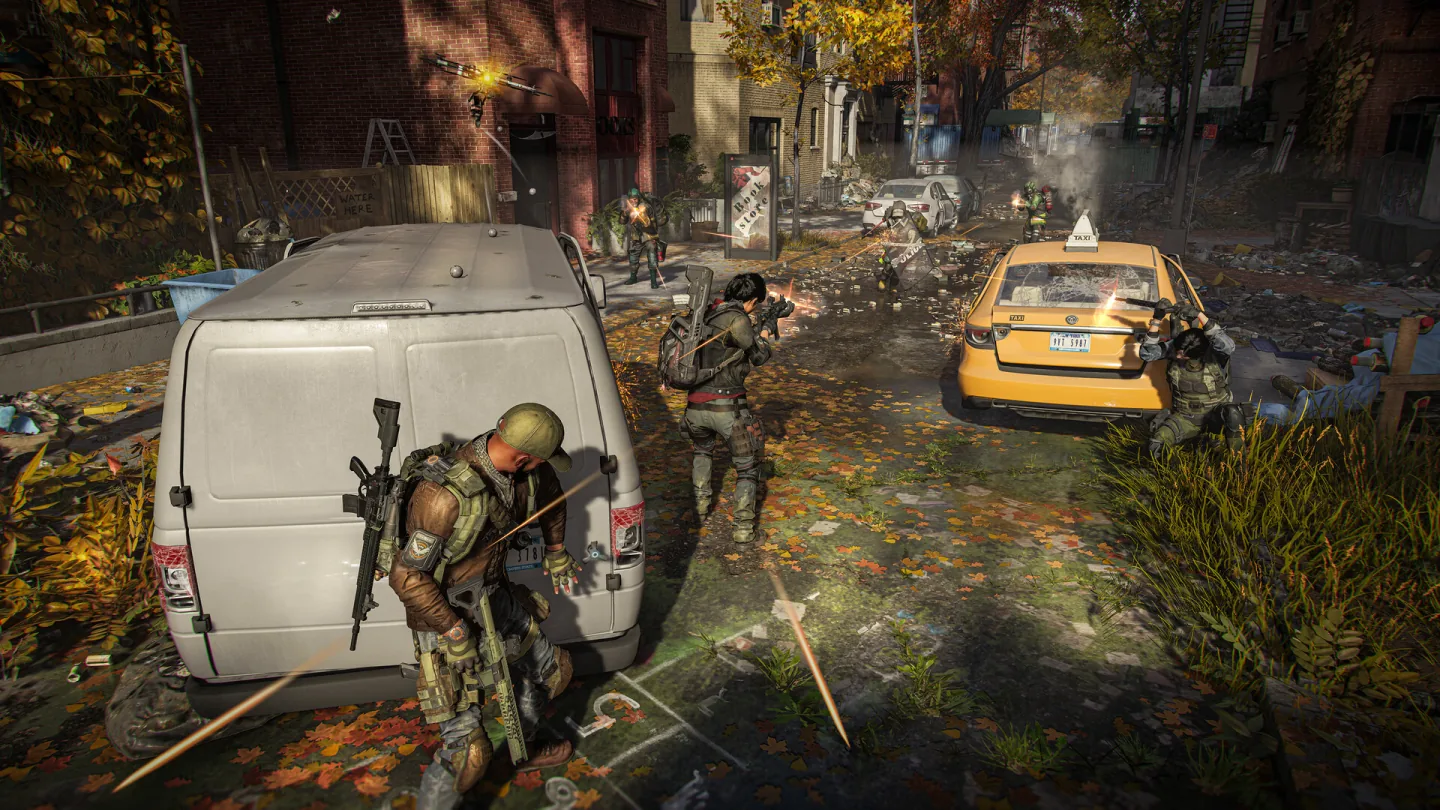
[Tom Clancy’s The Division® 2](https://store.steampowered.com/app/2221490/) · Game imagery © its respective rights holders. Publisher-distributed Steam screenshot; all rights reserved. Excluded from MIT and CC BY 4.0.
1. Character at the cover edge
2. The van blocks some firing directions
- Check firing lines and cover exits separately from camera position.
- [Tom Clancy’s The Division® 2](https://store.steampowered.com/app/2221490/)
## How it works
A camera behind the character exposes surrounding space, while cover changes firing angles and movement options.
## Variants
### Mechanic variants
- Cover snapping: the character occupies a cover edge.
- Peeking: firing temporarily exposes the body.
- Shoulder swapping: the camera changes the visible angle.
- Destruction: repeated hits remove cover protection.
## Design example
A flanking route forces the player to leave cover while a partner suppresses the opponent.
Prototype check: Test both sides of an obstacle: seeing a target must not permit firing through geometry blocking the muzzle.
## Context and limits
Shooting connects position selection to the moment of firing. Distinguish view direction, weapon direction and the actual hit query: the camera may see a target while a wall blocks the muzzle. Traveling projectiles need readable trajectories and flight time; immediate hits need clear feedback and a consistent reticle. These overviews propose original rules and hypothetical scenarios. Godot's documentation explains ray intersection queries, not network lag compensation or a universal weapon model.
## Connected materials
## Sources and provenance
Original bilingual editorial overviews authored for gamemechanics.pro on 2026-10-20 and reviewed on 2026-10-21. Scenarios are hypothetical design examples; prototype checks describe work to perform, not completed playtests. Primary sources support the stated techniques and implementation context, not every proposed variant.
- [Godot: Ray-casting](https://docs.godotengine.org/en/stable/tutorials/physics/ray-casting.html) (id: source-8a492c292e237e0e)
- [Tom Clancy’s The Division® 2](https://store.steampowered.com/app/2221490/) (id: source-0fa300d02004d748)
CC-BY-4.0 · gamemechanics.pro contributors