---
key: mechanic/phone-touch--family-14
type: mechanic
id: phone-touch--family-14
lang: en
title: Tactile feedback
summary: >-
A brief tactile cue confirms a state change. In Procreate Pocket holding the
lower slider switches its mode and produces haptic feedback.
updatedAt: '2026-10-22'
status: active
url: 'https://gamemechanics.pro/en/knowledge/mechanic/phone-touch--family-14/'
jsonUrl: >-
https://gamemechanics.pro/api/v1/knowledge/en/mechanic/phone-touch--family-14.json
markdownUrl: >-
https://gamemechanics.pro/content/knowledge/en/mechanic/phone-touch--family-14.md
aliases: []
tags:
- Phone touchscreen interactions
- Mechanics catalog
sourceIds:
- source-9f699935c52f4076
sources:
- id: source-9f699935c52f4076
title: Procreate Pocket
url: 'https://help.procreate.com/pocket/handbook/interface-gestures/interface'
verifiedAt: null
relations: []
placements:
- catalogId: phone-touch
id: family-14
title: Phone touchscreen interactions
url: 'https://gamemechanics.pro/en/mechanics/phone-touch/#family-14'
categoryIds:
- section-1
supersededBy: []
attributes:
preview:
updatedAt: '2026-10-22'
title: Tactile feedback
description: >-
A brief tactile cue confirms a state change. In Procreate Pocket holding
the lower slider switches its mode and produces haptic feedback.
image:
src: images/mechanics/touch-pocket-interface-0.webp
width: 640
height: 1387
crop:
x: 350
'y': 420
width: 290
height: 510
game: Procreate Pocket
sourceUrl: 'https://help.procreate.com/pocket/handbook/interface-gestures/interface'
originalUrl: >-
https://cdn.sanity.io/images/skm640rd/production/0de741e2b23abb6d5e0756a214d621a945bc35bd-1179x2556.png?auto=format&auto=format&w=640
credit: Savage Interactive
rights: >-
© Savage Interactive. Developer-distributed app screenshot; all rights
reserved. Excluded from MIT and CC BY 4.0.
caption: 'Procreate Pocket: the lower slider confirms a mode change with haptics'
alt: 'Procreate Pocket: the lower slider confirms a mode change with haptics'
markers:
- x: 94
'y': 53
label: Holding switches Pressure/Opacity with a tactile cue
tips:
- >-
Show mode changes visually too; not every phone supports haptic
feedback.
examples:
- title: Procreate Pocket
url: >-
https://help.procreate.com/pocket/handbook/interface-gestures/interface
endsAt: null
provenance: >-
Original editorial design catalog consolidated from project discussions on
2026-10-20. Complete discussion item lists and contextual limitations are
preserved; linked primary sources support specific techniques, not the entire
classification. English translation was prepared with machine assistance and
editorial review.
license: CC-BY-4.0
codeLicense: MIT
attribution: gamemechanics.pro contributors
catalogKey: catalog/phone-touch
---
# Tactile feedback
id: phone-touch--family-14
type: mechanic
key: mechanic/phone-touch--family-14
lang: en
status: active
url: https://gamemechanics.pro/en/knowledge/mechanic/phone-touch--family-14/
A brief tactile cue confirms a state change. In Procreate Pocket holding the lower slider switches its mode and produces haptic feedback.
## At a glance
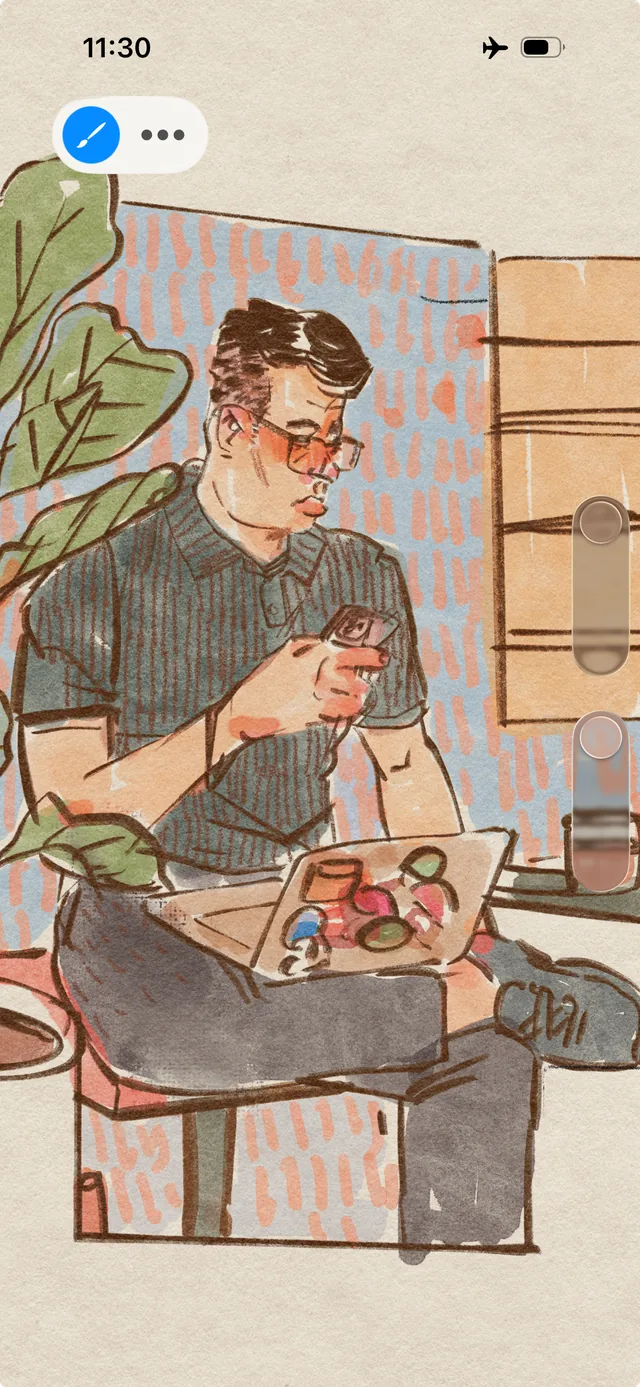
[Procreate Pocket](https://help.procreate.com/pocket/handbook/interface-gestures/interface) · © Savage Interactive. Developer-distributed app screenshot; all rights reserved. Excluded from MIT and CC BY 4.0.
1. Holding switches Pressure/Opacity with a tactile cue
- Show mode changes visually too; not every phone supports haptic feedback.
- [Procreate Pocket](https://help.procreate.com/pocket/handbook/interface-gestures/interface)
## How it works
The haptic signal communicates the event or state of the interaction and complements visual and audio feedback.
## Variants
### Variants and applications
- Confirmation of action. Type: Tactile feedback. Fingers: Output, not input. Rule: A short impulse accompanies a successful command or change of state. Application: Let one feel the pressure, hit, successful connection of parts.
- Click on the divisions. Type: Tactile feedback. Fingers: Output, not input. Rule: Pulses come when discrete values pass through. Application: Safe disk, station selection, scale adjustment, binding to cells.
- Surface texture. Type: Tactile feedback. Fingers: Output, not input. Rule: The vibration pattern depends on the position and speed of movement on the virtual material. Application: Distinguish between metal, sand, roughness. This is an imitation, the screen does not become physically rough.
- Tension and resistance. Type: Tactile feedback. Fingers: Output, not input. Rule: Vibration changes along with the calculated voltage. Application: Transmit line tension, lock resistance, spring charge. There is no real restriction on finger movement.
- Getting closer to the goal. Type: Tactile feedback. Fingers: Output, not input. Rule: The nature of the pulses indicates the magnitude of the error or distance. Application: Tactile metal detector, signal search, selection of the position of a part.
- Vibration rhythm. Type: Tactile feedback. Fingers: Output, not input. Rule: The player repeats or supplements the sequence of tangible impulses. Application: Musical riddle, communication code, memorizing the sequence.
- State through pattern. Type: Tactile feedback. Fingers: Output, not input. Rule: Distinct vibrations indicate game events. Application: Recognize danger, low energy, hit and miss without constantly looking at the indicator.
- Coordinated impact and recoil. Type: Tactile feedback. Fingers: Output, not input. Rule: Vibration is synchronized with the image, sound and result of the gesture. Application: Throw, shutter click, collision, landing. Check the real device; provide for shutdown...
## Context and limits
Author's working classification for designing games and interactions. Options can overlap and combine; the list is not a generally accepted standard or proven exhaustive list. Application examples are conditional unless a specific verifiable observation is indicated nearby. Sources support individual techniques and technical limitations.
## Connected materials
## Sources and provenance
Original editorial design catalog consolidated from project discussions on 2026-10-20. Complete discussion item lists and contextual limitations are preserved; linked primary sources support specific techniques, not the entire classification. English translation was prepared with machine assistance and editorial review.
- [Procreate Pocket](https://help.procreate.com/pocket/handbook/interface-gestures/interface) (id: source-9f699935c52f4076)
CC-BY-4.0 · gamemechanics.pro contributors