---
key: mechanic/phone-touch--family-13
type: mechanic
id: phone-touch--family-13
lang: en
title: 'Pressure, contact geometry and stylus'
summary: >-
Hardware pressure input requires a compatible sensor. On devices without 3D
Touch, Procreate Pocket substitutes an on-screen brush-pressure slider.
updatedAt: '2026-10-22'
status: active
url: 'https://gamemechanics.pro/en/knowledge/mechanic/phone-touch--family-13/'
jsonUrl: >-
https://gamemechanics.pro/api/v1/knowledge/en/mechanic/phone-touch--family-13.json
markdownUrl: >-
https://gamemechanics.pro/content/knowledge/en/mechanic/phone-touch--family-13.md
aliases: []
tags:
- Phone touchscreen interactions
- Mechanics catalog
sourceIds:
- source-9f699935c52f4076
sources:
- id: source-9f699935c52f4076
title: Procreate Pocket
url: 'https://help.procreate.com/pocket/handbook/interface-gestures/interface'
verifiedAt: null
relations: []
placements:
- catalogId: phone-touch
id: family-13
title: Phone touchscreen interactions
url: 'https://gamemechanics.pro/en/mechanics/phone-touch/#family-13'
categoryIds:
- section-1
supersededBy: []
attributes:
preview:
updatedAt: '2026-10-22'
title: 'Pressure, contact geometry and stylus'
description: >-
Hardware pressure input requires a compatible sensor. On devices without
3D Touch, Procreate Pocket substitutes an on-screen brush-pressure slider.
image:
src: images/mechanics/touch-pocket-interface-9.webp
width: 640
height: 1387
crop:
x: 0
'y': 650
width: 640
height: 500
game: Procreate Pocket
sourceUrl: 'https://help.procreate.com/pocket/handbook/interface-gestures/interface'
originalUrl: >-
https://cdn.sanity.io/images/skm640rd/production/a13df385bd27c5fddb898bef2fdcaeb9eb090abb-1179x2556.png?auto=format&auto=format&w=640
credit: Savage Interactive
rights: >-
© Savage Interactive. Developer-distributed app screenshot; all rights
reserved. Excluded from MIT and CC BY 4.0.
caption: 'Procreate Pocket: a pressure slider substitutes for hardware 3D Touch'
alt: 'Procreate Pocket: a pressure slider substitutes for hardware 3D Touch'
markers:
- x: 84
'y': 65
label: Brush Pressure Slider enables a software pressure control
tips:
- Contact area is not force; check the specific phone and stylus.
examples:
- title: Procreate Pocket
url: >-
https://help.procreate.com/pocket/handbook/interface-gestures/interface
endsAt: null
provenance: >-
Original editorial design catalog consolidated from project discussions on
2026-10-20. Complete discussion item lists and contextual limitations are
preserved; linked primary sources support specific techniques, not the entire
classification. English translation was prepared with machine assistance and
editorial review.
license: CC-BY-4.0
codeLicense: MIT
attribution: gamemechanics.pro contributors
catalogKey: catalog/phone-touch
---
# Pressure, contact geometry and stylus
id: phone-touch--family-13
type: mechanic
key: mechanic/phone-touch--family-13
lang: en
status: active
url: https://gamemechanics.pro/en/knowledge/mechanic/phone-touch--family-13/
Hardware pressure input requires a compatible sensor. On devices without 3D Touch, Procreate Pocket substitutes an on-screen brush-pressure slider.
## At a glance
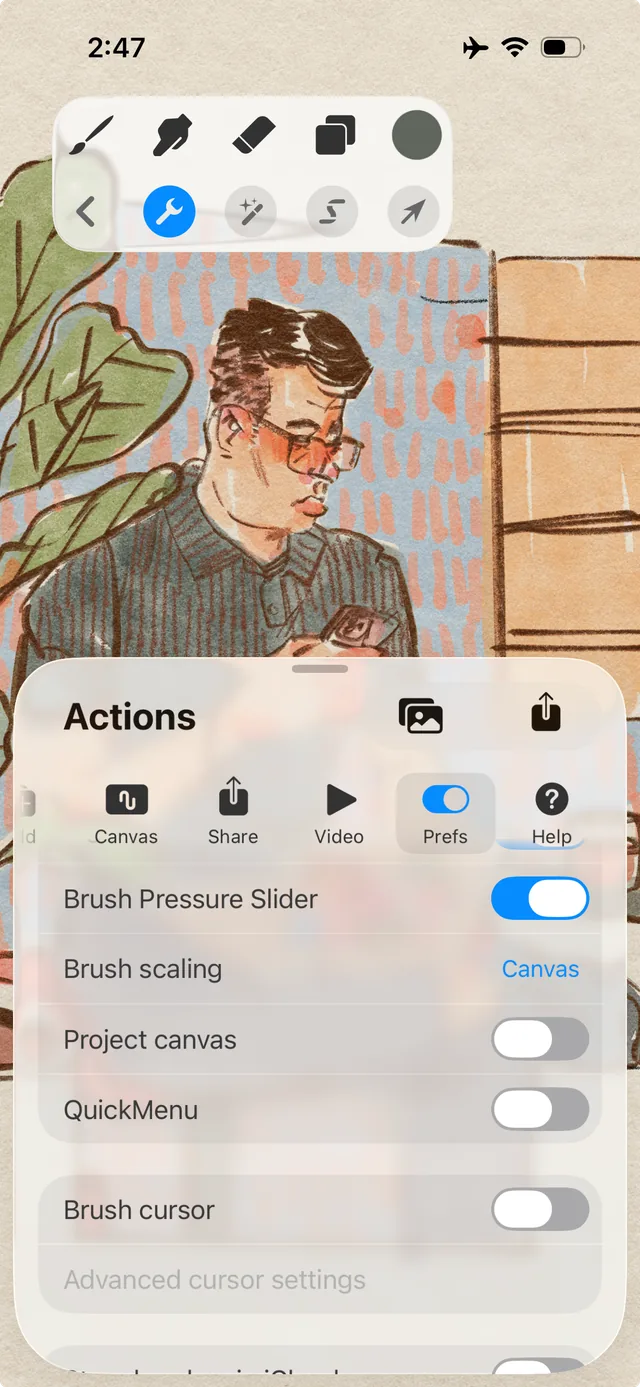
[Procreate Pocket](https://help.procreate.com/pocket/handbook/interface-gestures/interface) · © Savage Interactive. Developer-distributed app screenshot; all rights reserved. Excluded from MIT and CC BY 4.0.
1. Brush Pressure Slider enables a software pressure control
- Contact area is not force; check the specific phone and stylus.
- [Procreate Pocket](https://help.procreate.com/pocket/handbook/interface-gestures/interface)
## How it works
Device-supported pressure, contact geometry, and stylus parameters complement the coordinates; capabilities are checked separately.
## Variants
### Variants and applications
- Pressure force. Type: device. Fingers: Special equipment. Rule: The available hardware force value controls the parameter. Application: Mark thickness, grip force, tool volume. Only with real support; spare input via duration or slider.
- Pressure threshold. Type: device. Fingers: Special equipment. Rule: The action is performed when the hardware force threshold is reached. Application: Push the material, turn on the second stage of the tool. A prolonged touch cannot be considered a force measurement.
- Contact area. Type: device. Fingers: Special equipment. Rule: Estimating the size of the contact patch changes the properties of the brush or tool. Application: Wide sponge and thin brush. Data is noisy and device dependent; Do not use for precise finger identification.
- Tilt of the stylus. Type: device. Fingers: Special equipment. Rule: The maintained angle of the active pen changes the shape of the action. Application: Side hatching, cutter angle, jet shape.
- Rotate the stylus around its axis. Type: device. Fingers: Special equipment. Rule: If the pen imparts rotation, it specifies the orientation of the tool. Application: Rotate a flat brush, chisel, asymmetrical stamp.
- Hover without touching. Type: device. Fingers: Special equipment. Rule: The compatible device reports the position of the pen above the screen. Application: Hit preview, aiming, preparing the next stroke. Do not consider it a normal feature of finger input.
- Stylus button or eraser. Type: device. Fingers: Special equipment. Rule: Additional pen control selects action. Application: Temporarily turn on eraser, eyedropper, alternative tool. Depends on the pen and API.
- Different roles of the pen and fingers. Type: device. Fingers: Special equipment. Rule: The type of pointer determines the purpose of the contact. Application: Write with a pen and move the canvas with your fingers, hold the template with your hand. You need a compatible phone and correct processing of random contacts.
## Context and limits
Author's working classification for designing games and interactions. Options can overlap and combine; the list is not a generally accepted standard or proven exhaustive list. Application examples are conditional unless a specific verifiable observation is indicated nearby. Sources support individual techniques and technical limitations.
## Connected materials
## Sources and provenance
Original editorial design catalog consolidated from project discussions on 2026-10-20. Complete discussion item lists and contextual limitations are preserved; linked primary sources support specific techniques, not the entire classification. English translation was prepared with machine assistance and editorial review.
- [Procreate Pocket](https://help.procreate.com/pocket/handbook/interface-gestures/interface) (id: source-9f699935c52f4076)
CC-BY-4.0 · gamemechanics.pro contributors