---
key: mechanic/phone-touch--family-10
type: mechanic
id: phone-touch--family-10
lang: en
title: Multi-touch coordination
summary: >-
Contacts independently control parts of an object. Touchgrind Skate 2 uses two
fingers on a virtual board much like a physical fingerboard.
updatedAt: '2026-10-22'
status: active
url: 'https://gamemechanics.pro/en/knowledge/mechanic/phone-touch--family-10/'
jsonUrl: >-
https://gamemechanics.pro/api/v1/knowledge/en/mechanic/phone-touch--family-10.json
markdownUrl: >-
https://gamemechanics.pro/content/knowledge/en/mechanic/phone-touch--family-10.md
aliases: []
tags:
- Phone touchscreen interactions
- Mechanics catalog
sourceIds:
- source-c8a8e21794e0a516
sources:
- id: source-c8a8e21794e0a516
title: Touchgrind Skate 2
url: 'https://apps.apple.com/us/app/touchgrind-skate-2/id720068876?uo=4'
verifiedAt: null
relations: []
placements:
- catalogId: phone-touch
id: family-10
title: Phone touchscreen interactions
url: 'https://gamemechanics.pro/en/mechanics/phone-touch/#family-10'
categoryIds:
- section-1
supersededBy: []
attributes:
preview:
updatedAt: '2026-10-22'
title: Multi-touch coordination
description: >-
Contacts independently control parts of an object. Touchgrind Skate 2 uses
two fingers on a virtual board much like a physical fingerboard.
image:
src: images/mechanics/input-touchgrind-0.webp
width: 720
height: 1280
crop:
x: 0
'y': 650
width: 720
height: 630
game: Touchgrind Skate 2
sourceUrl: 'https://apps.apple.com/us/app/touchgrind-skate-2/id720068876?uo=4'
originalUrl: >-
https://is1-ssl.mzstatic.com/image/thumb/Purple113/v4/fa/db/b8/fadbb833-4bbf-b66d-0221-f0219b8f4ff5/mzl.ozfeehxb.jpg/720x1560bb.jpg
credit: Illusion Labs
rights: >-
Imagery © Illusion Labs. Developer-distributed screenshot or frame; all
rights reserved. Excluded from MIT and CC BY 4.0.
caption: 'Touchgrind Skate 2: two fingers control one board'
alt: 'Touchgrind Skate 2: two fingers control one board'
markers:
- x: 51
'y': 73
label: Different finger positions participate in board control
tips:
- Retain contact identifiers so finger roles cannot swap.
examples:
- title: Touchgrind Skate 2
url: 'https://apps.apple.com/us/app/touchgrind-skate-2/id720068876?uo=4'
endsAt: null
provenance: >-
Original editorial design catalog consolidated from project discussions on
2026-10-20. Complete discussion item lists and contextual limitations are
preserved; linked primary sources support specific techniques, not the entire
classification. English translation was prepared with machine assistance and
editorial review.
license: CC-BY-4.0
codeLicense: MIT
attribution: gamemechanics.pro contributors
catalogKey: catalog/phone-touch
---
# Multi-touch coordination
id: phone-touch--family-10
type: mechanic
key: mechanic/phone-touch--family-10
lang: en
status: active
url: https://gamemechanics.pro/en/knowledge/mechanic/phone-touch--family-10/
Contacts independently control parts of an object. Touchgrind Skate 2 uses two fingers on a virtual board much like a physical fingerboard.
## At a glance
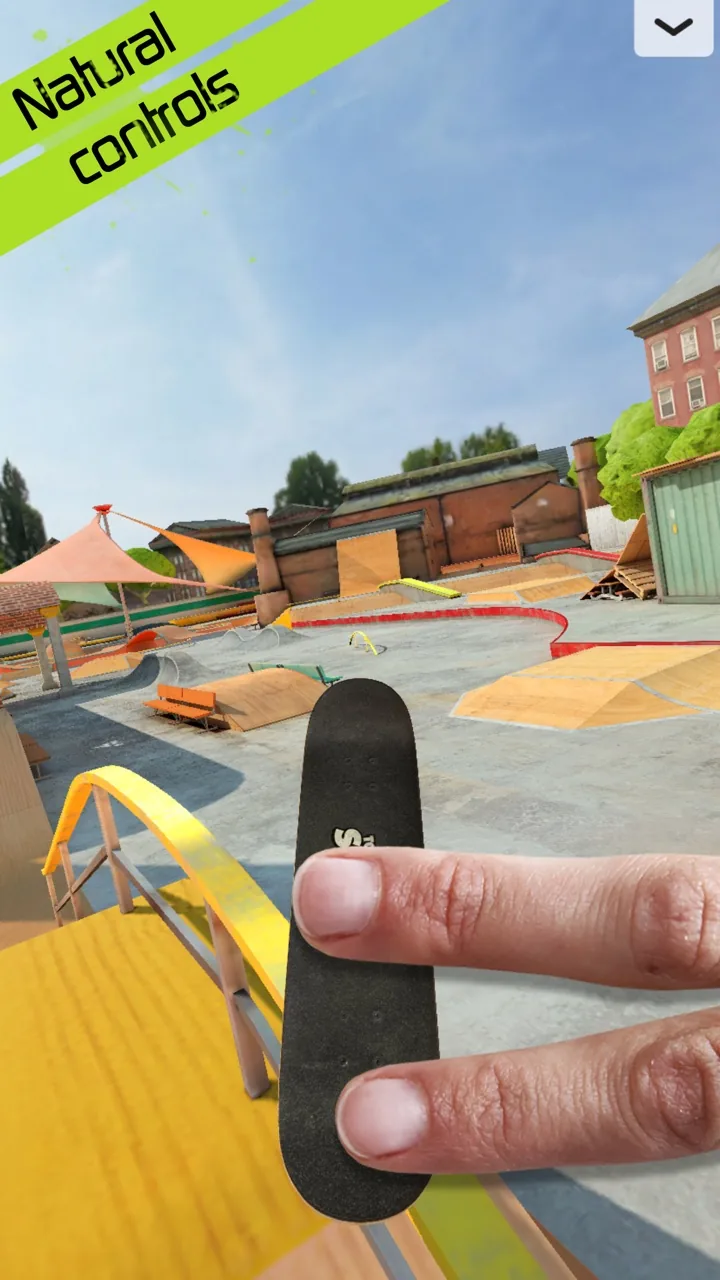
[Touchgrind Skate 2](https://apps.apple.com/us/app/touchgrind-skate-2/id720068876?uo=4) · Imagery © Illusion Labs. Developer-distributed screenshot or frame; all rights reserved. Excluded from MIT and CC BY 4.0.
1. Different finger positions participate in board control
- Retain contact identifiers so finger roles cannot swap.
- [Touchgrind Skate 2](https://apps.apple.com/us/app/touchgrind-skate-2/id720068876?uo=4)
## How it works
Multiple contacts are given independent roles or must perform a coordinated action.
## Variants
### Variants and applications
- Independent objects. Type: multi. Fingers: 2+. Rule: Each active contact controls its own object. Application: Two characters, multiple traps, independent musical voices.
- Movement and aiming. Type: multi. Fingers: 2+. Rule: Different input zones control movement and direction of action. Application: Two virtual sticks, movement plus vision or shooting.
- Retention and separate team. Type: multi. Fingers: 2+. Rule: One finger supports the action, the other selects or activates the target. Application: Hold the shield and attack, hold the enemy and use the tool.
- Modifier finger. Type: multi. Fingers: 2+. Rule: Contact in a special zone changes the meaning of the movement of the other finger. Application: Fine tuning, alternative tool, slow motion.
- The section between the fingers. Type: multi. Fingers: 2+. Rule: Two contacts define a line that interacts with the world. Application: Membrane shield, laser barrier, trap, stretchable platform.
- Polygon of contacts. Type: multi. Fingers: 2+. Rule: Three or more points define the area of influence. Application: Capture creatures, hold a contour, cover several objects. Check contact limit and convenience.
- Number of contacts. Type: multi. Fingers: 2+. Rule: The mode or command depends on the number of simultaneously active touches. Application: Choose the size of the instrument, the number of voices, the power of the ritual. The application does not recognize the identity of the finger.
- Transferring a contact. Type: multi. Fingers: 2+. Rule: A new finger must enter before the previous one comes off, maintaining the general condition. Application: Carry energy along a chain, maintain a continuous bridge or cooperative grip.
## Context and limits
Author's working classification for designing games and interactions. Options can overlap and combine; the list is not a generally accepted standard or proven exhaustive list. Application examples are conditional unless a specific verifiable observation is indicated nearby. Sources support individual techniques and technical limitations.
## Connected materials
## Sources and provenance
Original editorial design catalog consolidated from project discussions on 2026-10-20. Complete discussion item lists and contextual limitations are preserved; linked primary sources support specific techniques, not the entire classification. English translation was prepared with machine assistance and editorial review.
- [Touchgrind Skate 2](https://apps.apple.com/us/app/touchgrind-skate-2/id720068876?uo=4) (id: source-c8a8e21794e0a516)
CC-BY-4.0 · gamemechanics.pro contributors