---
key: mechanic/phone-touch--family-09
type: mechanic
id: phone-touch--family-09
lang: en
title: Multi-touch geometry
summary: >-
Two contacts set scale and rotation. In Procreate Pocket fingers zoom the
canvas and rotate it to a comfortable drawing angle.
updatedAt: '2026-10-22'
status: active
url: 'https://gamemechanics.pro/en/knowledge/mechanic/phone-touch--family-09/'
jsonUrl: >-
https://gamemechanics.pro/api/v1/knowledge/en/mechanic/phone-touch--family-09.json
markdownUrl: >-
https://gamemechanics.pro/content/knowledge/en/mechanic/phone-touch--family-09.md
aliases: []
tags:
- Phone touchscreen interactions
- Mechanics catalog
sourceIds:
- source-1d07116941032082
sources:
- id: source-1d07116941032082
title: Procreate Pocket
url: 'https://help.procreate.com/pocket/handbook/interface-gestures/gestures'
verifiedAt: null
relations: []
placements:
- catalogId: phone-touch
id: family-09
title: Phone touchscreen interactions
url: 'https://gamemechanics.pro/en/mechanics/phone-touch/#family-09'
categoryIds:
- section-1
supersededBy: []
attributes:
preview:
updatedAt: '2026-10-22'
title: Multi-touch geometry
description: >-
Two contacts set scale and rotation. In Procreate Pocket fingers zoom the
canvas and rotate it to a comfortable drawing angle.
image:
src: images/mechanics/touch-pocket-gestures-4.webp
width: 640
height: 1387
crop:
x: 0
'y': 180
width: 640
height: 1100
game: Procreate Pocket
sourceUrl: 'https://help.procreate.com/pocket/handbook/interface-gestures/gestures'
originalUrl: >-
https://cdn.sanity.io/images/skm640rd/production/570543055caeaa36cf6285c879fba107bc81ef9e-1179x2556.png?auto=format&auto=format&w=640
credit: Savage Interactive
rights: >-
© Savage Interactive. Developer-distributed app screenshot; all rights
reserved. Excluded from MIT and CC BY 4.0.
caption: 'Procreate Pocket: the canvas is rotated with a two-finger gesture'
alt: 'Procreate Pocket: the canvas is rotated with a two-finger gesture'
markers:
- x: 50
'y': 53
label: >-
The tilted image reflects canvas rotation rather than stroke
rotation
tips:
- 'Avoid jumps in center, scale or angle when the contact count changes.'
examples:
- title: Procreate Pocket
url: 'https://help.procreate.com/pocket/handbook/interface-gestures/gestures'
endsAt: null
provenance: >-
Original editorial design catalog consolidated from project discussions on
2026-10-20. Complete discussion item lists and contextual limitations are
preserved; linked primary sources support specific techniques, not the entire
classification. English translation was prepared with machine assistance and
editorial review.
license: CC-BY-4.0
codeLicense: MIT
attribution: gamemechanics.pro contributors
catalogKey: catalog/phone-touch
---
# Multi-touch geometry
id: phone-touch--family-09
type: mechanic
key: mechanic/phone-touch--family-09
lang: en
status: active
url: https://gamemechanics.pro/en/knowledge/mechanic/phone-touch--family-09/
Two contacts set scale and rotation. In Procreate Pocket fingers zoom the canvas and rotate it to a comfortable drawing angle.
## At a glance
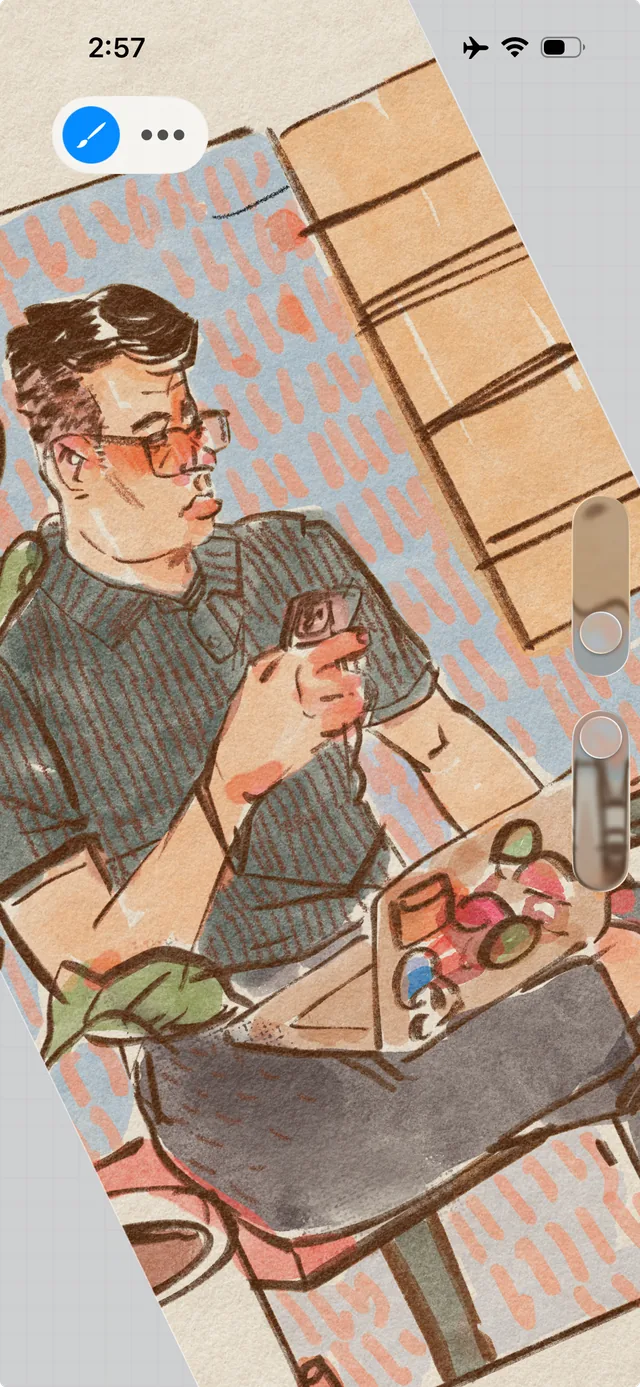
[Procreate Pocket](https://help.procreate.com/pocket/handbook/interface-gestures/gestures) · © Savage Interactive. Developer-distributed app screenshot; all rights reserved. Excluded from MIT and CC BY 4.0.
1. The tilted image reflects canvas rotation rather than stroke rotation
- Avoid jumps in center, scale or angle when the contact count changes.
- [Procreate Pocket](https://help.procreate.com/pocket/handbook/interface-gestures/gestures)
## How it works
The distance, angle, and relative position of the contacts control the scale, rotation, and geometry of the object.
## Variants
### Variants and applications
- Mixing and breeding. Type: multi. Fingers: 2+. Rule: The distance between the contacts controls the scale. Application: Change the scale of the map or the size of the game object.
- Rotate with two fingers. Type: multi. Fingers: 2+. Rule: The angle between the contacts controls the rotation. Application: Orient a piece, rotate a puzzle, combine constellations.
- Two finger transfer. Type: multi. Fingers: 2+. Rule: The general displacement of the contacts transfers the object or space. Application: Move the map, camera, large structure separately from the game selection.
- Anchor and lever. Type: multi. Fingers: 2+. Rule: One contact fixes the support, the other controls the position relative to it. Application: Work with a compass, rotate the lever, pull the rope around the support.
- Stretching. Type: multi. Fingers: 2+. Rule: Individual contacts move different points of a deformable object. Application: To stretch dough, rubber, membrane or bridge.
- Shift layers. Type: multi. Fingers: 2+. Rule: The relative movement of the contacts changes the shift or misalignment of the parts. Application: Align transparent plates, loosen the connection, deform the mesh.
- Conditional compression. Type: multi. Fingers: 2+. Rule: Bringing fingers together is interpreted programmatically as squeezing. Application: Squeeze out a sponge, compress a spring, crush a soft object. The screen does not measure actual grip force.
- Bend at control points. Type: multi. Fingers: 2+. Rule: The position of several contacts determines the angle or curvature of the model. Application: Fold paper, bend wire, open a virtual book.
## Context and limits
Author's working classification for designing games and interactions. Options can overlap and combine; the list is not a generally accepted standard or proven exhaustive list. Application examples are conditional unless a specific verifiable observation is indicated nearby. Sources support individual techniques and technical limitations.
## Connected materials
## Sources and provenance
Original editorial design catalog consolidated from project discussions on 2026-10-20. Complete discussion item lists and contextual limitations are preserved; linked primary sources support specific techniques, not the entire classification. English translation was prepared with machine assistance and editorial review.
- [Procreate Pocket](https://help.procreate.com/pocket/handbook/interface-gestures/gestures) (id: source-1d07116941032082)
CC-BY-4.0 · gamemechanics.pro contributors