---
key: mechanic/phone-touch--family-08
type: mechanic
id: phone-touch--family-08
lang: en
title: Continuous Control
summary: >-
Finger position continuously sets a value. Procreate Pocket’s vertical slider
changes brush size; moving sideways increases adjustment precision.
updatedAt: '2026-10-22'
status: active
url: 'https://gamemechanics.pro/en/knowledge/mechanic/phone-touch--family-08/'
jsonUrl: >-
https://gamemechanics.pro/api/v1/knowledge/en/mechanic/phone-touch--family-08.json
markdownUrl: >-
https://gamemechanics.pro/content/knowledge/en/mechanic/phone-touch--family-08.md
aliases: []
tags:
- Phone touchscreen interactions
- Mechanics catalog
sourceIds:
- source-9f699935c52f4076
sources:
- id: source-9f699935c52f4076
title: Procreate Pocket
url: 'https://help.procreate.com/pocket/handbook/interface-gestures/interface'
verifiedAt: null
relations: []
placements:
- catalogId: phone-touch
id: family-08
title: Phone touchscreen interactions
url: 'https://gamemechanics.pro/en/mechanics/phone-touch/#family-08'
categoryIds:
- section-1
supersededBy: []
attributes:
preview:
updatedAt: '2026-10-22'
title: Continuous Control
description: >-
Finger position continuously sets a value. Procreate Pocket’s vertical
slider changes brush size; moving sideways increases adjustment precision.
image:
src: images/mechanics/touch-pocket-interface-0.webp
width: 640
height: 1387
crop:
x: 350
'y': 420
width: 290
height: 510
game: Procreate Pocket
sourceUrl: 'https://help.procreate.com/pocket/handbook/interface-gestures/interface'
originalUrl: >-
https://cdn.sanity.io/images/skm640rd/production/0de741e2b23abb6d5e0756a214d621a945bc35bd-1179x2556.png?auto=format&auto=format&w=640
credit: Savage Interactive
rights: >-
© Savage Interactive. Developer-distributed app screenshot; all rights
reserved. Excluded from MIT and CC BY 4.0.
caption: 'Procreate Pocket: a continuous slider sets brush size'
alt: 'Procreate Pocket: a continuous slider sets brush size'
markers:
- x: 94
'y': 38
label: The upper slider controls brush size
tips:
- Retain control when the finger moves outside the original control.
examples:
- title: Procreate Pocket
url: >-
https://help.procreate.com/pocket/handbook/interface-gestures/interface
endsAt: null
provenance: >-
Original editorial design catalog consolidated from project discussions on
2026-10-20. Complete discussion item lists and contextual limitations are
preserved; linked primary sources support specific techniques, not the entire
classification. English translation was prepared with machine assistance and
editorial review.
license: CC-BY-4.0
codeLicense: MIT
attribution: gamemechanics.pro contributors
catalogKey: catalog/phone-touch
---
# Continuous Control
id: phone-touch--family-08
type: mechanic
key: mechanic/phone-touch--family-08
lang: en
status: active
url: https://gamemechanics.pro/en/knowledge/mechanic/phone-touch--family-08/
Finger position continuously sets a value. Procreate Pocket’s vertical slider changes brush size; moving sideways increases adjustment precision.
## At a glance
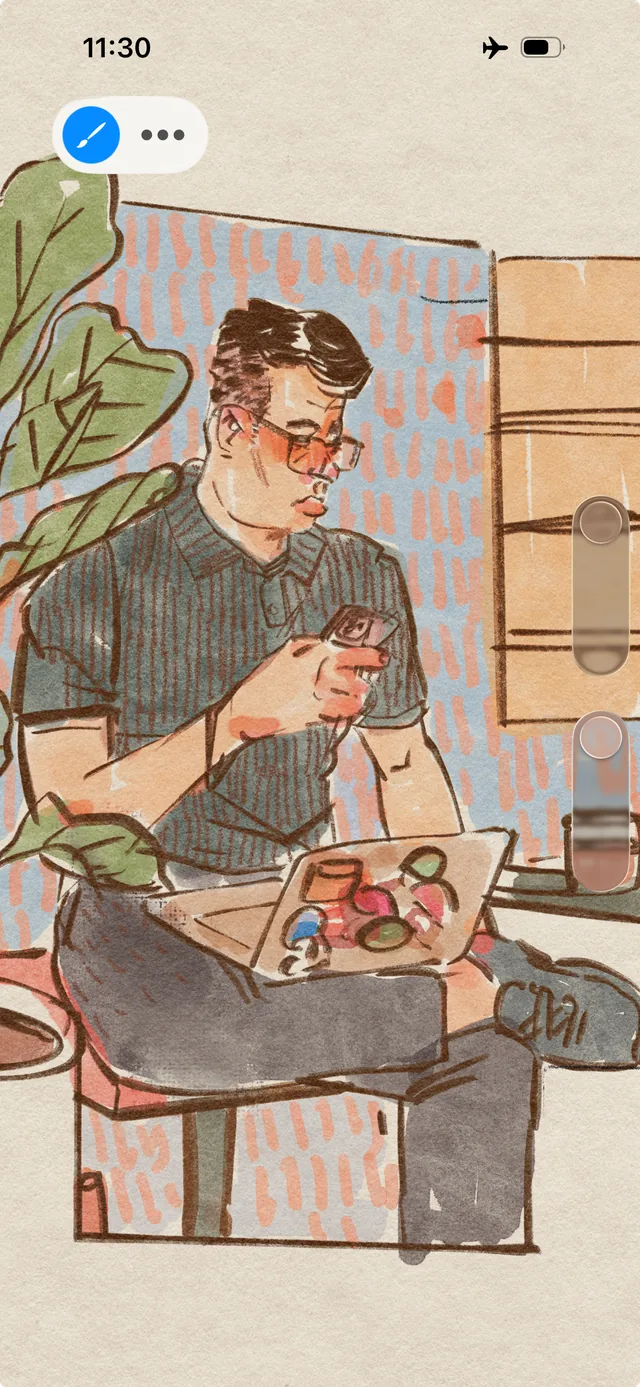
[Procreate Pocket](https://help.procreate.com/pocket/handbook/interface-gestures/interface) · © Savage Interactive. Developer-distributed app screenshot; all rights reserved. Excluded from MIT and CC BY 4.0.
1. The upper slider controls brush size
- Retain control when the finger moves outside the original control.
- [Procreate Pocket](https://help.procreate.com/pocket/handbook/interface-gestures/interface)
## How it works
The current position and displacement of the finger continuously changes direction, force, speed or other in-game value.
## Variants
### Variants and applications
- Fixed virtual joystick. Type: Touch. Fingers: 1. Rule: Deviation from a constant center sets the direction and magnitude of the command. Application: Character movement, control of a car or robot.
- Floating joystick. Type: Touch. Fingers: 1. Rule: The control center is created at the point of origin of contact. Application: Control with one hand without searching for a fixed button.
- Relative touchpad. Type: Touch. Fingers: 1. Rule: Incremental finger movement moves the cursor or camera. Application: Review, aiming, remote control of a small object.
- Absolute compliance. Type: Touch. Fingers: 1. Rule: The position of the finger directly sets the position of the controlled target. Application: Move the racket, shield, ship, light source. Need a visible object above the finger or offset...
- One-dimensional slider. Type: Touch. Fingers: 1. Rule: One coordinate specifies a continuous parameter. Application: Gas, instrument volume, depth, height, power.
- 2D XY panel. Type: Touch. Fingers: 1. Rule: Two coordinates independently change two parameters. Application: Pitch and timbre of sound, two components of a mixture, azimuth and range.
- Virtual rotation handle. Type: Touch. Fingers: 1. Rule: The angular position of the finger sets the parameter or sequence of clicks. Application: Tuning the radio, rotating the safe dial, adjusting the valve.
- Rewind the scale. Type: Touch. Fingers: 1. Rule: Moving selects a moment on the time axis. Application: Search for a frame with evidence, reconstruct events, manage time in a puzzle.
## Context and limits
Author's working classification for designing games and interactions. Options can overlap and combine; the list is not a generally accepted standard or proven exhaustive list. Application examples are conditional unless a specific verifiable observation is indicated nearby. Sources support individual techniques and technical limitations.
## Connected materials
## Sources and provenance
Original editorial design catalog consolidated from project discussions on 2026-10-20. Complete discussion item lists and contextual limitations are preserved; linked primary sources support specific techniques, not the entire classification. English translation was prepared with machine assistance and editorial review.
- [Procreate Pocket](https://help.procreate.com/pocket/handbook/interface-gestures/interface) (id: source-9f699935c52f4076)
CC-BY-4.0 · gamemechanics.pro contributors