---
key: mechanic/phone-touch--family-04
type: mechanic
id: phone-touch--family-04
lang: en
title: Dragging and placement
summary: >-
Touch grabs an element, movement drags it and release places it. Procreate
Pocket uses dragging to reorder layers.
updatedAt: '2026-10-22'
status: active
url: 'https://gamemechanics.pro/en/knowledge/mechanic/phone-touch--family-04/'
jsonUrl: >-
https://gamemechanics.pro/api/v1/knowledge/en/mechanic/phone-touch--family-04.json
markdownUrl: >-
https://gamemechanics.pro/content/knowledge/en/mechanic/phone-touch--family-04.md
aliases: []
tags:
- Phone touchscreen interactions
- Mechanics catalog
sourceIds:
- source-1d07116941032082
sources:
- id: source-1d07116941032082
title: Procreate Pocket
url: 'https://help.procreate.com/pocket/handbook/interface-gestures/gestures'
verifiedAt: null
relations: []
placements:
- catalogId: phone-touch
id: family-04
title: Phone touchscreen interactions
url: 'https://gamemechanics.pro/en/mechanics/phone-touch/#family-04'
categoryIds:
- section-1
supersededBy: []
attributes:
preview:
updatedAt: '2026-10-22'
title: Dragging and placement
description: >-
Touch grabs an element, movement drags it and release places it. Procreate
Pocket uses dragging to reorder layers.
image:
src: images/mechanics/touch-pocket-gestures-22.webp
width: 640
height: 1387
crop:
x: 0
'y': 640
width: 640
height: 660
game: Procreate Pocket
sourceUrl: 'https://help.procreate.com/pocket/handbook/interface-gestures/gestures'
originalUrl: >-
https://cdn.sanity.io/images/skm640rd/production/5e177eab8478b6ee10a47fde4e7964bffa775051-1179x2556.png?auto=format&auto=format&w=640
credit: Savage Interactive
rights: >-
© Savage Interactive. Developer-distributed app screenshot; all rights
reserved. Excluded from MIT and CC BY 4.0.
caption: 'Procreate Pocket: a selected layer can be dragged within the list'
alt: 'Procreate Pocket: a selected layer can be dragged within the list'
markers:
- x: 50
'y': 75
label: The selected layer retains its own row and thumbnail
tips:
- Show the insertion position and cancel the drag if contact is lost.
examples:
- title: Procreate Pocket
url: 'https://help.procreate.com/pocket/handbook/interface-gestures/gestures'
endsAt: null
provenance: >-
Original editorial design catalog consolidated from project discussions on
2026-10-20. Complete discussion item lists and contextual limitations are
preserved; linked primary sources support specific techniques, not the entire
classification. English translation was prepared with machine assistance and
editorial review.
license: CC-BY-4.0
codeLicense: MIT
attribution: gamemechanics.pro contributors
catalogKey: catalog/phone-touch
---
# Dragging and placement
id: phone-touch--family-04
type: mechanic
key: mechanic/phone-touch--family-04
lang: en
status: active
url: https://gamemechanics.pro/en/knowledge/mechanic/phone-touch--family-04/
Touch grabs an element, movement drags it and release places it. Procreate Pocket uses dragging to reorder layers.
## At a glance
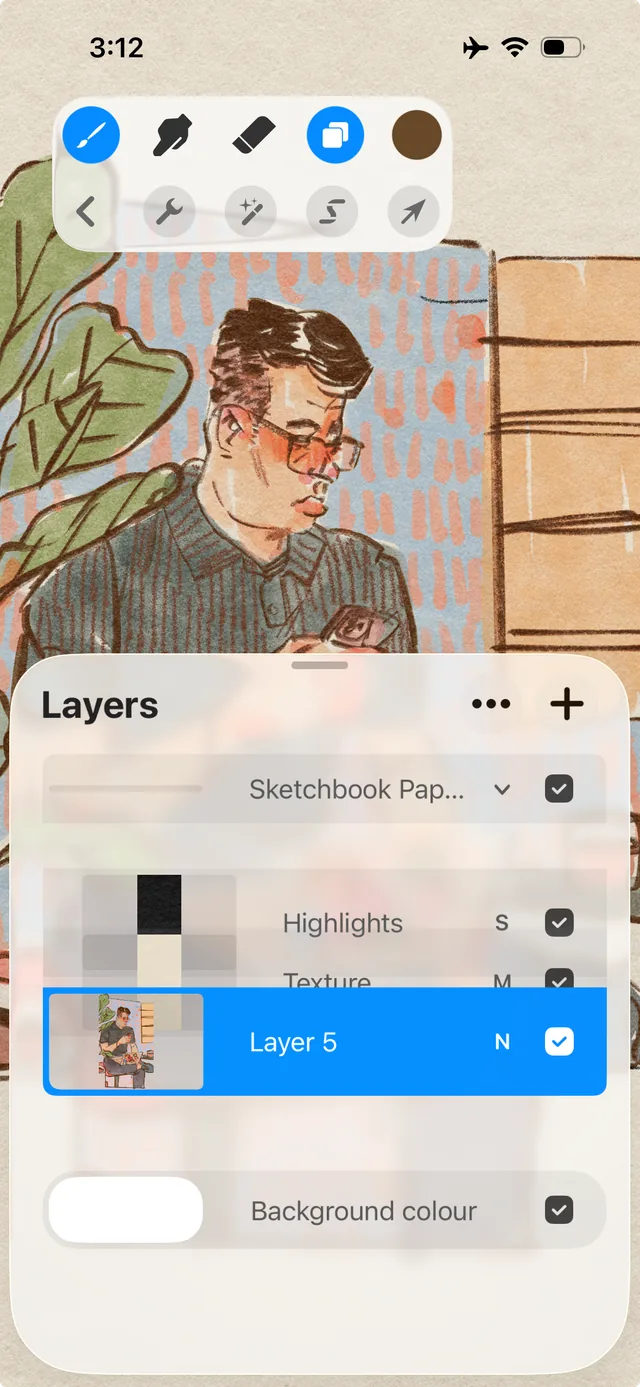
[Procreate Pocket](https://help.procreate.com/pocket/handbook/interface-gestures/gestures) · © Savage Interactive. Developer-distributed app screenshot; all rights reserved. Excluded from MIT and CC BY 4.0.
1. The selected layer retains its own row and thumbnail
- Show the insertion position and cancel the drag if contact is lost.
- [Procreate Pocket](https://help.procreate.com/pocket/handbook/interface-gestures/gestures)
## How it works
Moving the captured pin moves the object or sets its position, and releasing it determines the placement result.
## Variants
### Variants and applications
- Direct movement. Type: Touch. Fingers: 1. Rule: The object follows the finger while maintaining the grip point. Application: Move a figurine, furniture, mechanism part, inventory item.
- Laying on the grid. Type: Touch. Fingers: 1. Rule: The position after releasing is rounded to a valid square. Application: Tetris-like laying, arrangement of buildings, backpack organization.
- Alignment with purpose. Type: Touch. Fingers: 1. Rule: The transfer is counted when the contours or points coincide sufficiently. Application: Assemble a puzzle, insert a key, combine transparent diagrams.
- Exchange of positions. Type: Touch. Fingers: 1. Rule: Carrying to an occupied place changes objects in places. Application: Puzzles with chips, rearranging equipment, making combinations.
- Insertion sort. Type: Touch. Fingers: 1. Rule: The release location sets a new position in the sequence. Application: Line up commands, restore chronology, organize cards.
- Using an item by transfer. Type: Touch. Fingers: 1. Rule: Contact of the carried item with the target causes interaction. Application: Combine ingredients, feed the character, apply the tool to the evidence.
- Delivery with preservation of cargo. Type: Touch. Fingers: 1. Rule: The player carries an object through space with obstacles. Application: Carry a fragile load, bring a spark, transfer liquid while limiting sudden movements.
- Moving across the border. Type: Touch. Fingers: 1. Rule: The event is triggered by crossing the border, and not just by releasing it. Application: Transfer an item to the conveyor, load the cargo into the portal, drag the card to another zone.
## Context and limits
Author's working classification for designing games and interactions. Options can overlap and combine; the list is not a generally accepted standard or proven exhaustive list. Application examples are conditional unless a specific verifiable observation is indicated nearby. Sources support individual techniques and technical limitations.
## Connected materials
## Sources and provenance
Original editorial design catalog consolidated from project discussions on 2026-10-20. Complete discussion item lists and contextual limitations are preserved; linked primary sources support specific techniques, not the entire classification. English translation was prepared with machine assistance and editorial review.
- [Procreate Pocket](https://help.procreate.com/pocket/handbook/interface-gestures/gestures) (id: source-1d07116941032082)
CC-BY-4.0 · gamemechanics.pro contributors