---
key: mechanic/phone-touch--family-02
type: mechanic
id: phone-touch--family-02
lang: en
title: Hold and release
summary: >-
Holding after movement activates another mode. In Procreate Pocket a drawn
outline snaps into a clean shape when the finger stays on the canvas.
updatedAt: '2026-10-22'
status: active
url: 'https://gamemechanics.pro/en/knowledge/mechanic/phone-touch--family-02/'
jsonUrl: >-
https://gamemechanics.pro/api/v1/knowledge/en/mechanic/phone-touch--family-02.json
markdownUrl: >-
https://gamemechanics.pro/content/knowledge/en/mechanic/phone-touch--family-02.md
aliases: []
tags:
- Phone touchscreen interactions
- Mechanics catalog
sourceIds:
- source-1d07116941032082
sources:
- id: source-1d07116941032082
title: Procreate Pocket
url: 'https://help.procreate.com/pocket/handbook/interface-gestures/gestures'
verifiedAt: null
relations: []
placements:
- catalogId: phone-touch
id: family-02
title: Phone touchscreen interactions
url: 'https://gamemechanics.pro/en/mechanics/phone-touch/#family-02'
categoryIds:
- section-1
supersededBy: []
attributes:
preview:
updatedAt: '2026-10-22'
title: Hold and release
description: >-
Holding after movement activates another mode. In Procreate Pocket a drawn
outline snaps into a clean shape when the finger stays on the canvas.
image:
src: images/mechanics/touch-pocket-gestures-18.webp
width: 640
height: 1387
crop:
x: 0
'y': 150
width: 640
height: 900
game: Procreate Pocket
sourceUrl: 'https://help.procreate.com/pocket/handbook/interface-gestures/gestures'
originalUrl: >-
https://cdn.sanity.io/images/skm640rd/production/fdd30b3f5a7591aaad69aa0074697667c08c1c7a-1179x2556.png?auto=format&auto=format&w=640
credit: Savage Interactive
rights: >-
© Savage Interactive. Developer-distributed app screenshot; all rights
reserved. Excluded from MIT and CC BY 4.0.
caption: 'Procreate Pocket: QuickShape recognised a triangle after holding'
alt: 'Procreate Pocket: QuickShape recognised a triangle after holding'
markers:
- x: 46
'y': 59
label: Holding turned the outline into a clean triangle
tips:
- Show the hold-mode transition and allow its delay to be adjusted.
examples:
- title: Procreate Pocket
url: 'https://help.procreate.com/pocket/handbook/interface-gestures/gestures'
endsAt: null
provenance: >-
Original editorial design catalog consolidated from project discussions on
2026-10-20. Complete discussion item lists and contextual limitations are
preserved; linked primary sources support specific techniques, not the entire
classification. English translation was prepared with machine assistance and
editorial review.
license: CC-BY-4.0
codeLicense: MIT
attribution: gamemechanics.pro contributors
catalogKey: catalog/phone-touch
---
# Hold and release
id: phone-touch--family-02
type: mechanic
key: mechanic/phone-touch--family-02
lang: en
status: active
url: https://gamemechanics.pro/en/knowledge/mechanic/phone-touch--family-02/
Holding after movement activates another mode. In Procreate Pocket a drawn outline snaps into a clean shape when the finger stays on the canvas.
## At a glance
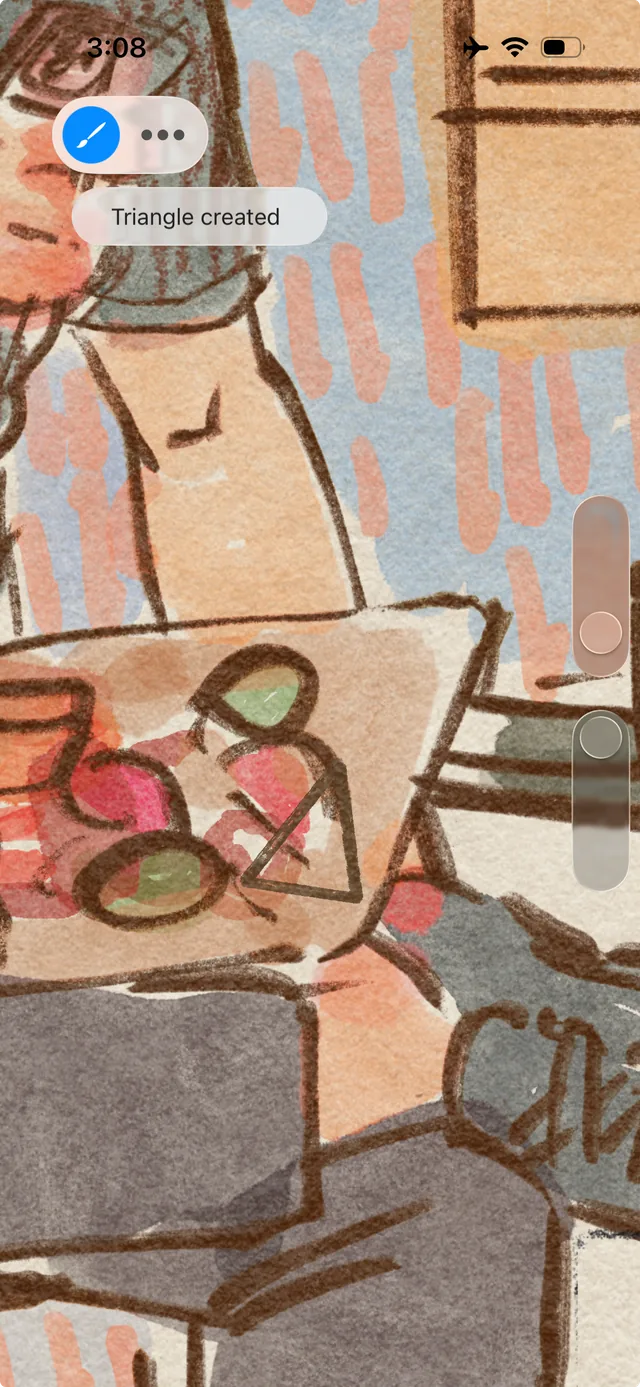
[Procreate Pocket](https://help.procreate.com/pocket/handbook/interface-gestures/gestures) · © Savage Interactive. Developer-distributed app screenshot; all rights reserved. Excluded from MIT and CC BY 4.0.
1. Holding turned the outline into a clean triangle
- Show the hold-mode transition and allow its delay to be adjusted.
- [Procreate Pocket](https://help.procreate.com/pocket/handbook/interface-gestures/gestures)
## How it works
The holding state, its duration and release determine the temporary mode, charge or completion of the action.
## Variants
### Variants and applications
- Action for the duration of contact. Type: Touch. Fingers: 1. Rule: The action works as long as the finger touches the active zone. Application: Shooting, shield, gas, watering, spraying paint.
- Charge and release. Type: Touch. Fingers: 1. Rule: Holding accumulates charge, releasing triggers the action. Application: Charge a shot, throw an object, perform a strong jump.
- Duration as a parameter. Type: Touch. Fingers: 1. Rule: The holding time sets the magnitude of the result. Application: Measure a portion of liquid, the length of the wick, the height of the jump or the duration of the sound.
- Stabilization by holding. Type: Touch. Fingers: 1. Rule: Contact gradually reduces spread or oscillation. Application: Calm the scope, focus the lens, prepare a precision instrument.
- Holding changes the passage of time. Type: Touch. Fingers: 1. Rule: The world slows down, stops or speeds up only on contact. Application: Plan a trajectory between hazards or manually advance the simulation.
- Holding at risk. Type: Touch. Fingers: 1. Rule: The benefit grows with the danger, the player decides when to let go. Application: Do not overheat the drill, do not overfill the vessel, do not break the fishing line.
- Maintaining the condition. Type: Touch. Fingers: 1. Rule: While the zone is pressed, the remote object remains active. Application: Hold a door open, support a bridge or power a mechanism.
- Letting go in the moment. Type: Touch. Fingers: 1. Rule: The result is determined by the time the finger is lifted. Application: Stop the scale, catch the parry window, release the grip in time.
## Context and limits
Author's working classification for designing games and interactions. Options can overlap and combine; the list is not a generally accepted standard or proven exhaustive list. Application examples are conditional unless a specific verifiable observation is indicated nearby. Sources support individual techniques and technical limitations.
## Connected materials
## Sources and provenance
Original editorial design catalog consolidated from project discussions on 2026-10-20. Complete discussion item lists and contextual limitations are preserved; linked primary sources support specific techniques, not the entire classification. English translation was prepared with machine assistance and editorial review.
- [Procreate Pocket](https://help.procreate.com/pocket/handbook/interface-gestures/gestures) (id: source-1d07116941032082)
CC-BY-4.0 · gamemechanics.pro contributors