---
key: mechanic/phone-touch--family-01
type: mechanic
id: phone-touch--family-01
lang: en
title: Taps and selection
summary: >-
A short tap selects an object or starts a command. Pokémon Smile uses a large
start button and separate icons for other sections.
updatedAt: '2026-10-22'
status: active
url: 'https://gamemechanics.pro/en/knowledge/mechanic/phone-touch--family-01/'
jsonUrl: >-
https://gamemechanics.pro/api/v1/knowledge/en/mechanic/phone-touch--family-01.json
markdownUrl: >-
https://gamemechanics.pro/content/knowledge/en/mechanic/phone-touch--family-01.md
aliases: []
tags:
- Phone touchscreen interactions
- Mechanics catalog
sourceIds:
- source-8dfb822df620d977
sources:
- id: source-8dfb822df620d977
title: Pokémon Smile
url: 'https://apps.apple.com/us/app/pok%C3%A9mon-smile/id1512331079?uo=4'
verifiedAt: null
relations: []
placements:
- catalogId: phone-touch
id: family-01
title: Phone touchscreen interactions
url: 'https://gamemechanics.pro/en/mechanics/phone-touch/#family-01'
categoryIds:
- section-1
supersededBy: []
attributes:
preview:
updatedAt: '2026-10-22'
title: Taps and selection
description: >-
A short tap selects an object or starts a command. Pokémon Smile uses a
large start button and separate icons for other sections.
image:
src: images/mechanics/input-pokemon-smile-1.webp
width: 720
height: 1280
crop:
x: 35
'y': 325
width: 650
height: 620
game: Pokémon Smile
sourceUrl: 'https://apps.apple.com/us/app/pok%C3%A9mon-smile/id1512331079?uo=4'
originalUrl: >-
https://is1-ssl.mzstatic.com/image/thumb/PurpleSource114/v4/77/73/f9/7773f950-f8d0-ddde-7bc1-24e9cfc38591/4c4395db-2b85-4247-9852-2e380223c876_MainMenu_5.5_EN.png/720x1560bb.jpg
credit: The Pokemon Company
rights: >-
Imagery © The Pokemon Company. Developer-distributed screenshot or
frame; all rights reserved. Excluded from MIT and CC BY 4.0.
caption: 'Pokémon Smile: a large start button and separate menu sections'
alt: 'Pokémon Smile: a large start button and separate menu sections'
markers:
- x: 50
'y': 38
label: Tapping Get Brushing starts the main session
tips:
- >-
Make touch targets large enough and allow moving off a button before
release.
examples:
- title: Pokémon Smile
url: 'https://apps.apple.com/us/app/pok%C3%A9mon-smile/id1512331079?uo=4'
endsAt: null
provenance: >-
Original editorial design catalog consolidated from project discussions on
2026-10-20. Complete discussion item lists and contextual limitations are
preserved; linked primary sources support specific techniques, not the entire
classification. English translation was prepared with machine assistance and
editorial review.
license: CC-BY-4.0
codeLicense: MIT
attribution: gamemechanics.pro contributors
catalogKey: catalog/phone-touch
---
# Taps and selection
id: phone-touch--family-01
type: mechanic
key: mechanic/phone-touch--family-01
lang: en
status: active
url: https://gamemechanics.pro/en/knowledge/mechanic/phone-touch--family-01/
A short tap selects an object or starts a command. Pokémon Smile uses a large start button and separate icons for other sections.
## At a glance
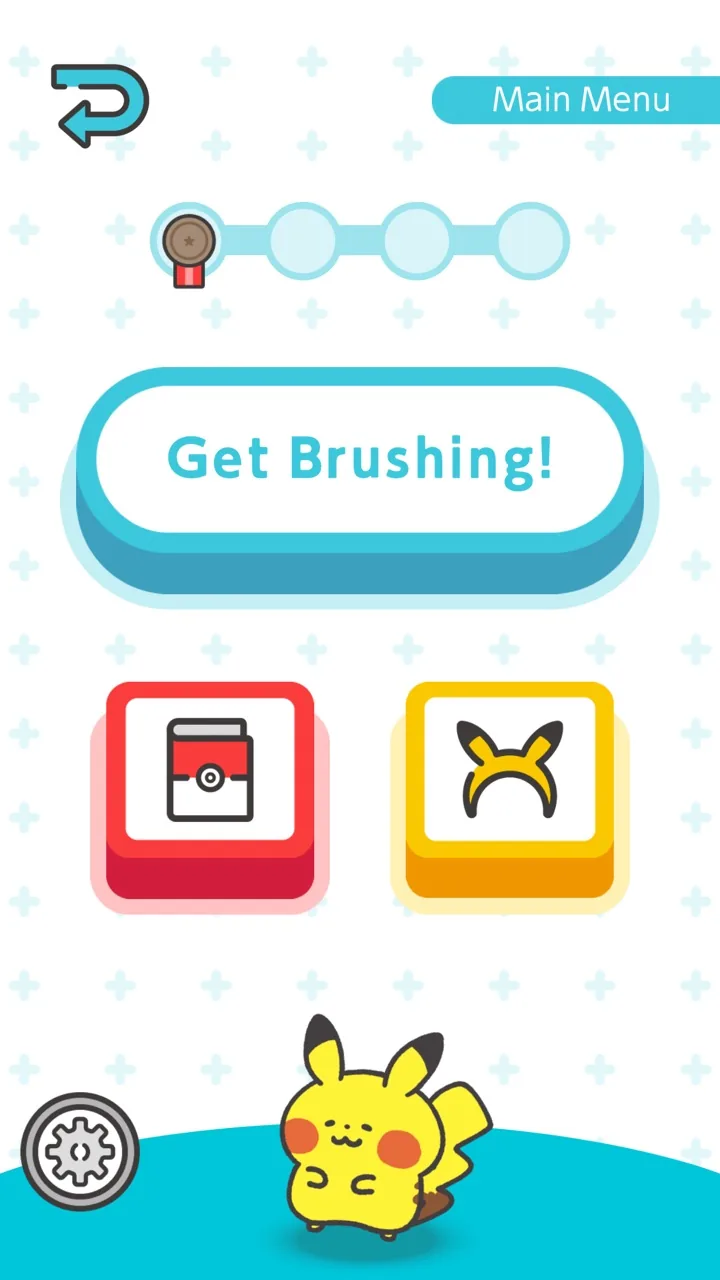
[Pokémon Smile](https://apps.apple.com/us/app/pok%C3%A9mon-smile/id1512331079?uo=4) · Imagery © The Pokemon Company. Developer-distributed screenshot or frame; all rights reserved. Excluded from MIT and CC BY 4.0.
1. Tapping Get Brushing starts the main session
- Make touch targets large enough and allow moving off a button before release.
- [Pokémon Smile](https://apps.apple.com/us/app/pok%C3%A9mon-smile/id1512331079?uo=4)
## How it works
Short contact selects an object, position or command; the rule determines the moment of activation and the possibility of cancellation.
## Variants
### Variants and applications
- Activation. Type: Touch. Fingers: 1. Rule: A short touch causes one action. Application: Press a button, jump, open a door, hit.
- Selecting an object. Type: Touch. Fingers: 1. Rule: Touching makes the object current, the next action is applied to it. Application: Select units, objects, evidence or answer options.
- Indication of location. Type: Touch. Fingers: 1. Rule: Touch coordinates become the target of movement or placement. Application: Send the hero to a point, place a tower or marker.
- Aiming touch. Type: Touch. Fingers: 1. Rule: Success depends on hitting a specific area of the object. Application: Get into a vulnerability, find a hidden object, play the right note.
- Creation on point. Type: Touch. Fingers: 1. Rule: Touching creates an object or event at the selected coordinates. Application: Plant a plant, place a route node, cause a splash.
- Switching state. Type: Touch. Fingers: 1. Rule: Each touch changes the state in a cycle. Application: Switch rails, polarity, color, stance or direction of gravity.
- Contextual action. Type: Touch. Fingers: 1. Rule: One gesture causes a different action depending on the object and the state of the world. Application: Touch a door to open, an ally to heal, a fire to rest.
- Double tap. Type: Touch. Fingers: 1. Rule: Two touches within a given time and space tolerance form a command. Application: Dash, quick group selection, approaching an object. Need a clear border with a single touch...
## Context and limits
Author's working classification for designing games and interactions. Options can overlap and combine; the list is not a generally accepted standard or proven exhaustive list. Application examples are conditional unless a specific verifiable observation is indicated nearby. Sources support individual techniques and technical limitations.
## Connected materials
## Sources and provenance
Original editorial design catalog consolidated from project discussions on 2026-10-20. Complete discussion item lists and contextual limitations are preserved; linked primary sources support specific techniques, not the entire classification. English translation was prepared with machine assistance and editorial review.
- [Pokémon Smile](https://apps.apple.com/us/app/pok%C3%A9mon-smile/id1512331079?uo=4) (id: source-8dfb822df620d977)
CC-BY-4.0 · gamemechanics.pro contributors