---
key: mechanic/phone-motion--family-tilt
type: mechanic
id: phone-motion--family-tilt
lang: en
title: Tilt and continuous control
summary: >-
Phone tilt produces continuous movement. In Tilt to Live the player steers a
white arrow between dangerous dots and useful pickups.
updatedAt: '2026-10-22'
status: active
url: 'https://gamemechanics.pro/en/knowledge/mechanic/phone-motion--family-tilt/'
jsonUrl: >-
https://gamemechanics.pro/api/v1/knowledge/en/mechanic/phone-motion--family-tilt.json
markdownUrl: >-
https://gamemechanics.pro/content/knowledge/en/mechanic/phone-motion--family-tilt.md
aliases: []
tags:
- Phone motion interactions
- Mechanics catalog
sourceIds:
- source-5b0da157abcdaf6a
sources:
- id: source-5b0da157abcdaf6a
title: Tilt to Live
url: 'https://apps.apple.com/us/app/tilt-to-live/id335454448?uo=4'
verifiedAt: null
relations: []
placements:
- catalogId: phone-motion
id: family-tilt
title: Phone motion interactions
url: 'https://gamemechanics.pro/en/mechanics/phone-motion/#family-tilt'
categoryIds:
- section-1
supersededBy: []
attributes:
preview:
updatedAt: '2026-10-22'
title: Tilt and continuous control
description: >-
Phone tilt produces continuous movement. In Tilt to Live the player steers
a white arrow between dangerous dots and useful pickups.
image:
src: images/mechanics/input-tilt-live-0.webp
width: 720
height: 405
game: Tilt to Live
sourceUrl: 'https://apps.apple.com/us/app/tilt-to-live/id335454448?uo=4'
originalUrl: >-
https://is1-ssl.mzstatic.com/image/thumb/Purple221/v4/2e/5b/d0/2e5bd0d1-32c9-de31-b654-133792014432/pr_source.png/720x1560bb.jpg
credit: One Man Left
rights: >-
Imagery © One Man Left. Developer-distributed screenshot or frame; all
rights reserved. Excluded from MIT and CC BY 4.0.
caption: 'Tilt to Live: tilting the phone steers the white arrow'
alt: 'Tilt to Live: tilting the phone steers the white arrow'
markers:
- x: 37
'y': 57
label: Tilting the device changes the arrow’s position
tips:
- Allow neutral-position calibration and sensitivity adjustment.
examples:
- title: Tilt to Live
url: 'https://apps.apple.com/us/app/tilt-to-live/id335454448?uo=4'
endsAt: null
provenance: >-
Original editorial design catalog consolidated from project discussions on
2026-10-20. Complete discussion item lists and contextual limitations are
preserved; linked primary sources support specific techniques, not the entire
classification. English translation was prepared with machine assistance and
editorial review.
license: CC-BY-4.0
codeLicense: MIT
attribution: gamemechanics.pro contributors
catalogKey: catalog/phone-motion
---
# Tilt and continuous control
id: phone-motion--family-tilt
type: mechanic
key: mechanic/phone-motion--family-tilt
lang: en
status: active
url: https://gamemechanics.pro/en/knowledge/mechanic/phone-motion--family-tilt/
Phone tilt produces continuous movement. In Tilt to Live the player steers a white arrow between dangerous dots and useful pickups.
## At a glance
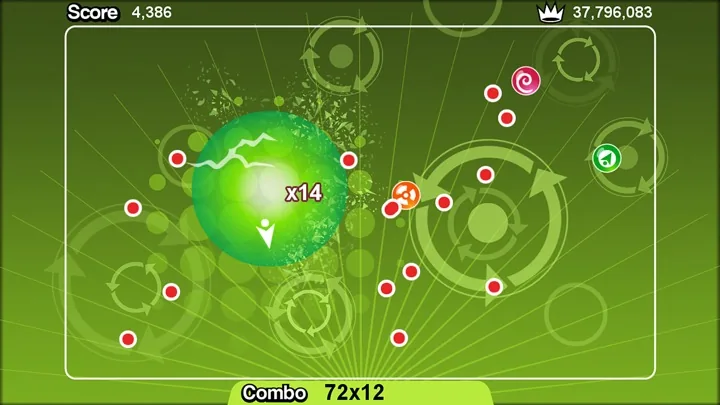
[Tilt to Live](https://apps.apple.com/us/app/tilt-to-live/id335454448?uo=4) · Imagery © One Man Left. Developer-distributed screenshot or frame; all rights reserved. Excluded from MIT and CC BY 4.0.
1. Tilting the device changes the arrow’s position
- Allow neutral-position calibration and sensitivity adjustment.
- [Tilt to Live](https://apps.apple.com/us/app/tilt-to-live/id335454448?uo=4)
## How it works
How an angle turns into a position, speed, force or parameter. The differences determine the feeling of control, even if the original gesture is the same.
## Variants
### Variants and applications
- Tilt → position. Action: The angle directly specifies the position of the object; returning the phone returns the object. Application: Arkanoid racket, slider, platform position, cursor. Sensors: Name: Accelerometer; Value: Sufficient for the specified simplified scenario under the described conditions. Limitations: Suitable for a limited range; you need a neutral posture and a small dead zone...
- Incline → speed. Action: The stronger the tilt, the faster the object moves; in neutral it stops. Application: Platformer character, sliding through menus, scrolling long text. Sensors: Name: Accelerometer; Value: Sufficient for the specified simplified scenario under the described conditions. Limitations: Limit maximum speed; give me the opportunity to stop quickly...
- Tilt → acceleration. Action: Tilt adds acceleration; the accumulated virtual speed is preserved. Application: Ship with inertia, physics puzzle, movement on a slippery surface. Sensors: Name: Accelerometer; Value: Sufficient for the specified simplified scenario under the described conditions. Limitations: This is a game object model, not a measured phone speed; braking needs to be explained.
- Tilt in two axes. Action: The two tilt components set the direction on the plane, and the deviation from the neutral sets the input amount. Application: 2D joystick, moving around the map, controlling the drone in a conventional plane. Sensors: Name: Accelerometer; Value: Sufficient for the specified simplified scenario under the described conditions. Limitations: Convert axes to screen orientation and select circular or split dead zone.
- Rudder, roll and pitch. Action: The angle of the phone controls the rotation of the vehicle or the deviation of the virtual body. Application: Auto racing, airplane, snowboard, boat, glider. Sensors: Name: Accelerometer; Value: Sufficient for the specified simplified scenario under the described conditions. Limitations: For quiet slopes, A is sufficient; for fast rotations, a combination with a gyroscope is preferable.
- Fine adjustment of the sight. Action: Small changes in orientation move the sight relative to its original position. Application: Shooting after rough finger pointing, sniper optics, presentation pointer. Sensors: Name: Accelerometer + gyroscope; Meaning: A bunch of sensors for orientation, rotation and separation of movement from gravity. Limitations: For horizontal rotation and fast adjustment, a gyroscope is needed; provide for re-centering.
- Tilt → parameter. Action: One axis changes the value, two axes control two related parameters. Application: Volume and timbre, scale, wind force, launch angle and power, color mixing. Sensors: Name: Accelerometer; Value: Sufficient for the specified simplified scenario under the described conditions. Limitations: State the limits and current value; decide whether it persists after returning to neutral.
- Slope → state mixing. Action: Deviation smoothly changes the proportion of two states or the degree of disclosure of the effect. Application: The world of light and shadow, manifestation of a hidden layer, card transparency, transition between forms. Sensors: Name: Accelerometer; Value: Sufficient for the specified simplified scenario under the described conditions. Limitations: Keep the range small to keep the screen readable.
## Context and limits
96 mechanics and scenarios; Basic gestures, control schemes and derived applications are separated into layers. Examples are design ideas other than individually confirmed products.
## Connected materials
## Sources and provenance
Original editorial design catalog consolidated from project discussions on 2026-10-20. Complete discussion item lists and contextual limitations are preserved; linked primary sources support specific techniques, not the entire classification. English translation was prepared with machine assistance and editorial review.
- [Tilt to Live](https://apps.apple.com/us/app/tilt-to-live/id335454448?uo=4) (id: source-5b0da157abcdaf6a)
CC-BY-4.0 · gamemechanics.pro contributors