---
key: mechanic/phone-microphone--family-commands
type: mechanic
id: phone-microphone--family-commands
lang: en
title: Verbal commands
summary: >-
The microphone receives a spoken command. The app recognizes its action and
parameters, then confirms execution so the result can be checked.
updatedAt: '2026-10-22'
status: active
url: >-
https://gamemechanics.pro/en/knowledge/mechanic/phone-microphone--family-commands/
jsonUrl: >-
https://gamemechanics.pro/api/v1/knowledge/en/mechanic/phone-microphone--family-commands.json
markdownUrl: >-
https://gamemechanics.pro/content/knowledge/en/mechanic/phone-microphone--family-commands.md
aliases:
- Spoken commands
tags:
- Phone microphone interactions
- Mechanics catalog
sourceIds:
- source-a3f4070f5ea12d71
- source-3909cb777273dcb9
sources:
- id: source-a3f4070f5ea12d71
title: 'Apple: Set up speech recognition on your device'
url: 'https://developer.apple.com/videos/play/wwdc2023/10101/'
verifiedAt: null
- id: source-3909cb777273dcb9
title: Siri (iOS 5)
url: >-
https://cdsassets.apple.com/live/6GJYWVAV/user/ma1622_iphone_ios5_user_guide.pdf#page=53
verifiedAt: null
relations: []
placements:
- catalogId: phone-microphone
id: family-commands
title: Phone microphone interactions
url: 'https://gamemechanics.pro/en/mechanics/phone-microphone/#family-commands'
categoryIds:
- section-1
supersededBy: []
attributes:
preview:
updatedAt: '2026-10-22'
title: Spoken commands
description: >-
The microphone receives a spoken command. The app recognizes its action
and parameters, then confirms execution so the result can be checked.
image:
src: images/mechanics/sensor-siri-ios5-timer.webp
width: 320
height: 480
game: Siri (iOS 5)
sourceUrl: >-
https://cdsassets.apple.com/live/6GJYWVAV/user/ma1622_iphone_ios5_user_guide.pdf#page=53
originalUrl: >-
https://cdsassets.apple.com/live/6GJYWVAV/user/ma1622_iphone_ios5_user_guide.pdf
credit: Apple Inc.
rights: >-
© Apple Inc. Historical iOS 5 user-guide screenshot, printed page 53.
Used to illustrate the voice-command interaction, not a current
interface. All rights reserved; excluded from MIT and CC BY 4.0.
caption: 'Siri: a spoken command starts a timer; historical iOS 5 interface'
alt: 'Siri: a spoken command starts a timer; historical iOS 5 interface'
markers:
- x: 50
'y': 40
label: The running timer confirms execution of the recognized request
tips:
- >-
Show recognized parameters before an action with significant
consequences.
examples:
- title: Siri (iOS 5)
url: >-
https://cdsassets.apple.com/live/6GJYWVAV/user/ma1622_iphone_ios5_user_guide.pdf#page=53
endsAt: null
provenance: >-
Original editorial design catalog consolidated from project discussions on
2026-10-20. Complete discussion item lists and contextual limitations are
preserved; linked primary sources support specific techniques, not the entire
classification. English translation was prepared with machine assistance and
editorial review.
license: CC-BY-4.0
codeLicense: MIT
attribution: gamemechanics.pro contributors
catalogKey: catalog/phone-microphone
---
# Verbal commands
id: phone-microphone--family-commands
type: mechanic
key: mechanic/phone-microphone--family-commands
lang: en
status: active
url: https://gamemechanics.pro/en/knowledge/mechanic/phone-microphone--family-commands/
The microphone receives a spoken command. The app recognizes its action and parameters, then confirms execution so the result can be checked.
## At a glance
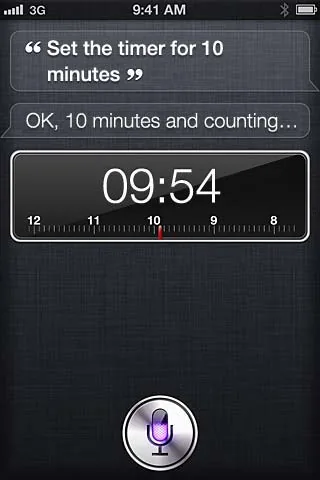
[Siri (iOS 5)](https://cdsassets.apple.com/live/6GJYWVAV/user/ma1622_iphone_ios5_user_guide.pdf#page=53) · © Apple Inc. Historical iOS 5 user-guide screenshot, printed page 53. Used to illustrate the voice-command interaction, not a current interface. All rights reserved; excluded from MIT and CC BY 4.0.
1. The running timer confirms execution of the recognized request
- Show recognized parameters before an action with significant consequences.
- [Siri (iOS 5)](https://cdsassets.apple.com/live/6GJYWVAV/user/ma1622_iphone_ios5_user_guide.pdf#page=53)
## How it works
A limited vocabulary is usually easier to make predictable. Language and offline support depends on the selected resolver.
## Variants
### Variants and applications
- Command in one word. Signal: Match with the game dictionary. Application: Say “jump”, “stop”, “shield” for direct control. Access level: Recognition.
- Selecting a replica. Signal: Recognizes one of the displayed responses. Application: Answer a character or select a menu item out loud. Access level: Recognition.
- Addressing by name. Signal: The name of the object or character. Application: Tell who to move or what item to take. Access level: Recognition.
- Action with parameters. Signal: Verb, target, number, direction. Application: Order “two steps to the right” or “turn the red valve.” Access level: Recognition.
- Command queue. Signal: Recognized sequence. Application: Pre-program the robot's route with a few phrases. Access level: Recognition.
- Conditional order. Signal: A limited construction of condition and action. Application: Say “if you see the enemy, hide” and check the execution. Access level: Recognition.
- Correction and cancellation. Signal: Correction commands in the current context. Application: Cancel an order or clarify the target by voice. Access level: Recognition.
- Activation word. Signal: Keyword before the main command. Application: Contact the game assistant without turning any speech into action. Access level: Recognition.
## Context and limits
Author's design map for mobile games and interactive applications. 144 techniques in 18 groups, including basic signals, rules and combinations. Applications are design ideas and not a list of released games.
## Connected materials
## Sources and provenance
Original editorial design catalog consolidated from project discussions on 2026-10-20. Complete discussion item lists and contextual limitations are preserved; linked primary sources support specific techniques, not the entire classification. English translation was prepared with machine assistance and editorial review.
- [Apple: Set up speech recognition on your device](https://developer.apple.com/videos/play/wwdc2023/10101/) (id: source-a3f4070f5ea12d71)
- [Siri (iOS 5)](https://cdsassets.apple.com/live/6GJYWVAV/user/ma1622_iphone_ios5_user_guide.pdf#page=53) (id: source-3909cb777273dcb9)
CC-BY-4.0 · gamemechanics.pro contributors