---
key: mechanic/phone-magnetometer--family-08
type: mechanic
id: phone-magnetometer--family-08
lang: en
title: Objects and physical tokens
summary: >-
A physical overlay maps magnet position to a command. In the MagBoard
prototype, a printed grid defines keys for a phone application.
updatedAt: '2026-10-22'
status: active
url: 'https://gamemechanics.pro/en/knowledge/mechanic/phone-magnetometer--family-08/'
jsonUrl: >-
https://gamemechanics.pro/api/v1/knowledge/en/mechanic/phone-magnetometer--family-08.json
markdownUrl: >-
https://gamemechanics.pro/content/knowledge/en/mechanic/phone-magnetometer--family-08.md
aliases:
- Objects and tangible media
tags:
- Phone magnetometer interactions
- Mechanics catalog
sourceIds:
- source-ee9f12adfc1daf72
sources:
- id: source-ee9f12adfc1daf72
title: MagBoard prototype / Calculator
url: 'https://arxiv.org/abs/1605.00284'
verifiedAt: null
relations: []
placements:
- catalogId: phone-magnetometer
id: family-08
title: Phone magnetometer interactions
url: 'https://gamemechanics.pro/en/mechanics/phone-magnetometer/#family-08'
categoryIds:
- section-1
supersededBy: []
attributes:
preview:
updatedAt: '2026-10-22'
title: Objects and tangible media
description: >-
A physical overlay maps magnet position to a command. In the MagBoard
prototype, a printed grid defines keys for a phone application.
image:
src: images/mechanics/sensor-magboard-photo.webp
width: 709
height: 651
game: MagBoard prototype / Calculator
sourceUrl: 'https://arxiv.org/abs/1605.00284'
originalUrl: 'https://arxiv.org/pdf/1605.00284'
credit: 'Heba Abdelnasser, Moustafa Youssef and Khaled A. Harras'
rights: >-
Photo from the authors’ MagBoard paper, arXiv:1605.00284, PDF page 2.
Third-party application imagery retains its own rights. All rights
reserved; excluded from portal MIT and CC BY 4.0.
caption: 'MagBoard: a printed overlay and the resulting calculator input'
alt: 'MagBoard: a printed overlay and the resulting calculator input'
markers:
- x: 54
'y': 57
label: A magnet over a cell selects the corresponding command
tips:
- >-
Register overlay placement and do not promise unique recognition of
arbitrary objects.
examples:
- title: MagBoard prototype / Calculator
url: 'https://arxiv.org/abs/1605.00284'
endsAt: null
provenance: >-
Original editorial design catalog consolidated from project discussions on
2026-10-20. Complete discussion item lists and contextual limitations are
preserved; linked primary sources support specific techniques, not the entire
classification. English translation was prepared with machine assistance and
editorial review.
license: CC-BY-4.0
codeLicense: MIT
attribution: gamemechanics.pro contributors
catalogKey: catalog/phone-magnetometer
---
# Objects and physical tokens
id: phone-magnetometer--family-08
type: mechanic
key: mechanic/phone-magnetometer--family-08
lang: en
status: active
url: https://gamemechanics.pro/en/knowledge/mechanic/phone-magnetometer--family-08/
A physical overlay maps magnet position to a command. In the MagBoard prototype, a printed grid defines keys for a phone application.
## At a glance
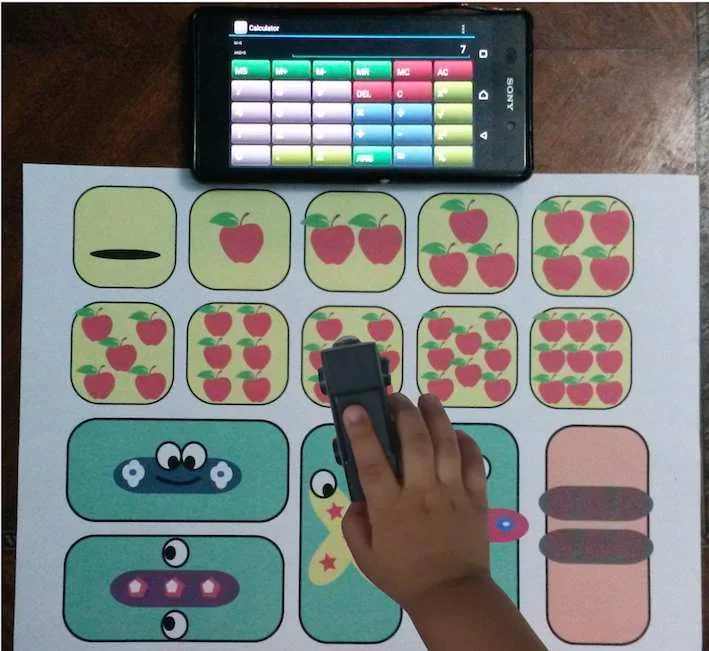
[MagBoard prototype / Calculator](https://arxiv.org/abs/1605.00284) · Photo from the authors’ MagBoard paper, arXiv:1605.00284, PDF page 2. Third-party application imagery retains its own rights. All rights reserved; excluded from portal MIT and CC BY 4.0.
1. A magnet over a cell selects the corresponding command
- Register overlay placement and do not promise unique recognition of arbitrary objects.
- [MagBoard prototype / Calculator](https://arxiv.org/abs/1605.00284)
## How it works
Prepared objects receive distinguishable magnetic characteristics; recognition depends on location and calibration.
## Variants
### Variants and applications
- Inserting a physical key. Action: Insert a magnetic object into the only prepared slot. Application: Open the door, start the plot, activate the artifact. Limitations: A familiar field configuration is detected; copy protection is not provided. Equipment: Magnetic props with a given geometry. Preparation: Needs setup. Type: Game rule.
- Selecting an item by signature. Action: Insert prepared objects with different magnetic templates into one slot one by one. Application: Character figures, physical inventory, tool selection. Limitations: Classes may overlap; you need a small proven set and exact position. Equipment: Magnetic props with a given geometry. Preparation: Experimental. Type: Input method.
- Side or orientation of the token. Action: Flip or rotate one token in a fixed location. Application: Selecting the face of the card, the state of the hero, the direction of action. Limitations: Distinction of orientations must be checked on a specific design. Equipment: Magnetic props with a given geometry. Preparation: Needs setup. Type: Input method.
- A chip on a marked path. Action: Move one magnetic chip along known points or cells. Application: Tabletop labyrinth, route, local tactical task. Limitations: One sensor does not provide a reliable complete picture of several chips on a large field. Equipment: Magnetic props with a given geometry. Preparation: Experimental. Type: Input method.
- Sequence of presentations. Action: Apply prepared items one at a time in a given order. Application: Potion recipe, story from cards, assembling a team. Limitations: The application stores the order; it does not detect all objects lying nearby at once. Equipment: Magnetic props with a given geometry. Preparation: Experimental. Type: Game rule.
- Magnetic code scanning. Action: Guide media with large magnetic marks through the guide. Application: Physics program, toy command, code page. Limitations: Special slow code; reading banking magnetic stripes is not expected. Equipment: Magnetic details with a given geometry. Preparation: Experimental. Type: Input method.
- Opening a page or flap. Action: Move a magnet along with a known fold or a separate page. Application: Interactive book, box, drop-down object. Limitations: Many magnets give a total field; start with one moving part. Equipment: Magnetic props with a given geometry. Preparation: Needs setup. Type: Input method.
- Assembly step control. Action: Bring the next module to a single reading zone before installation. Application: Educational constructor, sequential assembly of the device, repair in a quest. Limitations: The presentation of the module is confirmed, and not the correctness of the entire structure. Equipment: Magnetic props with a given geometry. Preparation: Experimental. Type: Game rule.
## Context and limits
Author's working classification for designing games and interactions. Options can overlap and combine; the list is not a generally accepted standard or proven exhaustive list. Application examples are conditional unless a specific verifiable observation is indicated nearby. Sources support individual techniques and technical limitations.
## Connected materials
## Sources and provenance
Original editorial design catalog consolidated from project discussions on 2026-10-20. Complete discussion item lists and contextual limitations are preserved; linked primary sources support specific techniques, not the entire classification. English translation was prepared with machine assistance and editorial review.
- [MagBoard prototype / Calculator](https://arxiv.org/abs/1605.00284) (id: source-ee9f12adfc1daf72)
CC-BY-4.0 · gamemechanics.pro contributors