---
key: mechanic/phone-magnetometer--family-03
type: mechanic
id: phone-magnetometer--family-03
lang: en
title: Using a magnet as a button
summary: >-
Bringing a magnet near changes the field. A scenario can map a threshold
crossing to a press and its removal to a release.
updatedAt: '2026-10-22'
status: active
url: 'https://gamemechanics.pro/en/knowledge/mechanic/phone-magnetometer--family-03/'
jsonUrl: >-
https://gamemechanics.pro/api/v1/knowledge/en/mechanic/phone-magnetometer--family-03.json
markdownUrl: >-
https://gamemechanics.pro/content/knowledge/en/mechanic/phone-magnetometer--family-03.md
aliases:
- A magnet as a button
tags:
- Phone magnetometer interactions
- Mechanics catalog
sourceIds:
- source-603978442e60360e
sources:
- id: source-603978442e60360e
title: Physics Toolbox Magnetometer
url: >-
https://apps.apple.com/us/app/physics-toolbox-magnetometer/id1003749103?uo=4
verifiedAt: null
relations: []
placements:
- catalogId: phone-magnetometer
id: family-03
title: Phone magnetometer interactions
url: 'https://gamemechanics.pro/en/mechanics/phone-magnetometer/#family-03'
categoryIds:
- section-1
supersededBy: []
attributes:
preview:
updatedAt: '2026-10-22'
title: A magnet as a button
description: >-
Bringing a magnet near changes the field. A scenario can map a threshold
crossing to a press and its removal to a release.
image:
src: images/mechanics/sensor-physics-magnet-3.webp
width: 665
height: 1440
crop:
x: 51
'y': 323
width: 563
height: 1034
game: Physics Toolbox Magnetometer
sourceUrl: >-
https://apps.apple.com/us/app/physics-toolbox-magnetometer/id1003749103?uo=4
originalUrl: >-
https://is1-ssl.mzstatic.com/image/thumb/PurpleSource211/v4/76/23/58/7623583b-a84f-fd15-b138-fa78cf800baa/04-record-lab-data.png/720x1560bb.jpg
credit: Chrystian Vieyra
rights: >-
© Chrystian Vieyra. Developer-distributed App Store screenshot. All
rights reserved; excluded from MIT and CC BY 4.0.
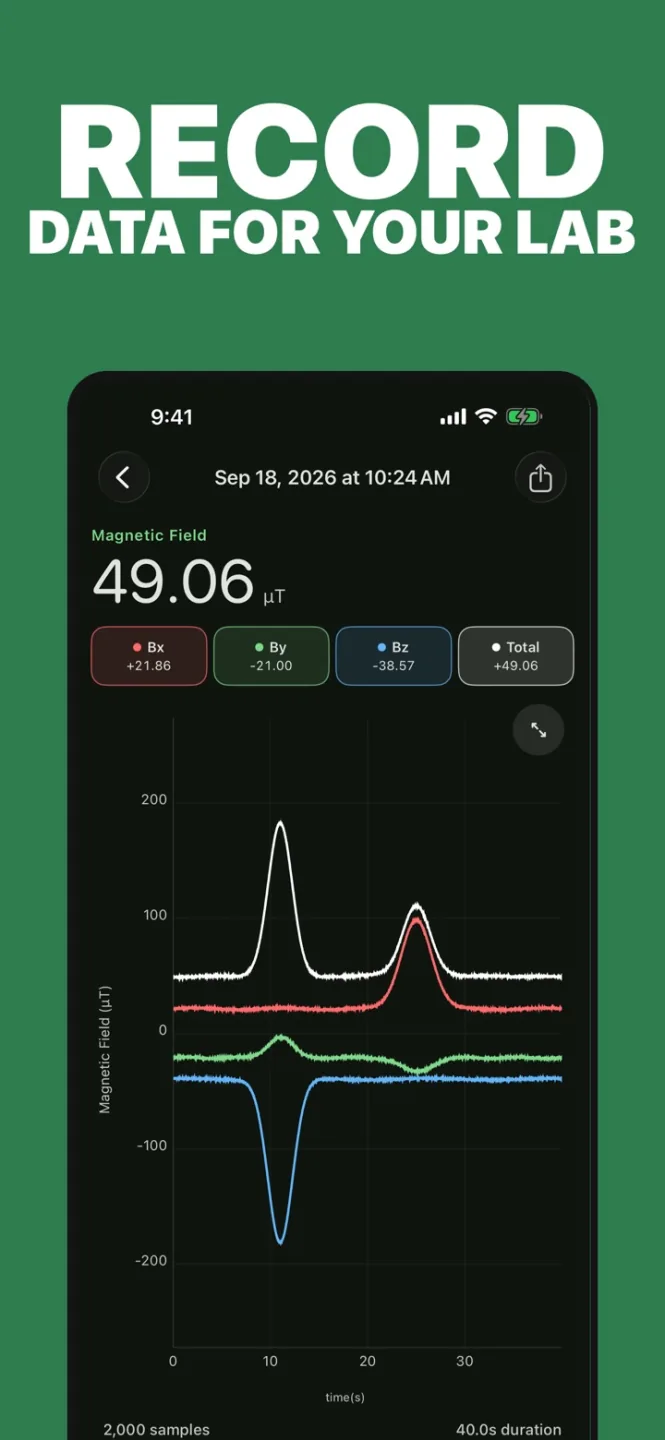
caption: 'Physics Toolbox: a recording of sharp magnetic-field changes'
alt: 'Physics Toolbox: a recording of sharp magnetic-field changes'
markers:
- x: 44
'y': 64
label: A field peak can supply a threshold-action input
tips:
- Use different activation and release thresholds to reduce chatter.
examples:
- title: Physics Toolbox Magnetometer
url: >-
https://apps.apple.com/us/app/physics-toolbox-magnetometer/id1003749103?uo=4
endsAt: null
provenance: >-
Original editorial design catalog consolidated from project discussions on
2026-10-20. Complete discussion item lists and contextual limitations are
preserved; linked primary sources support specific techniques, not the entire
classification. English translation was prepared with machine assistance and
editorial review.
license: CC-BY-4.0
codeLicense: MIT
attribution: gamemechanics.pro contributors
catalogKey: catalog/phone-magnetometer
---
# Using a magnet as a button
id: phone-magnetometer--family-03
type: mechanic
key: mechanic/phone-magnetometer--family-03
lang: en
status: active
url: https://gamemechanics.pro/en/knowledge/mechanic/phone-magnetometer--family-03/
Bringing a magnet near changes the field. A scenario can map a threshold crossing to a press and its removal to a release.
## At a glance
[Physics Toolbox Magnetometer](https://apps.apple.com/us/app/physics-toolbox-magnetometer/id1003749103?uo=4) · © Chrystian Vieyra. Developer-distributed App Store screenshot. All rights reserved; excluded from MIT and CC BY 4.0.
1. A field peak can supply a threshold-action input
- Use different activation and release thresholds to reduce chatter.
- [Physics Toolbox Magnetometer](https://apps.apple.com/us/app/physics-toolbox-magnetometer/id1003749103?uo=4)
## How it works
Approaching and moving away the magnetic source crosses the signal threshold and creates a discrete command.
## Variants
### Variants and applications
- Bring it to activate. Action: Apply the magnet; exceeding the field change threshold triggers the action. Application: Physical key, scanner launch, contactless button. Limitations: Select the threshold after background measurement; strong field may saturate the sensor. Equipment: Phone and external magnet. Preparation: Easy start. Type: Input method.
- Remove to activate. Action: Remove the magnet from its fixed place; changing the field triggers the action. Application: Pull out the pin, remove the seal, remove the battery in the quest. Limitations: Check state transition; a permanent magnet can affect auto-calibration. Equipment: Magnetic props with a given geometry. Preparation: Needs setup. Type: Input method.
- Magnet retention. Action: Maintain a magnet in the active zone as long as an action is needed. Application: Shield, beam, healing channel, door holding. Limitations: Different entry and exit thresholds are needed, otherwise the state rattles. Equipment: Phone and external magnet. Preparation: Easy start. Type: Input method.
- Double magnetic pulse. Action: Apply and remove the magnet twice in a limited time. Application: Double shot, tool change, confirmation of a rare action. Limitations: Set the minimum interval and protection against re-activation. Equipment: Phone and external magnet. Preparation: Easy start. Type: Input method.
- Short and long impulse. Action: Distinguish the duration of stay in the active zone. Application: Light and heavy attack, short and long command. Limitations: The user needs clear feedback about the recognized duration. Equipment: Phone and external magnet. Preparation: Easy start. Type: Input method.
- Confirmation by letting go. Action: Input begins when presented, confirmed when magnet is removed. Application: Load and release shot, select and apply action. Limitations: Do not confuse loss of signal due to phone movement with intentional release. Equipment: Phone and external magnet. Preparation: Easy start. Type: Game rule.
- Several rapids. Action: Go through successive levels of field change. Application: Charge stages, gear shifting, three lever positions without mechanics. Limitations: Levels require calibration; the field is not equal to the distance in centimeters. Equipment: Telephone and external magnet. Preparation: Needs setup. Type: Input method.
- The rhythm of approaches. Action: Alternate active and inactive states according to the pattern. Applications: Magnetic alphabet, rhythm game, signal repetition. Limitations: Works as a time code, not as a transfer of the unique personality of the item. Equipment: Phone and external magnet. Preparation: Easy start. Type: Game rule.
## Context and limits
Author's working classification for designing games and interactions. Options can overlap and combine; the list is not a generally accepted standard or proven exhaustive list. Application examples are conditional unless a specific verifiable observation is indicated nearby. Sources support individual techniques and technical limitations.
## Connected materials
## Sources and provenance
Original editorial design catalog consolidated from project discussions on 2026-10-20. Complete discussion item lists and contextual limitations are preserved; linked primary sources support specific techniques, not the entire classification. English translation was prepared with machine assistance and editorial review.
- [Physics Toolbox Magnetometer](https://apps.apple.com/us/app/physics-toolbox-magnetometer/id1003749103?uo=4) (id: source-603978442e60360e)
CC-BY-4.0 · gamemechanics.pro contributors