---
key: mechanic/phone-haptics--family-space
type: mechanic
id: phone-haptics--family-space
lang: en
title: 'Search, space and direction'
summary: >-
Position in a virtual field changes tactile output. In HapticPalette the Y
axis sets intensity and the X axis sets pattern sharpness.
updatedAt: '2026-10-22'
status: active
url: 'https://gamemechanics.pro/en/knowledge/mechanic/phone-haptics--family-space/'
jsonUrl: >-
https://gamemechanics.pro/api/v1/knowledge/en/mechanic/phone-haptics--family-space.json
markdownUrl: >-
https://gamemechanics.pro/content/knowledge/en/mechanic/phone-haptics--family-space.md
aliases: []
tags:
- Phone haptics
- Mechanics catalog
sourceIds:
- source-abae2b4f5a0b1ad2
sources:
- id: source-abae2b4f5a0b1ad2
title: HapticPalette (Apple sample)
url: >-
https://developer.apple.com/documentation/corehaptics/updating-continuous-and-transient-haptic-parameters-in-real-time
verifiedAt: null
relations: []
placements:
- catalogId: phone-haptics
id: family-space
title: Phone haptics
url: 'https://gamemechanics.pro/en/mechanics/phone-haptics/#family-space'
categoryIds:
- section-1
supersededBy: []
attributes:
preview:
updatedAt: '2026-10-22'
title: 'Search, space and direction'
description: >-
Position in a virtual field changes tactile output. In HapticPalette the Y
axis sets intensity and the X axis sets pattern sharpness.
image:
src: images/mechanics/haptic-apple-palette.webp
width: 965
height: 631
game: HapticPalette (Apple sample)
sourceUrl: >-
https://developer.apple.com/documentation/corehaptics/updating-continuous-and-transient-haptic-parameters-in-real-time
originalUrl: >-
https://developer.apple.com/tutorials/images/com.apple.corehaptics/HapticPaletteAxes@2x.png
credit: Apple
rights: >-
© Apple. Official annotated app screenshot. All rights reserved;
excluded from MIT and CC BY 4.0.
caption: 'HapticPalette: two coordinates set vibration parameters'
alt: 'HapticPalette: two coordinates set vibration parameters'
markers:
- x: 34
'y': 37
label: This touch position selects low sharpness and high intensity
tips:
- >-
A single motor does not convey direction by itself; define a clear
search rule.
examples:
- title: HapticPalette (Apple sample)
url: >-
https://developer.apple.com/documentation/corehaptics/updating-continuous-and-transient-haptic-parameters-in-real-time
endsAt: null
provenance: >-
Original editorial design catalog consolidated from project discussions on
2026-10-20. Complete discussion item lists and contextual limitations are
preserved; linked primary sources support specific techniques, not the entire
classification. English translation was prepared with machine assistance and
editorial review.
license: CC-BY-4.0
codeLicense: MIT
attribution: gamemechanics.pro contributors
catalogKey: catalog/phone-haptics
---
# Search, space and direction
id: phone-haptics--family-space
type: mechanic
key: mechanic/phone-haptics--family-space
lang: en
status: active
url: https://gamemechanics.pro/en/knowledge/mechanic/phone-haptics--family-space/
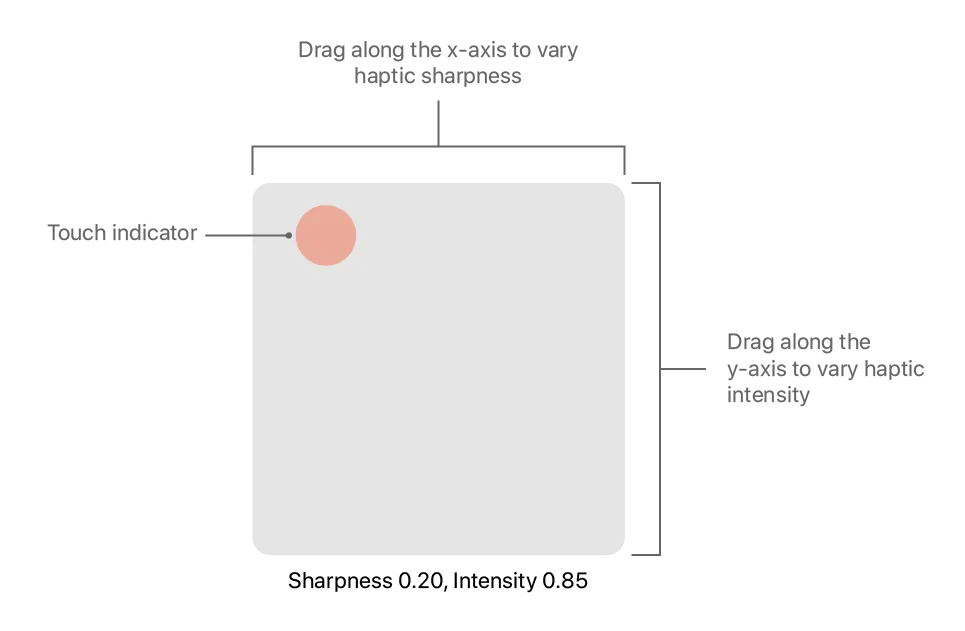
Position in a virtual field changes tactile output. In HapticPalette the Y axis sets intensity and the X axis sets pattern sharpness.
## At a glance
[HapticPalette (Apple sample)](https://developer.apple.com/documentation/corehaptics/updating-continuous-and-transient-haptic-parameters-in-real-time) · © Apple. Official annotated app screenshot. All rights reserved; excluded from MIT and CC BY 4.0.
1. This touch position selects low sharpness and high intensity
- A single motor does not convey direction by itself; define a clear search rule.
- [HapticPalette (Apple sample)](https://developer.apple.com/documentation/corehaptics/updating-continuous-and-transient-haptic-parameters-in-real-time)
## How it works
Vibration communicates spatial relationships; the direction is read by the player or a separate sensor.
## Variants
### Variants and applications
- Hot and cold. Role: Mechanics. Features: Basic impulses. Input: drag and drop. Rule: As the cursor approaches the target, the intervals between pulses become shorter; the player changes direction along a gradient. Application: Search for treasure, hidden button, leak. Limitations: You can encode distance by tempo without controlling the motor power.
- Amplitude detector. Role: Mechanics. Features: Rich tactility. Input: drag and drop. Rule: The player explores the area; The vibration strength increases near the source and helps select the next search point. Applications: Metal detecting, anomalies, resource gathering. Limitations: Requires discernible intensity control; provide an option with the pulse rate.
- Aiming sector. Role: Mechanics. Features: Basic impulses. Input: touch, sensors. Rule: The signal appears only when the virtual sight or the orientation of the phone falls into the desired sector. Application: Searching for a transmitter, pointing the antenna, AR quest. Limitations: Sensors are needed for real rotation; Vibration itself does not measure direction.
- Radial scanner. Role: Mechanics. Features: Basic impulses. Input: drag and drop. Rule: The player rotates the beam; pulses at the angles of intersection with objects allow you to remember their location. Application: Radar, navigation in the dark, reconnaissance. Limitations: The angle is set by the position of the beam; one motor does not indicate a physical sector of the body.
- Active sonar. Role: Mechanics. Features: Basic impulses. Input: touch. Rule: After starting a scan, the delay until the response pulse conventionally encodes the distance; the player waits and matches the echo. Application: Underwater exploration, wall search, tactical reconnaissance. Limitations: This is game coding; it does not measure the room without a separate sensor system.
- Following the contour. Role: Mechanics. Features: Basic impulses. Input: drag and drop. Rule: When you move your finger along an invisible line, marks appear; loss of line changes or stops the signal. Application: Stroke, labyrinth, circuit restoration. Limitations: Give a separate signal of loss of contact so that the pause does not look like a failure.
- Crossing borders. Role: Mechanics. Features: Basic impulses. Input: drag and drop. Rule: Entry into and exit from an area receive different patterns; the player maps zones using transitions. Application: Minefields in the game, biomes, invisible obstacles. Limitations: Requires distinguishable entry and exit patterns or clear context.
- Correct course strip. Role: Mechanics. Features: Basic impulses. Input: sensors, touch. Rule: Within the acceptable deviation there is a rare confirmation signal; a heading error causes a different pattern. Applications: Route keeping, virtual antenna, orientation training. Limitations: A route in the real world requires geodata; This is not a reliable danger warning channel.
- Coded turns. Role: Application. Features: Basic impulses. Input: geodata. Rule: The agreed rhythm indicates a left or right turn, and a separate series reports the approach to the maneuver. Application: Pedestrian navigator, route within the game. Limitations: Left and right are encoded by rhythm, not vibration localization; Need a short training phase...
- Label of a place or object. Role: Application. Features: Basic impulses. Input: geodata, camera, NFC/BLE. Rule: Upon confirmed detection of an object or entry into a zone, the phone gives an identifying pattern. Application: Museum quest, collecting, geo-game. Limitations: Location is determined by GPS, camera, NFC or BLE; take into account their errors and delays.
## Context and limits
Author's systematization: 160 cards in 16 groups. These are mechanics, feedback techniques, applications and experimental extensions, not 160 independent physical effects. Design examples are hypothetical, not statements about the released games that used them.
## Connected materials
## Sources and provenance
Original editorial design catalog consolidated from project discussions on 2026-10-20. Complete discussion item lists and contextual limitations are preserved; linked primary sources support specific techniques, not the entire classification. English translation was prepared with machine assistance and editorial review.
- [HapticPalette (Apple sample)](https://developer.apple.com/documentation/corehaptics/updating-continuous-and-transient-haptic-parameters-in-real-time) (id: source-abae2b4f5a0b1ad2)
CC-BY-4.0 · gamemechanics.pro contributors