---
key: mechanic/phone-haptics--family-materials
type: mechanic
id: phone-haptics--family-materials
lang: en
title: 'Materials, tools and virtual items'
summary: >-
Vibration character suggests an object or material. HapticPalette lets users
compare dull and crisp feedback under different parameters.
updatedAt: '2026-10-22'
status: active
url: >-
https://gamemechanics.pro/en/knowledge/mechanic/phone-haptics--family-materials/
jsonUrl: >-
https://gamemechanics.pro/api/v1/knowledge/en/mechanic/phone-haptics--family-materials.json
markdownUrl: >-
https://gamemechanics.pro/content/knowledge/en/mechanic/phone-haptics--family-materials.md
aliases:
- 'Materials, tools and objects'
tags:
- Phone haptics
- Mechanics catalog
sourceIds:
- source-abae2b4f5a0b1ad2
sources:
- id: source-abae2b4f5a0b1ad2
title: HapticPalette (Apple sample)
url: >-
https://developer.apple.com/documentation/corehaptics/updating-continuous-and-transient-haptic-parameters-in-real-time
verifiedAt: null
relations: []
placements:
- catalogId: phone-haptics
id: family-materials
title: Phone haptics
url: 'https://gamemechanics.pro/en/mechanics/phone-haptics/#family-materials'
categoryIds:
- section-1
supersededBy: []
attributes:
preview:
updatedAt: '2026-10-22'
title: 'Materials, tools and objects'
description: >-
Vibration character suggests an object or material. HapticPalette lets
users compare dull and crisp feedback under different parameters.
image:
src: images/mechanics/haptic-apple-palette.webp
width: 965
height: 631
game: HapticPalette (Apple sample)
sourceUrl: >-
https://developer.apple.com/documentation/corehaptics/updating-continuous-and-transient-haptic-parameters-in-real-time
originalUrl: >-
https://developer.apple.com/tutorials/images/com.apple.corehaptics/HapticPaletteAxes@2x.png
credit: Apple
rights: >-
© Apple. Official annotated app screenshot. All rights reserved;
excluded from MIT and CC BY 4.0.
caption: 'HapticPalette: two coordinates set vibration parameters'
alt: 'HapticPalette: two coordinates set vibration parameters'
markers:
- x: 34
'y': 37
label: This touch position selects low sharpness and high intensity
tips:
- >-
Do not describe chassis vibration as a physical change in screen
friction.
examples:
- title: HapticPalette (Apple sample)
url: >-
https://developer.apple.com/documentation/corehaptics/updating-continuous-and-transient-haptic-parameters-in-real-time
endsAt: null
provenance: >-
Original editorial design catalog consolidated from project discussions on
2026-10-20. Complete discussion item lists and contextual limitations are
preserved; linked primary sources support specific techniques, not the entire
classification. English translation was prepared with machine assistance and
editorial review.
license: CC-BY-4.0
codeLicense: MIT
attribution: gamemechanics.pro contributors
catalogKey: catalog/phone-haptics
---
# Materials, tools and virtual items
id: phone-haptics--family-materials
type: mechanic
key: mechanic/phone-haptics--family-materials
lang: en
status: active
url: https://gamemechanics.pro/en/knowledge/mechanic/phone-haptics--family-materials/
Vibration character suggests an object or material. HapticPalette lets users compare dull and crisp feedback under different parameters.
## At a glance
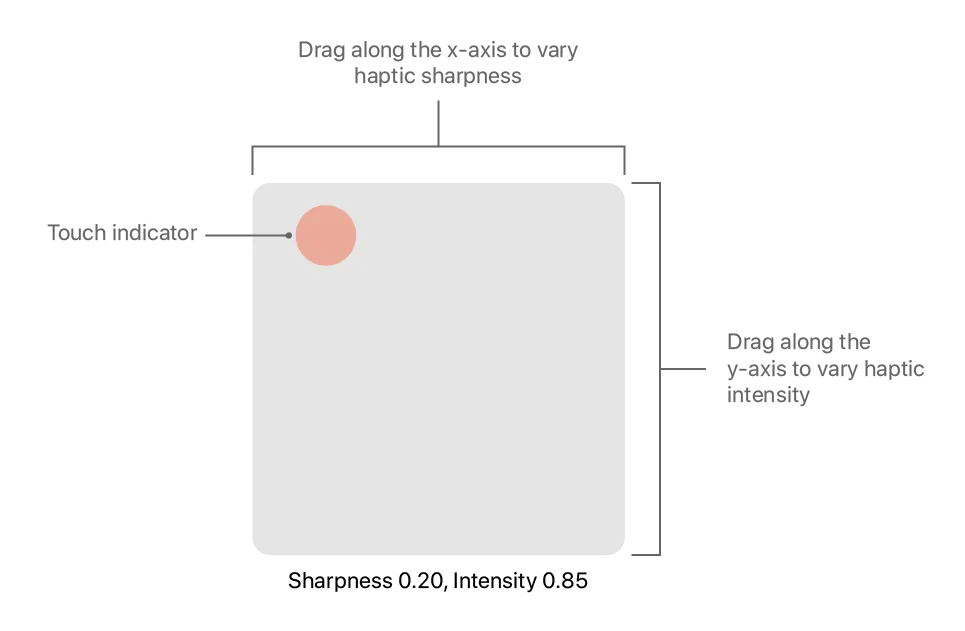
[HapticPalette (Apple sample)](https://developer.apple.com/documentation/corehaptics/updating-continuous-and-transient-haptic-parameters-in-real-time) · © Apple. Official annotated app screenshot. All rights reserved; excluded from MIT and CC BY 4.0.
1. This touch position selects low sharpness and high intensity
- Do not describe chassis vibration as a physical change in screen friction.
- [HapticPalette (Apple sample)](https://developer.apple.com/documentation/corehaptics/updating-continuous-and-transient-haptic-parameters-in-real-time)
## How it works
A tactile drawing creates an association with an object and can become part of a task.
## Variants
### Variants and applications
- Swipe over texture. Role: Feedback. Features: Rich tactility. Input: drag and drop. Rule: When you move your finger, the density and character of the impulses change, creating a conventional image of roughness. Application: Wood, stone, fabric, card surface. Limitations: A regular screen does not acquire physical relief or controlled friction.
- Response material. Role: Mechanics. Features: Rich tactility. Input: touch. Rule: The player taps virtual samples and selects material according to the learned pattern. Application: Geology in the game, sorting, recognition of artifacts. Limitations: The meanings of the patterns are conditional; demonstration of samples and verification of distinctiveness is needed.
- Crack and destruction. Role: Feedback. Features: Rich tactility. Input: status. Rule: Several increasing clicks lead to the final blow when the object is destroyed. Application: Ice, glass, wood, opening the shell. Limitations: Do not use too loud and long effect for each small object.
- Elastic object. Role: Feedback. Features: Rich tactility. Input: drag and drop. Rule: Tension is reflected by an increase, and release by a short decaying response. Applications: Elastic band, bow, spring, soft button. Limitations: This is a combination of visual movement and vibration; elastic force is not transferred to the finger.
- Teeth and ratchet. Role: Mechanics. Features: Basic impulses. Input: Rotate on screen. Rule: Each tooth passed is marked with a click; reverse motion receives a different signal or is prohibited by the rules. Application: Winch, safe, manual adjustment. Limitations: The prohibition is a software, not a physical stop.
- Cutting into portions. Role: Mechanics. Features: Basic impulses. Input: swipe. Rule: Impulse indicates the intersection of the desired line; the player measures the steps or the number of cuts. Application: Cooking, cutting, resource division. Limitations: Swipe speed and number of servings are calculated by taps.
- Scraping off the layer. Role: Mechanics. Features: Rich tactility. Input: drag and drop. Rule: The working pattern changes when the bottom layer is reached; the player stops so as not to damage the base. Application: Restoration, excavation, cleaning. Limitations: Damage and depth are virtual; do not imitate medical accuracy.
- Stamp, seal, latch. Role: Feedback. Features: Basic impulses. Input: touch. Rule: A distinct impulse corresponds to the final fixation of an object. Application: Printing a document in a game, assembly, closing a container. Constraints: The commit event must actually occur in the model.
- Tearing and unfastening. Role: Feedback. Features: Rich tactility. Input: drag and drop. Rule: A series of clicks follows the movement of the finger; the final pulse marks the complete break of the connection. Applications: Zipper, Velcro, perforation, packaging. Limitations: Distinguish between individual clicks and a continuous hum; no physical resistance...
- Assembly for landing. Role: Mechanics. Features: Basic impulses. Input: drag and drop. Rule: The correct position of the part causes a short signal; the player looks for the orientation and fixes the connection. Application: Constructor, weapon assembly, repair. Limitations: A gesture is enough to orient the part; real rotation of the phone is not necessary.
## Context and limits
Author's systematization: 160 cards in 16 groups. These are mechanics, feedback techniques, applications and experimental extensions, not 160 independent physical effects. Design examples are hypothetical, not statements about the released games that used them.
## Connected materials
## Sources and provenance
Original editorial design catalog consolidated from project discussions on 2026-10-20. Complete discussion item lists and contextual limitations are preserved; linked primary sources support specific techniques, not the entire classification. English translation was prepared with machine assistance and editorial review.
- [HapticPalette (Apple sample)](https://developer.apple.com/documentation/corehaptics/updating-continuous-and-transient-haptic-parameters-in-real-time) (id: source-abae2b4f5a0b1ad2)
CC-BY-4.0 · gamemechanics.pro contributors