---
key: mechanic/phone-haptics--family-control
type: mechanic
id: phone-haptics--family-control
lang: en
title: Precision and feedback control
summary: >-
Continuous tactile feedback makes input states distinguishable. In
HapticPalette finger movement immediately changes vibration intensity and
sharpness.
updatedAt: '2026-10-22'
status: active
url: 'https://gamemechanics.pro/en/knowledge/mechanic/phone-haptics--family-control/'
jsonUrl: >-
https://gamemechanics.pro/api/v1/knowledge/en/mechanic/phone-haptics--family-control.json
markdownUrl: >-
https://gamemechanics.pro/content/knowledge/en/mechanic/phone-haptics--family-control.md
aliases:
- Precision through haptic feedback
tags:
- Phone haptics
- Mechanics catalog
sourceIds:
- source-abae2b4f5a0b1ad2
sources:
- id: source-abae2b4f5a0b1ad2
title: HapticPalette (Apple sample)
url: >-
https://developer.apple.com/documentation/corehaptics/updating-continuous-and-transient-haptic-parameters-in-real-time
verifiedAt: null
relations: []
placements:
- catalogId: phone-haptics
id: family-control
title: Phone haptics
url: 'https://gamemechanics.pro/en/mechanics/phone-haptics/#family-control'
categoryIds:
- section-1
supersededBy: []
attributes:
preview:
updatedAt: '2026-10-22'
title: Precision through haptic feedback
description: >-
Continuous tactile feedback makes input states distinguishable. In
HapticPalette finger movement immediately changes vibration intensity and
sharpness.
image:
src: images/mechanics/haptic-apple-palette.webp
width: 965
height: 631
game: HapticPalette (Apple sample)
sourceUrl: >-
https://developer.apple.com/documentation/corehaptics/updating-continuous-and-transient-haptic-parameters-in-real-time
originalUrl: >-
https://developer.apple.com/tutorials/images/com.apple.corehaptics/HapticPaletteAxes@2x.png
credit: Apple
rights: >-
© Apple. Official annotated app screenshot. All rights reserved;
excluded from MIT and CC BY 4.0.
caption: 'HapticPalette: two coordinates set vibration parameters'
alt: 'HapticPalette: two coordinates set vibration parameters'
markers:
- x: 34
'y': 37
label: This touch position selects low sharpness and high intensity
tips:
- 'Keep a stable mapping between action, parameter and perceived feedback.'
examples:
- title: HapticPalette (Apple sample)
url: >-
https://developer.apple.com/documentation/corehaptics/updating-continuous-and-transient-haptic-parameters-in-real-time
endsAt: null
provenance: >-
Original editorial design catalog consolidated from project discussions on
2026-10-20. Complete discussion item lists and contextual limitations are
preserved; linked primary sources support specific techniques, not the entire
classification. English translation was prepared with machine assistance and
editorial review.
license: CC-BY-4.0
codeLicense: MIT
attribution: gamemechanics.pro contributors
catalogKey: catalog/phone-haptics
---
# Precision and feedback control
id: phone-haptics--family-control
type: mechanic
key: mechanic/phone-haptics--family-control
lang: en
status: active
url: https://gamemechanics.pro/en/knowledge/mechanic/phone-haptics--family-control/
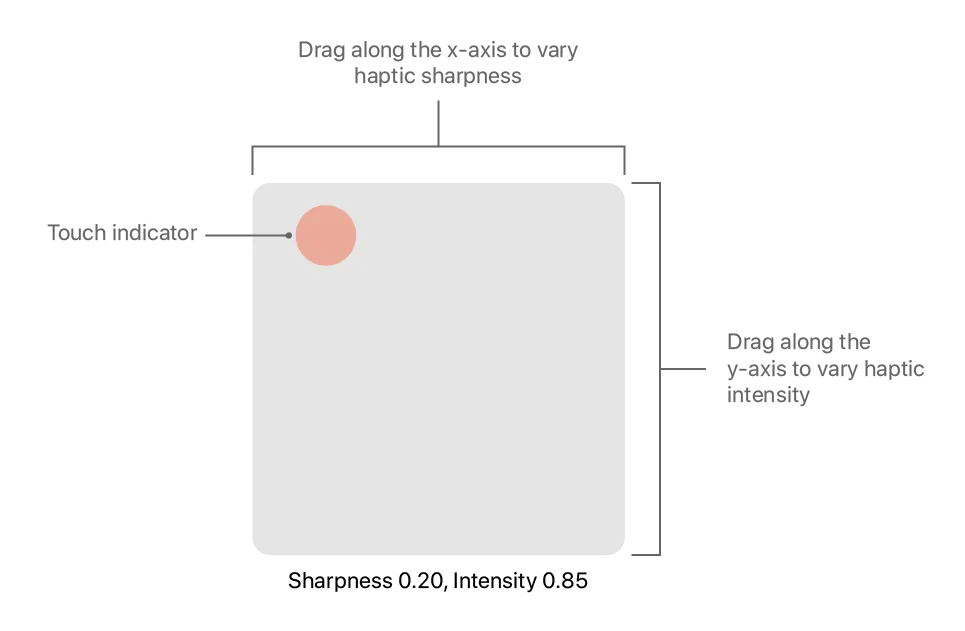
Continuous tactile feedback makes input states distinguishable. In HapticPalette finger movement immediately changes vibration intensity and sharpness.
## At a glance
[HapticPalette (Apple sample)](https://developer.apple.com/documentation/corehaptics/updating-continuous-and-transient-haptic-parameters-in-real-time) · © Apple. Official annotated app screenshot. All rights reserved; excluded from MIT and CC BY 4.0.
1. This touch position selects low sharpness and high intensity
- Keep a stable mapping between action, parameter and perceived feedback.
- [HapticPalette (Apple sample)](https://developer.apple.com/documentation/corehaptics/updating-continuous-and-transient-haptic-parameters-in-real-time)
## How it works
The signal reflects the state of the system, and the player continuously adjusts the input.
## Variants
### Variants and applications
- Maintaining the optimum. Role: Mechanics. Features: Basic impulses. Input: hold, drag. Rule: The pattern changes when it leaves the acceptable range; the player returns the parameter to the working area. Application: Furnace temperature, pressure, accuracy of treatment in the game. Limitations: Two different signals or an additional scale are needed to direct the correction.
- Line tension. Role: Mechanics. Features: Rich tactility. Input: hold, drag. Rule: As tension increases, vibration increases; the player loosens or tightens the line, avoiding a break. Application: Fishing, towing, rope. Limitations: Intensity can be replaced by rhythm steps; The phone does not create any physical tension.
- Catch a bite. Role: Mechanics. Features: Basic impulses. Input: touch. Rule: Against the background of rare touches, a characteristic jerk appears; the player hooks only after the required signal. Application: Fishing, trapping, reaction to a rare event. Limitations: The bite pattern must differ from the background signals.
- Balance of an unstable system. Role: Mechanics. Features: Basic impulses. Input: drag and drop, sensors. Rule: Increased impulses indicate an approaching fall; the player compensates for the deviation. Application: Rope walker, carrying a load, virtual ball. Limitations: The risk signal does not itself indicate the direction of the deviation; it is coded separately.
- Overheat control. Role: Mechanics. Features: Basic impulses. Input: hold. Rule: Vibration warns of heat accumulation; the player alternates working and cooling. Applications: Laser, drill, engine, repair mini-game. Limitations: Short warning bursts are usually more useful than a constant buzzing.
- Cavitation or mode failure. Role: Mechanics. Features: Basic impulses. Input: drag and drop. Rule: An uneven pattern indicates erratic operation; changing the feed returns smooth sparse signals. Application: Pump, turbine, space engine. Limitations: This is a state model; Do not pass it off as a real equipment measurement.
- Search for resonance. Role: Mechanics. Features: Rich tactility. Input: drag and drop. Rule: The player changes the virtual frequency, and the maximum intensity indicates a match with the target. Application: Radio tuning, magic crystal, science puzzle. Limitations: The frequency of the virtual system does not have to match the frequency of the vibration motor.
- Tactile sight fixation. Role: Mechanics. Features: Basic impulses. Input: drag and drop, sensors. Rule: A short signal indicates the capture of the target, and another pattern indicates a loss; the player holds down the aim. Application: Shooting, in-game photography, scanning. Limitations: Do not substitute vibration for checking the actual accuracy of a camera or weapon.
- Smooth tool guidance. Role: Mechanics. Features: Basic impulses. Input: drag and drop. Rule: Pulses mark the permissible speed; too sharp or slow movement changes the feedback. Application: Cutting, polishing, seam in the simulator. Limitations: Touch trajectory is estimated; The actual resistance of the instrument is not reproduced.
- Stop when signal disappears. Role: Mechanics. Features: Basic impulses. Input: hold. Rule: Vibration occurs during a dangerous process; its completion allows you to release the button or go to the next step. Application: Clearing mines in the game, gateway, completing a scan. Limitations: Add confirmation of the end so that the system vibration break does not look like a success.
## Context and limits
Author's systematization: 160 cards in 16 groups. These are mechanics, feedback techniques, applications and experimental extensions, not 160 independent physical effects. Design examples are hypothetical, not statements about the released games that used them.
## Connected materials
## Sources and provenance
Original editorial design catalog consolidated from project discussions on 2026-10-20. Complete discussion item lists and contextual limitations are preserved; linked primary sources support specific techniques, not the entire classification. English translation was prepared with machine assistance and editorial review.
- [HapticPalette (Apple sample)](https://developer.apple.com/documentation/corehaptics/updating-continuous-and-transient-haptic-parameters-in-real-time) (id: source-abae2b4f5a0b1ad2)
CC-BY-4.0 · gamemechanics.pro contributors