---
key: mechanic/phone-camera--family-silhouette
type: mechanic
id: phone-camera--family-silhouette
lang: en
title: 'Silhouette, masks and segmentation'
summary: >-
Segmentation separates a person’s image area from the background. MediaPipe
shows a portrait and its mask; image overlap does not establish 3D contact.
updatedAt: '2026-10-22'
status: active
url: >-
https://gamemechanics.pro/en/knowledge/mechanic/phone-camera--family-silhouette/
jsonUrl: >-
https://gamemechanics.pro/api/v1/knowledge/en/mechanic/phone-camera--family-silhouette.json
markdownUrl: >-
https://gamemechanics.pro/content/knowledge/en/mechanic/phone-camera--family-silhouette.md
aliases: []
tags:
- Phone camera interactions
- Mechanics catalog
sourceIds:
- source-d3f05312a925ada0
- source-df5e89f1f582fdae
- source-66ac0c4c0893f669
sources:
- id: source-d3f05312a925ada0
title: MediaPipe Pose Landmarker
url: >-
https://developers.google.com/edge/mediapipe/solutions/vision/pose_landmarker
verifiedAt: null
- id: source-df5e89f1f582fdae
title: MediaPipe Image Segmenter
url: >-
https://developers.google.com/edge/mediapipe/solutions/vision/image_segmenter
verifiedAt: null
- id: source-66ac0c4c0893f669
title: MediaPipe Image Segmenter
url: 'https://ai.google.dev/edge/mediapipe/solutions/vision/image_segmenter'
verifiedAt: null
relations: []
placements:
- catalogId: phone-camera
id: family-silhouette
title: Phone camera interactions
url: 'https://gamemechanics.pro/en/mechanics/phone-camera/#family-silhouette'
categoryIds:
- section-1
supersededBy: []
attributes:
preview:
updatedAt: '2026-10-22'
title: 'Silhouette, masks and segmentation'
description: >-
Segmentation separates a person’s image area from the background.
MediaPipe shows a portrait and its mask; image overlap does not establish
3D contact.
image:
src: images/mechanics/camera-mp-segmentation.webp
width: 1024
height: 574
game: MediaPipe Image Segmenter
sourceUrl: 'https://ai.google.dev/edge/mediapipe/solutions/vision/image_segmenter'
originalUrl: >-
https://ai.google.dev/static/mediapipe/images/solutions/examples/image_segmentation.png
credit: Google / original image contributors
rights: >-
© Google / original image contributors. Official documentation or
publisher-distributed image; respective rights retained. Excluded from
portal MIT and CC BY 4.0.
caption: 'MediaPipe Image Segmenter: the source image and a person mask'
alt: 'MediaPipe Image Segmenter: the source image and a person mask'
markers:
- x: 73
'y': 48
label: The pink area marks the person segment; white marks the background
tips:
- 'Test mask edges under different lighting, clothes and backgrounds.'
examples:
- title: MediaPipe Image Segmenter
url: 'https://ai.google.dev/edge/mediapipe/solutions/vision/image_segmenter'
endsAt: null
provenance: >-
Original editorial design catalog consolidated from project discussions on
2026-10-20. Complete discussion item lists and contextual limitations are
preserved; linked primary sources support specific techniques, not the entire
classification. English translation was prepared with machine assistance and
editorial review.
license: CC-BY-4.0
codeLicense: MIT
attribution: gamemechanics.pro contributors
catalogKey: catalog/phone-camera
---
# Silhouette, masks and segmentation
id: phone-camera--family-silhouette
type: mechanic
key: mechanic/phone-camera--family-silhouette
lang: en
status: active
url: https://gamemechanics.pro/en/knowledge/mechanic/phone-camera--family-silhouette/
Segmentation separates a person’s image area from the background. MediaPipe shows a portrait and its mask; image overlap does not establish 3D contact.
## At a glance
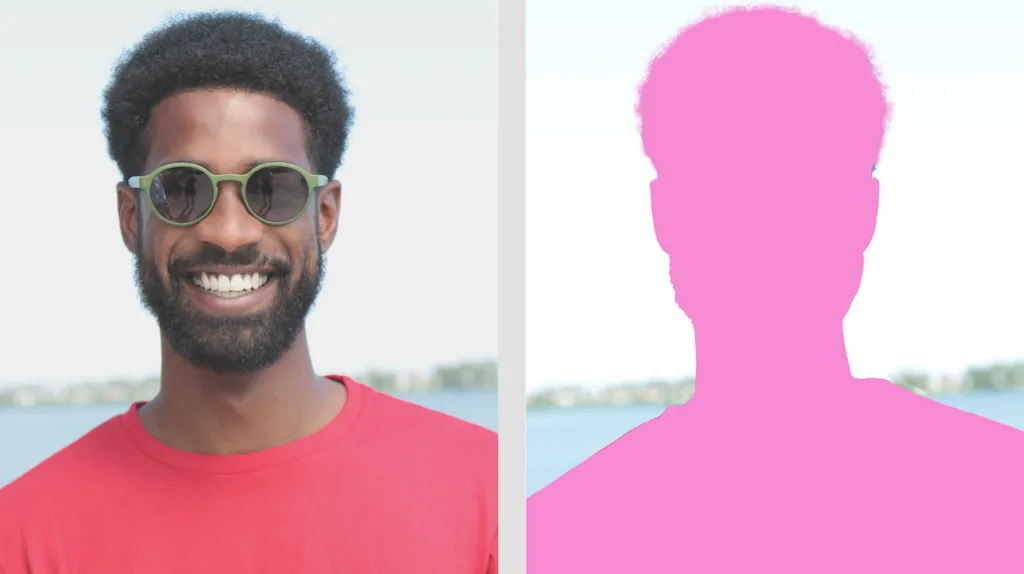
[MediaPipe Image Segmenter](https://ai.google.dev/edge/mediapipe/solutions/vision/image_segmenter) · © Google / original image contributors. Official documentation or publisher-distributed image; respective rights retained. Excluded from portal MIT and CC BY 4.0.
1. The pink area marks the person segment; white marks the background
- Test mask edges under different lighting, clothes and backgrounds.
- [MediaPipe Image Segmenter](https://ai.google.dev/edge/mediapipe/solutions/vision/image_segmenter)
## How it works
The game works with the shape of the occupied area, not just the joints. The quality of the mask depends on the model, light, clothing and background. Collision in 2D does not mean physical contact in 3D.
## Variants
### Variants and applications
- Silhouette as a collider. Action: Cross virtual targets with a body contour or hit particles. Application: Chamber Pong, catching balls, interactive installation. Technologies: Recognition or machine learning model.
- Passage through the hole. Action: Fit the silhouette to the virtual opening. Application: “Wall with a hole”, spatial coordination, group puzzle. Technologies: Recognition or machine learning model.
- Occupying zones. Action: Close the necessary parts of the frame with your body and leave others open. Application: Live buttons, command pattern, dynamic poster. Technologies: Recognition or machine learning model.
- Body drawing. Action: Leave a trace of a mask or individual parts of the body. Application: Video art, motion painting, creative play. Technologies: Recognition or machine learning model.
- Silhouette as a surface. Action: Apply a material, pattern or game state to a selected person. Application: Digital costume, coloring, character disguise. Technologies: Recognition or machine learning model.
- Virtual layer overlap. Action: Hide a digital object behind a selected person in a 2D composition. Application: Focus, animated mirror, interactive scene. Technologies: Recognition or machine learning model.
- Group form. Action: Create a common silhouette from several participants. Application: Cooperative sculpture, letters with bodies, party game. Technologies: Recognition or machine learning model.
- Changing the environment. Action: Save a person and replace the background or its individual classes. Application: Virtual stage, video theater, creative portrait. Technologies: Recognition or machine learning model.
## Context and limits
Games, learning, creativity and interactive applications. Author's systematization of game rules based on proven technical capabilities. Examples are application ideas and not statements of released products.
## Connected materials
## Sources and provenance
Original editorial design catalog consolidated from project discussions on 2026-10-20. Complete discussion item lists and contextual limitations are preserved; linked primary sources support specific techniques, not the entire classification. English translation was prepared with machine assistance and editorial review.
- [MediaPipe Pose Landmarker](https://developers.google.com/edge/mediapipe/solutions/vision/pose_landmarker) (id: source-d3f05312a925ada0)
- [MediaPipe Image Segmenter](https://developers.google.com/edge/mediapipe/solutions/vision/image_segmenter) (id: source-df5e89f1f582fdae)
- [MediaPipe Image Segmenter](https://ai.google.dev/edge/mediapipe/solutions/vision/image_segmenter) (id: source-66ac0c4c0893f669)
CC-BY-4.0 · gamemechanics.pro contributors