---
key: mechanic/phone-camera--family-memory
type: mechanic
id: phone-camera--family-memory
lang: en
title: 'Time, video memory and state comparison'
summary: >-
A frame sequence preserves a scene’s history. Stop Motion Studio’s timeline
lets the creator compare motion stages and revisit individual captures.
updatedAt: '2026-10-22'
status: active
url: 'https://gamemechanics.pro/en/knowledge/mechanic/phone-camera--family-memory/'
jsonUrl: >-
https://gamemechanics.pro/api/v1/knowledge/en/mechanic/phone-camera--family-memory.json
markdownUrl: >-
https://gamemechanics.pro/content/knowledge/en/mechanic/phone-camera--family-memory.md
aliases: []
tags:
- Phone camera interactions
- Mechanics catalog
sourceIds:
- source-c121374ae20b1406
- source-f24dc0ecd8ddfac5
sources:
- id: source-c121374ae20b1406
title: 'Apple AVFoundation: Camera Capture and Control'
url: 'https://developer.apple.com/documentation/avfoundation/capture-setup'
verifiedAt: null
- id: source-f24dc0ecd8ddfac5
title: Stop Motion Studio
url: 'https://apps.apple.com/us/app/stop-motion-studio/id441651297?uo=4'
verifiedAt: null
relations: []
placements:
- catalogId: phone-camera
id: family-memory
title: Phone camera interactions
url: 'https://gamemechanics.pro/en/mechanics/phone-camera/#family-memory'
categoryIds:
- section-1
supersededBy: []
attributes:
preview:
updatedAt: '2026-10-22'
title: 'Time, video memory and state comparison'
description: >-
A frame sequence preserves a scene’s history. Stop Motion Studio’s
timeline lets the creator compare motion stages and revisit individual
captures.
image:
src: images/mechanics/input-stop-motion-0.webp
width: 720
height: 405
game: Stop Motion Studio
sourceUrl: 'https://apps.apple.com/us/app/stop-motion-studio/id441651297?uo=4'
originalUrl: >-
https://is1-ssl.mzstatic.com/image/thumb/Purple211/v4/d5/f5/81/d5f581c4-b078-8daf-2537-ed01da4ef627/bd2cc9e8-4e63-4155-bb2d-d408a2102a4a_5_5_1.png/720x1560bb.jpg
credit: 'CATEATER, LLC'
rights: >-
Imagery © CATEATER, LLC. Developer-distributed screenshot or frame; all
rights reserved. Excluded from MIT and CC BY 4.0.
caption: 'Stop Motion Studio: saved frames from one scene'
alt: 'Stop Motion Studio: saved frames from one scene'
markers:
- x: 49
'y': 88
label: The selected frame can be compared with its neighbors
tips:
- Account for camera movement and lighting changes when comparing states.
examples:
- title: Stop Motion Studio
url: 'https://apps.apple.com/us/app/stop-motion-studio/id441651297?uo=4'
endsAt: null
provenance: >-
Original editorial design catalog consolidated from project discussions on
2026-10-20. Complete discussion item lists and contextual limitations are
preserved; linked primary sources support specific techniques, not the entire
classification. English translation was prepared with machine assistance and
editorial review.
license: CC-BY-4.0
codeLicense: MIT
attribution: gamemechanics.pro contributors
catalogKey: catalog/phone-camera
---
# Time, video memory and state comparison
id: phone-camera--family-memory
type: mechanic
key: mechanic/phone-camera--family-memory
lang: en
status: active
url: https://gamemechanics.pro/en/knowledge/mechanic/phone-camera--family-memory/
A frame sequence preserves a scene’s history. Stop Motion Studio’s timeline lets the creator compare motion stages and revisit individual captures.
## At a glance
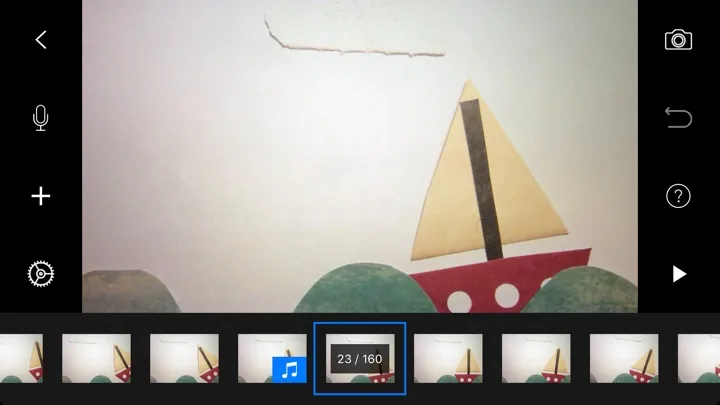
[Stop Motion Studio](https://apps.apple.com/us/app/stop-motion-studio/id441651297?uo=4) · Imagery © CATEATER, LLC. Developer-distributed screenshot or frame; all rights reserved. Excluded from MIT and CC BY 4.0.
1. The selected frame can be compared with its neighbors
- Account for camera movement and lighting changes when comparing states.
- [Stop Motion Studio](https://apps.apple.com/us/app/stop-motion-studio/id441651297?uo=4)
## How it works
The game links several observations of one scene. For comparison, alignment and taking into account light changes are needed. Photos and recording times alone do not prove the fact, location, or authorship of an event.
## Variants
### Variants and applications
- Find change. Action: Compare the scene with a standard and detect an added, removed or moved object. Application: Detective, memory, assembly control. Technologies: Image analysis; Recognition or machine learning model.
- Restore the scene. Action: Reproduce the previous layout using a saved image. Application: Puzzle cleaning, evidence reconstruction, spatial memory. Technologies: Image analysis; Recognition or machine learning model.
- Combination with the past. Action: Overlay the previous frame and combine the angle or position of the object. Application: Repeating a photograph, animation, observing changes. Technologies: Image analysis.
- Video echo. Action: Show delayed recording and interact with your past movement. Application: Duet with yourself, time puzzle, video performance. Technologies: Camera capture.
- Phantom trajectory. Action: Save a path or pose and repeat or bypass it. Application: Coordination, asynchronous competition, movement pattern training. Technologies: Image analysis; Recognition or machine learning model.
- Looped video part. Action: Record a short action and build it into a repeating game loop. Application: Video music, live-action characters, editing game. Technologies: Camera capture.
- Sequence of actions. Action: Check not only the finale, but also the order of the visible steps. Application: Recipe, assembly, procedure training, visual combo. Technologies: Recognition or machine learning model; Own algorithm.
- Changes over a long time. Action: Capture one scene at intervals and turn observed changes into progress. Application: Building diary, creative project, observing plant growth. Technologies: Camera capture; Recognition or machine learning model.
## Context and limits
Games, learning, creativity and interactive applications. Author's systematization of game rules based on proven technical capabilities. Examples are application ideas and not statements of released products.
## Connected materials
## Sources and provenance
Original editorial design catalog consolidated from project discussions on 2026-10-20. Complete discussion item lists and contextual limitations are preserved; linked primary sources support specific techniques, not the entire classification. English translation was prepared with machine assistance and editorial review.
- [Apple AVFoundation: Camera Capture and Control](https://developer.apple.com/documentation/avfoundation/capture-setup) (id: source-c121374ae20b1406)
- [Stop Motion Studio](https://apps.apple.com/us/app/stop-motion-studio/id441651297?uo=4) (id: source-f24dc0ecd8ddfac5)
CC-BY-4.0 · gamemechanics.pro contributors