---
key: mechanic/phone-camera--family-framing
type: mechanic
id: phone-camera--family-framing
lang: en
title: Framing and visual attention
summary: >-
The player aims the camera and frames a target. Seeing AI helps align a
document for reading; image position does not establish room coordinates.
updatedAt: '2026-10-22'
status: active
url: 'https://gamemechanics.pro/en/knowledge/mechanic/phone-camera--family-framing/'
jsonUrl: >-
https://gamemechanics.pro/api/v1/knowledge/en/mechanic/phone-camera--family-framing.json
markdownUrl: >-
https://gamemechanics.pro/content/knowledge/en/mechanic/phone-camera--family-framing.md
aliases: []
tags:
- Phone camera interactions
- Mechanics catalog
sourceIds:
- source-c121374ae20b1406
- source-c571f972753e630a
- source-5cd7e7e00e5de5a7
sources:
- id: source-c121374ae20b1406
title: 'Apple AVFoundation: Camera Capture and Control'
url: 'https://developer.apple.com/documentation/avfoundation/capture-setup'
verifiedAt: null
- id: source-c571f972753e630a
title: MediaPipe Object Detector
url: >-
https://developers.google.com/edge/mediapipe/solutions/vision/object_detector
verifiedAt: null
- id: source-5cd7e7e00e5de5a7
title: Seeing AI
url: 'https://apps.apple.com/us/app/seeing-ai/id999062298?uo=4'
verifiedAt: null
relations: []
placements:
- catalogId: phone-camera
id: family-framing
title: Phone camera interactions
url: 'https://gamemechanics.pro/en/mechanics/phone-camera/#family-framing'
categoryIds:
- section-1
supersededBy: []
attributes:
preview:
updatedAt: '2026-10-22'
title: Framing and visual attention
description: >-
The player aims the camera and frames a target. Seeing AI helps align a
document for reading; image position does not establish room coordinates.
image:
src: images/mechanics/input-seeing-ai-4.webp
width: 720
height: 1280
crop:
x: 90
'y': 280
width: 540
height: 940
game: Seeing AI
sourceUrl: 'https://apps.apple.com/us/app/seeing-ai/id999062298?uo=4'
originalUrl: >-
https://is1-ssl.mzstatic.com/image/thumb/PurpleSource211/v4/a4/1e/7c/a41e7cca-464f-349c-b6a4-ee9f92f6b529/1a75694e-ca86-4d81-b001-35e6ce9f1866_iPhone8_Document-en.jpg/720x1560bb.jpg
credit: Microsoft Corporation
rights: >-
Imagery © Microsoft Corporation. Developer-distributed screenshot or
frame; all rights reserved. Excluded from MIT and CC BY 4.0.
caption: 'Seeing AI: a document outline helps prepare the capture'
alt: 'Seeing AI: a document outline helps prepare the capture'
markers:
- x: 45
'y': 55
label: The outline marks the page to keep in view
tips:
- Show what is in frame and what still needs alignment.
examples:
- title: Seeing AI
url: 'https://apps.apple.com/us/app/seeing-ai/id999062298?uo=4'
endsAt: null
provenance: >-
Original editorial design catalog consolidated from project discussions on
2026-10-20. Complete discussion item lists and contextual limitations are
preserved; linked primary sources support specific techniques, not the entire
classification. English translation was prepared with machine assistance and
editorial review.
license: CC-BY-4.0
codeLicense: MIT
attribution: gamemechanics.pro contributors
catalogKey: catalog/phone-camera
---
# Framing and visual attention
id: phone-camera--family-framing
type: mechanic
key: mechanic/phone-camera--family-framing
lang: en
status: active
url: https://gamemechanics.pro/en/knowledge/mechanic/phone-camera--family-framing/
The player aims the camera and frames a target. Seeing AI helps align a document for reading; image position does not establish room coordinates.
## At a glance
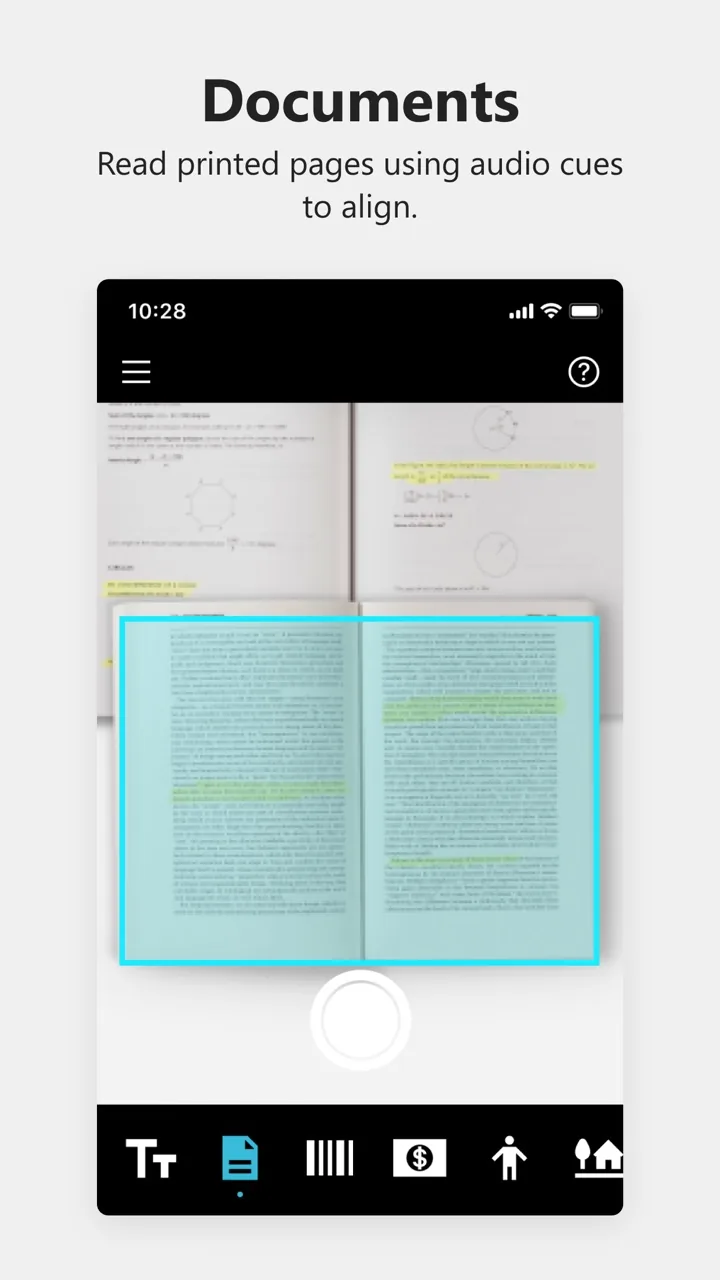
[Seeing AI](https://apps.apple.com/us/app/seeing-ai/id999062298?uo=4) · Imagery © Microsoft Corporation. Developer-distributed screenshot or frame; all rights reserved. Excluded from MIT and CC BY 4.0.
1. The outline marks the page to keep in view
- Show what is in frame and what still needs alignment.
- [Seeing AI](https://apps.apple.com/us/app/seeing-ai/id999062298?uo=4)
## How it works
What the player shows to the camera and how he places it in the frame. The position in the image is not the same as the position in the room. To automatically check, you need tracking, a marker or a limited scene.
## Variants
### Variants and applications
- Targeting. Action: Combine an object with the sight to select or activate it. Application: Photo hunting, exhibit selection, evidence scanner. Technologies: Image analysis; Recognition or machine learning model.
- Staying in frame. Action: Do not let the target leave the specified area until the scale is filled. Application: Taming a creature, long-term scanning, tracking. Technologies: Image analysis; Recognition or machine learning model.
- Specified scale. Action: Achieve the required portion of the frame area by moving the phone closer or changing the zoom. Application: Preparing the image, managing the charge, selecting the size. Technologies: Image analysis.
- Composition according to a template. Action: Place several elements in the marked areas. Application: Photography training, advertising shooting, composition puzzles. Technologies: Image analysis; Recognition or machine learning model.
- Combination of contours. Action: Apply a real contour to a translucent sample. Application: Search for a shooting point, scene reconstruction, silhouette assembly. Technologies: Image analysis.
- Prospective combination. Action: Find the angle in which spaced objects form a figure. Application: Anamorphic riddles, illusions of scale, visual passwords. Technologies: Image analysis.
- Frame composition. Action: Show the desired combination of objects and exclude prohibited ones. Application: Orders for a photographer, visual recipes, sorting objects. Technologies: Recognition or machine learning model.
- Scanning the sector. Action: Inspect parts of the scene one by one; the game takes into account coverage. Application: Search for a missing person, room inspection, virtual panorama. Technologies: Image analysis; AR spatial tracking.
## Context and limits
Games, learning, creativity and interactive applications. Author's systematization of game rules based on proven technical capabilities. Examples are application ideas and not statements of released products.
## Connected materials
## Sources and provenance
Original editorial design catalog consolidated from project discussions on 2026-10-20. Complete discussion item lists and contextual limitations are preserved; linked primary sources support specific techniques, not the entire classification. English translation was prepared with machine assistance and editorial review.
- [Apple AVFoundation: Camera Capture and Control](https://developer.apple.com/documentation/avfoundation/capture-setup) (id: source-c121374ae20b1406)
- [MediaPipe Object Detector](https://developers.google.com/edge/mediapipe/solutions/vision/object_detector) (id: source-c571f972753e630a)
- [Seeing AI](https://apps.apple.com/us/app/seeing-ai/id999062298?uo=4) (id: source-5cd7e7e00e5de5a7)
CC-BY-4.0 · gamemechanics.pro contributors