---
key: mechanic/phone-camera--family-face-head
type: mechanic
id: phone-camera--family-face-head
lang: en
title: Face and head position
summary: >-
Head position controls a pointer. iOS Head Tracking uses the camera for
pointer motion and dwell for actions; it does not establish identity.
updatedAt: '2026-10-22'
status: active
url: >-
https://gamemechanics.pro/en/knowledge/mechanic/phone-camera--family-face-head/
jsonUrl: >-
https://gamemechanics.pro/api/v1/knowledge/en/mechanic/phone-camera--family-face-head.json
markdownUrl: >-
https://gamemechanics.pro/content/knowledge/en/mechanic/phone-camera--family-face-head.md
aliases: []
tags:
- Phone camera interactions
- Mechanics catalog
sourceIds:
- source-17820b3f136aa433
- source-778351bee9d86030
sources:
- id: source-17820b3f136aa433
title: MediaPipe Face Landmarker
url: >-
https://developers.google.com/edge/mediapipe/solutions/vision/face_landmarker
verifiedAt: null
- id: source-778351bee9d86030
title: Head Tracking (iOS)
url: >-
https://support.apple.com/guide/iphone/control-iphone-with-the-movement-of-your-head-iph9c3dc17cf/ios
verifiedAt: null
relations: []
placements:
- catalogId: phone-camera
id: family-face-head
title: Phone camera interactions
url: 'https://gamemechanics.pro/en/mechanics/phone-camera/#family-face-head'
categoryIds:
- section-1
supersededBy: []
attributes:
preview:
updatedAt: '2026-10-22'
title: Face and head position
description: >-
Head position controls a pointer. iOS Head Tracking uses the camera for
pointer motion and dwell for actions; it does not establish identity.
image:
src: images/mechanics/camera-apple-head-tracking.webp
width: 490
height: 1008
crop:
x: 25
'y': 105
width: 440
height: 815
game: Head Tracking (iOS)
sourceUrl: >-
https://support.apple.com/guide/iphone/control-iphone-with-the-movement-of-your-head-iph9c3dc17cf/ios
originalUrl: >-
https://ipcdn-web.apple.com/assets/v2/web/e44793cc-1a1a-4ac0-a00b-345b478691f8
credit: Apple
rights: >-
© Apple. Official documentation or publisher-distributed image;
respective rights retained. Excluded from portal MIT and CC BY 4.0.
caption: 'iOS Head Tracking: enabled tracking and the AssistiveTouch menu'
alt: 'iOS Head Tracking: enabled tracking and the AssistiveTouch menu'
markers:
- x: 76
'y': 19
label: Head Tracking is enabled to track head movement
tips:
- 'Account for drift, sensitivity and a way to pause the pointer.'
examples:
- title: Head Tracking (iOS)
url: >-
https://support.apple.com/guide/iphone/control-iphone-with-the-movement-of-your-head-iph9c3dc17cf/ios
endsAt: null
provenance: >-
Original editorial design catalog consolidated from project discussions on
2026-10-20. Complete discussion item lists and contextual limitations are
preserved; linked primary sources support specific techniques, not the entire
classification. English translation was prepared with machine assistance and
editorial review.
license: CC-BY-4.0
codeLicense: MIT
attribution: gamemechanics.pro contributors
catalogKey: catalog/phone-camera
---
# Face and head position
id: phone-camera--family-face-head
type: mechanic
key: mechanic/phone-camera--family-face-head
lang: en
status: active
url: https://gamemechanics.pro/en/knowledge/mechanic/phone-camera--family-face-head/
Head position controls a pointer. iOS Head Tracking uses the camera for pointer motion and dwell for actions; it does not establish identity.
## At a glance
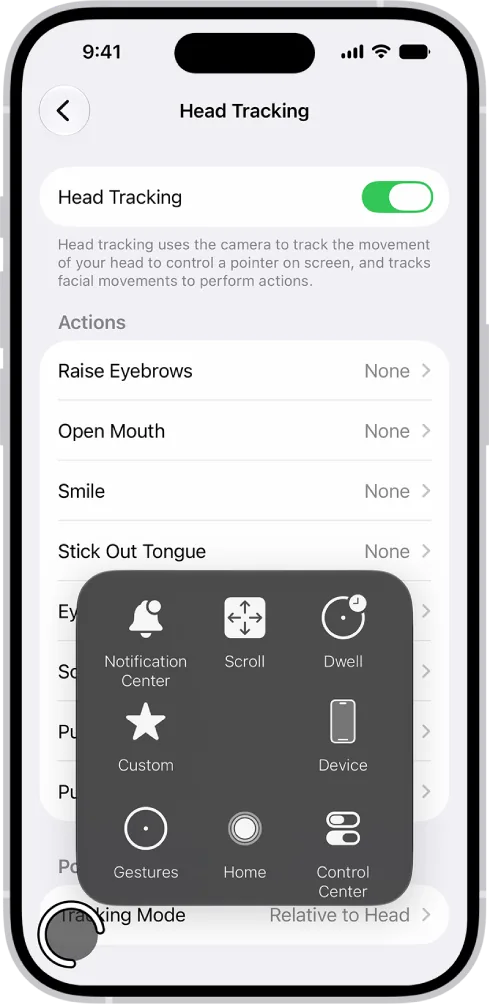
[Head Tracking (iOS)](https://support.apple.com/guide/iphone/control-iphone-with-the-movement-of-your-head-iph9c3dc17cf/ios) · © Apple. Official documentation or publisher-distributed image; respective rights retained. Excluded from portal MIT and CC BY 4.0.
1. Head Tracking is enabled to track head movement
- Account for drift, sensitivity and a way to pause the pointer.
- [Head Tracking (iOS)](https://support.apple.com/guide/iphone/control-iphone-with-the-movement-of-your-head-iph9c3dc17cf/ios)
## How it works
The front camera becomes a pose and presence controller. Facial landmarks do not confirm identity. Face size approximation; turning your head does not give you a point of view on the screen.
## Variants
### Variants and applications
- Presence of a person. Action: Appear in front of the camera or exit the frame to enable the game state. Application: Hide and seek, personal scene entry, interactive mirror. Technologies: Recognition or machine learning model.
- Head position. Action: Move your head in the frame and control the character or cursor. Application: Contactless arkanoid, evasion, accessibility interface. Technologies: Recognition or machine learning model.
- Turn to the sides. Action: Turn your head left and right to select direction. Application: Steering, response selection, view control. Technologies: Recognition or machine learning model.
- Head tilt. Action: Tilt your head to your shoulder and change a continuous parameter. Application: Balance, flight, tilt of a virtual surface. Technologies: Recognition or machine learning model.
- Nod or denial. Action: Perform a sequence of tilts or turns for a discrete command. Application: Dialogue, confirmation, rhythm game. Technologies: Recognition or machine learning model.
- Approaching face. Action: Change the visible scale of the face relative to the calibration. Application: Inflating a virtual bubble, zoom, comic transformation. Technologies: Recognition or machine learning model.
- Maintaining head posture. Action: Stay in the desired angle range for a given time. Application: Balancing game, beam holding, precise targeting. Technologies: Recognition or machine learning model.
- Several faces. Action: Gather the required number of participants in the frame and evaluate their location. Application: Group portrait quest, cooperative gate, party game. Technologies: Recognition or machine learning model.
## Context and limits
Games, learning, creativity and interactive applications. Author's systematization of game rules based on proven technical capabilities. Examples are application ideas and not statements of released products.
## Connected materials
## Sources and provenance
Original editorial design catalog consolidated from project discussions on 2026-10-20. Complete discussion item lists and contextual limitations are preserved; linked primary sources support specific techniques, not the entire classification. English translation was prepared with machine assistance and editorial review.
- [MediaPipe Face Landmarker](https://developers.google.com/edge/mediapipe/solutions/vision/face_landmarker) (id: source-17820b3f136aa433)
- [Head Tracking (iOS)](https://support.apple.com/guide/iphone/control-iphone-with-the-movement-of-your-head-iph9c3dc17cf/ios) (id: source-778351bee9d86030)
CC-BY-4.0 · gamemechanics.pro contributors