---
key: mechanic/phone-camera--family-content
type: mechanic
id: phone-camera--family-content
lang: en
title: Filming as game content creation
summary: >-
Captured images become creative material. Stop Motion Studio turns individual
frames into an editable animation sequence.
updatedAt: '2026-10-22'
status: active
url: 'https://gamemechanics.pro/en/knowledge/mechanic/phone-camera--family-content/'
jsonUrl: >-
https://gamemechanics.pro/api/v1/knowledge/en/mechanic/phone-camera--family-content.json
markdownUrl: >-
https://gamemechanics.pro/content/knowledge/en/mechanic/phone-camera--family-content.md
aliases: []
tags:
- Phone camera interactions
- Mechanics catalog
sourceIds:
- source-c121374ae20b1406
- source-df5e89f1f582fdae
- source-c571f972753e630a
- source-f24dc0ecd8ddfac5
sources:
- id: source-c121374ae20b1406
title: 'Apple AVFoundation: Camera Capture and Control'
url: 'https://developer.apple.com/documentation/avfoundation/capture-setup'
verifiedAt: null
- id: source-df5e89f1f582fdae
title: MediaPipe Image Segmenter
url: >-
https://developers.google.com/edge/mediapipe/solutions/vision/image_segmenter
verifiedAt: null
- id: source-c571f972753e630a
title: MediaPipe Object Detector
url: >-
https://developers.google.com/edge/mediapipe/solutions/vision/object_detector
verifiedAt: null
- id: source-f24dc0ecd8ddfac5
title: Stop Motion Studio
url: 'https://apps.apple.com/us/app/stop-motion-studio/id441651297?uo=4'
verifiedAt: null
relations: []
placements:
- catalogId: phone-camera
id: family-content
title: Phone camera interactions
url: 'https://gamemechanics.pro/en/mechanics/phone-camera/#family-content'
categoryIds:
- section-1
supersededBy: []
attributes:
preview:
updatedAt: '2026-10-22'
title: Filming as game content creation
description: >-
Captured images become creative material. Stop Motion Studio turns
individual frames into an editable animation sequence.
image:
src: images/mechanics/input-stop-motion-0.webp
width: 720
height: 405
game: Stop Motion Studio
sourceUrl: 'https://apps.apple.com/us/app/stop-motion-studio/id441651297?uo=4'
originalUrl: >-
https://is1-ssl.mzstatic.com/image/thumb/Purple211/v4/d5/f5/81/d5f581c4-b078-8daf-2537-ed01da4ef627/bd2cc9e8-4e63-4155-bb2d-d408a2102a4a_5_5_1.png/720x1560bb.jpg
credit: 'CATEATER, LLC'
rights: >-
Imagery © CATEATER, LLC. Developer-distributed screenshot or frame; all
rights reserved. Excluded from MIT and CC BY 4.0.
caption: 'Stop Motion Studio: captured images form a frame sequence'
alt: 'Stop Motion Studio: captured images form a frame sequence'
markers:
- x: 49
'y': 88
label: The timeline lets the creator select and edit captured frames
tips:
- Separate capture from editing and clearly show the saved result.
examples:
- title: Stop Motion Studio
url: 'https://apps.apple.com/us/app/stop-motion-studio/id441651297?uo=4'
endsAt: null
provenance: >-
Original editorial design catalog consolidated from project discussions on
2026-10-20. Complete discussion item lists and contextual limitations are
preserved; linked primary sources support specific techniques, not the entire
classification. English translation was prepared with machine assistance and
editorial review.
license: CC-BY-4.0
codeLicense: MIT
attribution: gamemechanics.pro contributors
catalogKey: catalog/phone-camera
---
# Filming as game content creation
id: phone-camera--family-content
type: mechanic
key: mechanic/phone-camera--family-content
lang: en
status: active
url: https://gamemechanics.pro/en/knowledge/mechanic/phone-camera--family-content/
Captured images become creative material. Stop Motion Studio turns individual frames into an editable animation sequence.
## At a glance
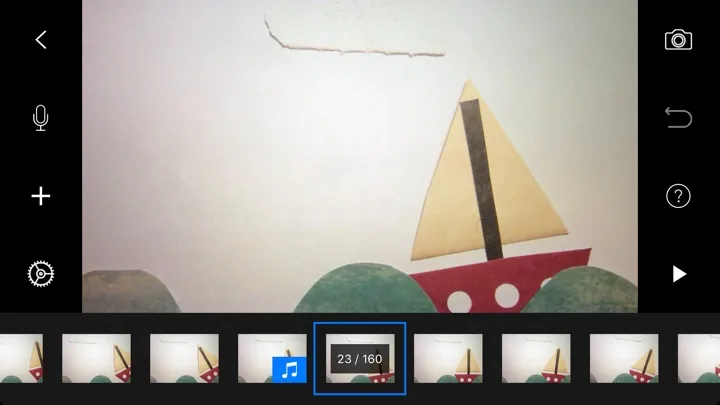
[Stop Motion Studio](https://apps.apple.com/us/app/stop-motion-studio/id441651297?uo=4) · Imagery © CATEATER, LLC. Developer-distributed screenshot or frame; all rights reserved. Excluded from MIT and CC BY 4.0.
1. The timeline lets the creator select and edit captured frames
- Separate capture from editing and clearly show the saved result.
- [Stop Motion Studio](https://apps.apple.com/us/app/stop-motion-studio/id441651297?uo=4)
## How it works
The result of the capture becomes the material for the next game action. The transformation can be a simple algorithm, an editor, or a model. For generative methods, latency, cost, and robustness of the result need to be checked separately.
## Variants
### Variants and applications
- Photo texture. Action: Capture a surface and apply it to a digital object. Application: Clothing creation, base design, material library. Technologies: Camera capture.
- Photo like a sprite. Action: Cut an object out of the frame and use it as a character or object. Application: Playing with your own toys, collage, custom inventory. Technologies: Camera capture; Recognition or machine learning model.
- Portrait as an avatar. Action: Create a character's appearance based on a selected photo. Application: Personalization, story comics, group characters. Technologies: Camera capture; Recognition or machine learning model.
- The stage is like a level. Action: Convert image contours or spots into game geometry. Application: Procedural maze, picture platformer, photo puzzle. Technologies: Image analysis.
- Image as seed. Action: Stably convert image attributes into generator parameters. Application: Packaging monster, daily dungeon, visual crafting. Technologies: Image analysis.
- Visual music. Action: Match colors, lines or positions of objects to notes and timbres. Application: Chamber sequencer, music teaching, sound design. Technologies: Image analysis.
- Three-dimensional copy. Action: Take an object from several angles and reconstruct the model. Application: Digitization of toys, museum objects, asset creation. Technologies: Scene reconstruction; Device capabilities.
- Meaning generation. Action: Use the description of the recognized scene to create a task or story. Application: Quest from room objects, story from a photo, AI game master. Technologies: Recognition or machine learning model; Generative model.
## Context and limits
Games, learning, creativity and interactive applications. Author's systematization of game rules based on proven technical capabilities. Examples are application ideas and not statements of released products.
## Connected materials
## Sources and provenance
Original editorial design catalog consolidated from project discussions on 2026-10-20. Complete discussion item lists and contextual limitations are preserved; linked primary sources support specific techniques, not the entire classification. English translation was prepared with machine assistance and editorial review.
- [Apple AVFoundation: Camera Capture and Control](https://developer.apple.com/documentation/avfoundation/capture-setup) (id: source-c121374ae20b1406)
- [MediaPipe Image Segmenter](https://developers.google.com/edge/mediapipe/solutions/vision/image_segmenter) (id: source-df5e89f1f582fdae)
- [MediaPipe Object Detector](https://developers.google.com/edge/mediapipe/solutions/vision/object_detector) (id: source-c571f972753e630a)
- [Stop Motion Studio](https://apps.apple.com/us/app/stop-motion-studio/id441651297?uo=4) (id: source-f24dc0ecd8ddfac5)
CC-BY-4.0 · gamemechanics.pro contributors