---
key: mechanic/phone-camera--family-capture-time
type: mechanic
id: phone-camera--family-capture-time
lang: en
title: Capture timing and recording modes
summary: >-
Pressing the shutter or starting recording creates an event. Stop Motion
Studio builds motion from a sequence of individually captured frames.
updatedAt: '2026-10-22'
status: active
url: >-
https://gamemechanics.pro/en/knowledge/mechanic/phone-camera--family-capture-time/
jsonUrl: >-
https://gamemechanics.pro/api/v1/knowledge/en/mechanic/phone-camera--family-capture-time.json
markdownUrl: >-
https://gamemechanics.pro/content/knowledge/en/mechanic/phone-camera--family-capture-time.md
aliases: []
tags:
- Phone camera interactions
- Mechanics catalog
sourceIds:
- source-c121374ae20b1406
- source-f24dc0ecd8ddfac5
sources:
- id: source-c121374ae20b1406
title: 'Apple AVFoundation: Camera Capture and Control'
url: 'https://developer.apple.com/documentation/avfoundation/capture-setup'
verifiedAt: null
- id: source-f24dc0ecd8ddfac5
title: Stop Motion Studio
url: 'https://apps.apple.com/us/app/stop-motion-studio/id441651297?uo=4'
verifiedAt: null
relations: []
placements:
- catalogId: phone-camera
id: family-capture-time
title: Phone camera interactions
url: 'https://gamemechanics.pro/en/mechanics/phone-camera/#family-capture-time'
categoryIds:
- section-1
supersededBy: []
attributes:
preview:
updatedAt: '2026-10-22'
title: Capture timing and recording modes
description: >-
Pressing the shutter or starting recording creates an event. Stop Motion
Studio builds motion from a sequence of individually captured frames.
image:
src: images/mechanics/input-stop-motion-1.webp
width: 720
height: 405
game: Stop Motion Studio
sourceUrl: 'https://apps.apple.com/us/app/stop-motion-studio/id441651297?uo=4'
originalUrl: >-
https://is1-ssl.mzstatic.com/image/thumb/PurpleSource221/v4/0e/b7/cb/0eb7cbe4-ad03-f3dd-beeb-bea88b4f104b/73d281b5-668b-47ef-8846-ca1621a35e30_5_5_2.png/720x1560bb.jpg
credit: 'CATEATER, LLC'
rights: >-
Imagery © CATEATER, LLC. Developer-distributed screenshot or frame; all
rights reserved. Excluded from MIT and CC BY 4.0.
caption: 'Stop Motion Studio: the shutter adds a frame to the animation'
alt: 'Stop Motion Studio: the shutter adds a frame to the animation'
markers:
- x: 92
'y': 50
label: The red button captures the next frame of the scene
tips:
- Confirm capture and account for delay between the command and the image.
examples:
- title: Stop Motion Studio
url: 'https://apps.apple.com/us/app/stop-motion-studio/id441651297?uo=4'
endsAt: null
provenance: >-
Original editorial design catalog consolidated from project discussions on
2026-10-20. Complete discussion item lists and contextual limitations are
preserved; linked primary sources support specific techniques, not the entire
classification. English translation was prepared with machine assistance and
editorial review.
license: CC-BY-4.0
codeLicense: MIT
attribution: gamemechanics.pro contributors
catalogKey: catalog/phone-camera
---
# Capture timing and recording modes
id: phone-camera--family-capture-time
type: mechanic
key: mechanic/phone-camera--family-capture-time
lang: en
status: active
url: https://gamemechanics.pro/en/knowledge/mechanic/phone-camera--family-capture-time/
Pressing the shutter or starting recording creates an event. Stop Motion Studio builds motion from a sequence of individually captured frames.
## At a glance
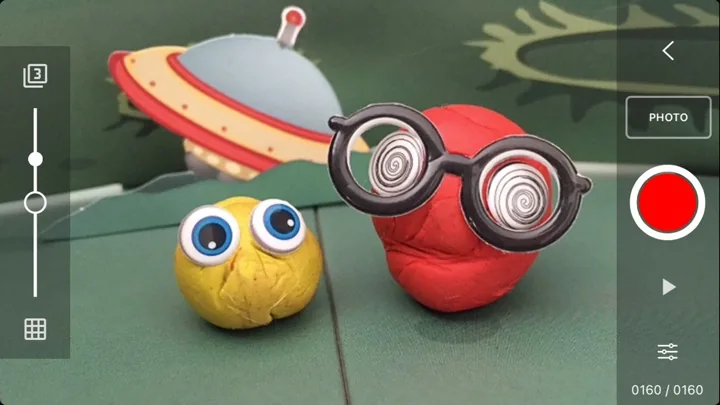
[Stop Motion Studio](https://apps.apple.com/us/app/stop-motion-studio/id441651297?uo=4) · Imagery © CATEATER, LLC. Developer-distributed screenshot or frame; all rights reserved. Excluded from MIT and CC BY 4.0.
1. The red button captures the next frame of the scene
- Confirm capture and account for delay between the command and the image.
- [Stop Motion Studio](https://apps.apple.com/us/app/stop-motion-studio/id441651297?uo=4)
## How it works
An event is the receipt of an image or a segment of video. The picture can be checked by an algorithm or used as a result of creativity. Capture frequency and latency vary by device.
## Variants
### Variants and applications
- A photograph as an action. Action: Press the shutter to freeze the state and make a game move. Application: Photo attack, collecting evidence, trading card. Technologies: Camera capture.
- Decisive moment. Action: Take a frame while the target is in a short acceptable state. Application: Reporting, photo hunting, rhythmic shooting. Technologies: Camera capture; Recognition or machine learning model.
- Serial shooting. Action: Take several shots and choose a successful one within the limit. Application: Catching a quick event, comparison of takes, editorial game. Technologies: Camera capture.
- Observation excerpt. Action: Record continuously the specified time; the gap resets progress. Application: Behavioral research, detective surveillance, video task. Technologies: Camera capture; Recognition or machine learning model.
- Delayed self-timer. Action: Start the timer and have time to assemble a composition or take a pose. Application: Group tasks, cooperative, staged photography. Technologies: Camera capture.
- Event shutter. Action: The camera automatically captures an object's input, gesture or change. Application: Camera trap, automation, cause-and-effect experiments. Technologies: Camera capture; Recognition or machine learning model.
- Stop-motion animation. Action: Move real objects between separate pictures. Application: Stop-motion, bringing toys to life, teaching animation. Technologies: Camera capture.
- Changing the time scale. Action: Record the process and play it back quickly or slowly. Application: Observation of transformations, trick analysis, editing puzzle. Technologies: Camera capture; Device capabilities.
## Context and limits
Games, learning, creativity and interactive applications. Author's systematization of game rules based on proven technical capabilities. Examples are application ideas and not statements of released products.
## Connected materials
## Sources and provenance
Original editorial design catalog consolidated from project discussions on 2026-10-20. Complete discussion item lists and contextual limitations are preserved; linked primary sources support specific techniques, not the entire classification. English translation was prepared with machine assistance and editorial review.
- [Apple AVFoundation: Camera Capture and Control](https://developer.apple.com/documentation/avfoundation/capture-setup) (id: source-c121374ae20b1406)
- [Stop Motion Studio](https://apps.apple.com/us/app/stop-motion-studio/id441651297?uo=4) (id: source-f24dc0ecd8ddfac5)
CC-BY-4.0 · gamemechanics.pro contributors