---
key: mechanic/phone-camera--family-ar-rules
type: mechanic
id: phone-camera--family-ar-rules
lang: en
title: 'AR: viewpoint and observation rules'
summary: >-
The player changes viewpoint and aims at spatial targets. Measure requires
aligning the pointer with object points; its measurements are approximate.
updatedAt: '2026-10-22'
status: active
url: 'https://gamemechanics.pro/en/knowledge/mechanic/phone-camera--family-ar-rules/'
jsonUrl: >-
https://gamemechanics.pro/api/v1/knowledge/en/mechanic/phone-camera--family-ar-rules.json
markdownUrl: >-
https://gamemechanics.pro/content/knowledge/en/mechanic/phone-camera--family-ar-rules.md
aliases: []
tags:
- Phone camera interactions
- Mechanics catalog
sourceIds:
- source-0599b2ea6361e813
- source-ed7020b965238bb1
- source-2d9202f2f950f384
- source-6af608cd666f05e5
sources:
- id: source-0599b2ea6361e813
title: 'ARCore: motion tracking, planes, anchors'
url: 'https://developers.google.com/ar/develop/fundamentals'
verifiedAt: null
- id: source-ed7020b965238bb1
title: 'ARCore Depth: depth and occlusion'
url: 'https://developers.google.com/ar/develop/depth'
verifiedAt: null
- id: source-2d9202f2f950f384
title: 'Apple ARKit: world tracking'
url: >-
https://developer.apple.com/documentation/arkit/understanding-world-tracking
verifiedAt: null
- id: source-6af608cd666f05e5
title: Measure (iOS)
url: 'https://support.apple.com/guide/iphone/measure-dimensions-iphd8ac2cfea/ios'
verifiedAt: null
relations: []
placements:
- catalogId: phone-camera
id: family-ar-rules
title: Phone camera interactions
url: 'https://gamemechanics.pro/en/mechanics/phone-camera/#family-ar-rules'
categoryIds:
- section-1
supersededBy: []
attributes:
preview:
updatedAt: '2026-10-22'
title: 'AR: viewpoint and observation rules'
description: >-
The player changes viewpoint and aims at spatial targets. Measure requires
aligning the pointer with object points; its measurements are approximate.
image:
src: images/mechanics/camera-apple-measure.webp
width: 490
height: 1008
game: Measure (iOS)
sourceUrl: >-
https://support.apple.com/guide/iphone/measure-dimensions-iphd8ac2cfea/ios
originalUrl: >-
https://ipcdn-web.apple.com/assets/v2/web/1f7529ac-b23e-4b34-a44c-4e84c42893d6
credit: Apple
rights: >-
© Apple. Official documentation image; all rights reserved. Excluded
from portal MIT and CC BY 4.0.
caption: 'Measure: a rectangle and dimensions over the camera view of a box'
alt: 'Measure: a rectangle and dimensions over the camera view of a box'
markers:
- x: 50
'y': 50
label: The central pointer helps select points in space
tips:
- 'Distinguish screen visibility, model line of sight and human attention.'
examples:
- title: Measure (iOS)
url: >-
https://support.apple.com/guide/iphone/measure-dimensions-iphd8ac2cfea/ios
endsAt: null
provenance: >-
Original editorial design catalog consolidated from project discussions on
2026-10-20. Complete discussion item lists and contextual limitations are
preserved; linked primary sources support specific techniques, not the entire
classification. English translation was prepared with machine assistance and
editorial review.
license: CC-BY-4.0
codeLicense: MIT
attribution: gamemechanics.pro contributors
catalogKey: catalog/phone-camera
---
# AR: viewpoint and observation rules
id: phone-camera--family-ar-rules
type: mechanic
key: mechanic/phone-camera--family-ar-rules
lang: en
status: active
url: https://gamemechanics.pro/en/knowledge/mechanic/phone-camera--family-ar-rules/
The player changes viewpoint and aims at spatial targets. Measure requires aligning the pointer with object points; its measurements are approximate.
## At a glance
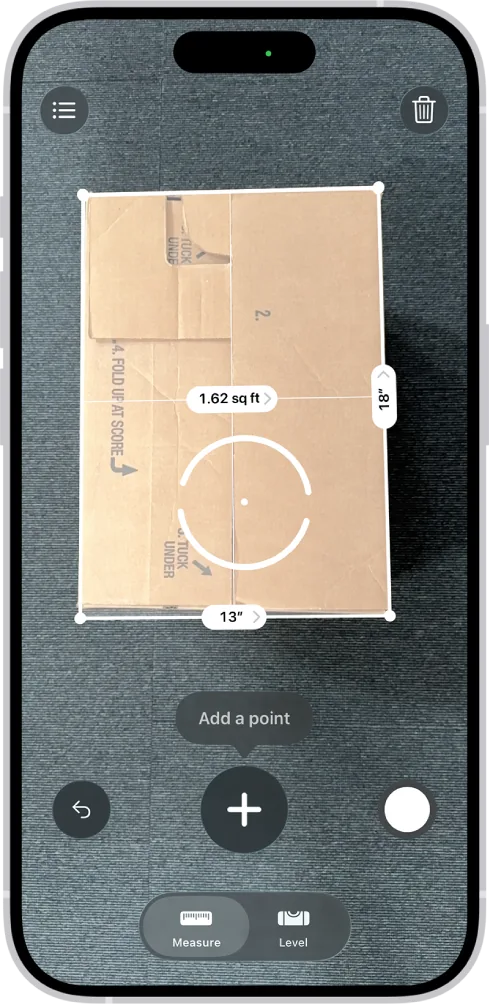
[Measure (iOS)](https://support.apple.com/guide/iphone/measure-dimensions-iphd8ac2cfea/ios) · © Apple. Official documentation image; all rights reserved. Excluded from portal MIT and CC BY 4.0.
1. The central pointer helps select points in space
- Distinguish screen visibility, model line of sight and human attention.
- [Measure (iOS)](https://support.apple.com/guide/iphone/measure-dimensions-iphd8ac2cfea/ios)
## How it works
The player acts by moving the phone and changing what he sees. Screen boundaries, line of sight in the model, and human attention are different quantities. Returning to a place requires relocalization, and consistency between sessions does not occur automatically.
## Variants
### Variants and applications
- The phone is like a window. Action: Move the device to look into a fixed digital world. Application: Diorama, virtual aquarium, object exploration. Technologies: AR spatial tracking.
- Walking around the object. Action: Examine a digital or recognized object from different angles. Application: Finding a weak point, museum model, spatial riddle. Technologies: AR spatial tracking.
- The angle is like a key. Action: Find the point where the elements of a digital scene add up to answer. Application: Perspective puzzle, character alignment, hidden caption. Technologies: AR spatial tracking.
- Distance as action. Action: Enter the range of distances relative to the virtual object. Application: Taming, activating a portal, playing with caution. Technologies: AR spatial tracking.
- Observation holds the state. Action: Keep the object in the visible sector; when you turn away, it changes. Application: Horror, “keep in sight”, quantum puzzle. Technologies: AR spatial tracking.
- Action outside the frame. Action: Remove an object from view and return it to trigger the transition. Application: Tricks, transformations, observation puzzle. Technologies: AR spatial tracking.
- Portal and border crossing. Action: Guide the phone or player through a given virtual area. Application: Another room, changing the world scale, spatial quest. Technologies: AR spatial tracking.
- Return to anchor. Action: Re-find a previously saved location and continue the state of the object. Application: Permanent pet, abandoned cache, asynchronous scene. Technologies: AR spatial tracking; Device capabilities.
## Context and limits
Games, learning, creativity and interactive applications. Author's systematization of game rules based on proven technical capabilities. Examples are application ideas and not statements of released products.
## Connected materials
## Sources and provenance
Original editorial design catalog consolidated from project discussions on 2026-10-20. Complete discussion item lists and contextual limitations are preserved; linked primary sources support specific techniques, not the entire classification. English translation was prepared with machine assistance and editorial review.
- [ARCore: motion tracking, planes, anchors](https://developers.google.com/ar/develop/fundamentals) (id: source-0599b2ea6361e813)
- [ARCore Depth: depth and occlusion](https://developers.google.com/ar/develop/depth) (id: source-ed7020b965238bb1)
- [Apple ARKit: world tracking](https://developer.apple.com/documentation/arkit/understanding-world-tracking) (id: source-2d9202f2f950f384)
- [Measure (iOS)](https://support.apple.com/guide/iphone/measure-dimensions-iphd8ac2cfea/ios) (id: source-6af608cd666f05e5)
CC-BY-4.0 · gamemechanics.pro contributors