---
key: mechanic/mouse--family-paths
type: mechanic
id: mouse--family-paths
lang: en
title: Drawing and Path Shaping
summary: >-
Rules consider the cursor’s path, shape, direction and sequence. Identical
endpoints may lead to different results.
updatedAt: '2026-10-22'
status: active
url: 'https://gamemechanics.pro/en/knowledge/mechanic/mouse--family-paths/'
jsonUrl: >-
https://gamemechanics.pro/api/v1/knowledge/en/mechanic/mouse--family-paths.json
markdownUrl: 'https://gamemechanics.pro/content/knowledge/en/mechanic/mouse--family-paths.md'
aliases:
- Mouse paths and gestures
tags:
- Mouse interactions
- Applied Mechanics
sourceIds:
- source-872a30e434db6d16
sources:
- id: source-872a30e434db6d16
title: Duolingo
url: >-
https://blog.duolingo.com/duolingo-101-how-to-learn-a-language-on-duolingo/
verifiedAt: null
relations: []
placements:
- catalogId: mouse
id: family-paths
title: Mouse interactions
url: 'https://gamemechanics.pro/en/mechanics/mouse/#family-paths'
categoryIds:
- section-2
supersededBy: []
attributes:
preview:
updatedAt: '2026-10-22'
title: Mouse paths and gestures
description: >-
Rules consider the cursor’s path, shape, direction and sequence. Identical
endpoints may lead to different results.
image:
src: images/mechanics/learning-duo-101-12.webp
width: 665
height: 1440
game: Duolingo
sourceUrl: >-
https://blog.duolingo.com/duolingo-101-how-to-learn-a-language-on-duolingo/
originalUrl: >-
https://s3.us-east-1.amazonaws.com/content.duolingo.com/Duolingo+101%3A+How+to+learn+a+language+on+Duolingo/14-characterBingo.png
credit: Duolingo
rights: © Duolingo. All rights reserved. Excluded from MIT and CC BY 4.0.
caption: 'Duolingo: a guide for the missing stroke'
alt: 'Duolingo: a guide for the missing stroke'
markers:
- x: 48
'y': 45
label: The arrow shows the stroke direction
tips:
- Show the path taken and the allowed deviation from the model.
examples:
- title: Duolingo
url: >-
https://blog.duolingo.com/duolingo-101-how-to-learn-a-language-on-duolingo/
endsAt: null
provenance: >-
Original editorial design catalog consolidated from project discussions on
2026-10-20. Complete discussion item lists and contextual limitations are
preserved; linked primary sources support specific techniques, not the entire
classification. English translation was prepared with machine assistance and
editorial review.
license: CC-BY-4.0
codeLicense: MIT
attribution: gamemechanics.pro contributors
catalogKey: catalog/mouse
---
# Drawing and Path Shaping
id: mouse--family-paths
type: mechanic
key: mechanic/mouse--family-paths
lang: en
status: active
url: https://gamemechanics.pro/en/knowledge/mechanic/mouse--family-paths/
Rules consider the cursor’s path, shape, direction and sequence. Identical endpoints may lead to different results.
## At a glance
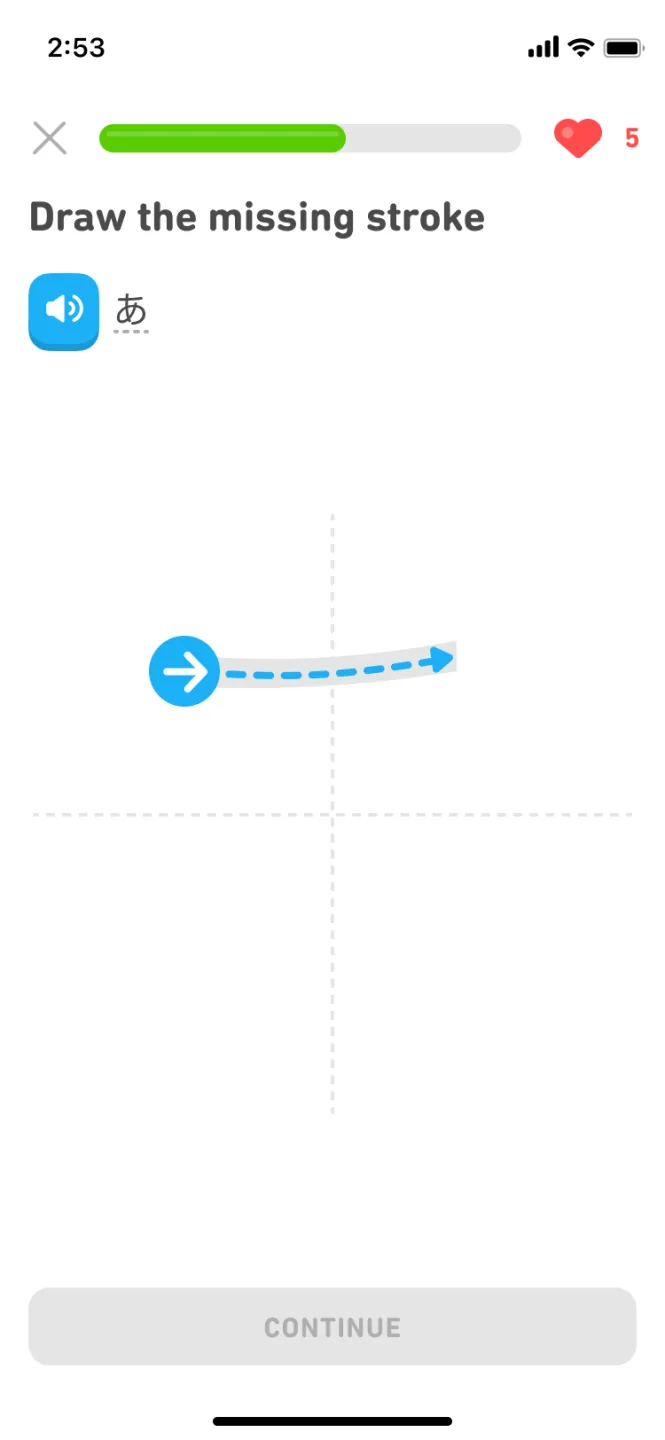
[Duolingo](https://blog.duolingo.com/duolingo-101-how-to-learn-a-language-on-duolingo/) · © Duolingo. All rights reserved. Excluded from MIT and CC BY 4.0.
1. The arrow shows the stroke direction
- Show the path taken and the allowed deviation from the model.
- [Duolingo](https://blog.duolingo.com/duolingo-101-how-to-learn-a-language-on-duolingo/)
## How it works
The path traveled becomes significant, not just the final position of the pointer.
## Variants
### Variants and applications
- Free stroke. Action: Move with the mouse with the tool active. Application: Drawing, signing, marking a map, creating a trail. Conditions: Anti-aliasing should not unduly change the intended shape.
- Broken by clicks. Action: Define vertices by successive clicks, then complete. Application: Route, contour, wire, wall. Conditions: Requires deletion of the last point and explicit completion.
- Outlining the sample. Action: Repeat a given contour or line. Application: Calligraphy, teaching gesture, ritual, precision cutting. Conditions: Evaluate path tolerance separately from speed.
- Directional mouse swipe. Action: Swipe quickly in a given direction, usually with a button. Application: Slash, dodge, flip, gesture command. Conditions: Direction, distance and speed are different thresholds.
- Roundabout Circulation. Action: Perform a revolution or arc around the center. Application: Twist the handle, stir, wind, accumulate rotation. Conditions: Count the angle, not just the length of the path.
- Back and forth movement. Action: Repeat back-and-forth movements. Application: Sawing, rubbing, sharpening, fanning the fire. Conditions: Take into account the amplitude and turns, and not random noise.
- Shaking. Action: Make several quick changes of direction. Application: Shake off the effect, release the object, mix the contents. Conditions: High sensitivity can turn the shaking into a false gesture.
- Character recognition. Action: Draw a recognizable shape in its entirety. Application: Runes, spells, symbols, handwriting recognition. Conditions: Training, approvals and analysis of the unrecognized result are required.
- Gesture marking menu. Action: From the reference point, execute a short trajectory in the desired direction. Application: Quick command from memory, selecting a tool without searching for an item. Conditions: A visible menu option is desirable for beginners.
- Intersection cut. Action: Draw a line through a target or several targets. Application: Cut a rope, cut objects, break a connection in a graph. Conditions: Check the intersection of the entire path segment, and not rare event points.
- Painting over or erasing an area. Action: Cover the surface with passes of the brush. Application: Coloring, cleaning dirt, removing a layer, developing a secret image. Conditions: Consider the coverage area, and not just the length of the movement.
- Closing a loop. Action: Draw an area and return to the starting area. Application: Capture an area, mark a zone, create a loop or seal. Conditions: Set the closure tolerance and self-intersection rules.
## Context and limits
Author's working classification for designing games and interactions. Options can overlap and combine; the list is not a generally accepted standard or proven exhaustive list. Application examples are conditional unless a specific verifiable observation is indicated nearby. Sources support individual techniques and technical limitations.
## Connected materials
## Sources and provenance
Original editorial design catalog consolidated from project discussions on 2026-10-20. Complete discussion item lists and contextual limitations are preserved; linked primary sources support specific techniques, not the entire classification. English translation was prepared with machine assistance and editorial review.
- [Duolingo](https://blog.duolingo.com/duolingo-101-how-to-learn-a-language-on-duolingo/) (id: source-872a30e434db6d16)
CC-BY-4.0 · gamemechanics.pro contributors