---
key: mechanic/mouse--family-hover
type: mechanic
id: mouse--family-hover
lang: en
title: Hovering and pointer presence
summary: >-
The pointer triggers a response without clicking: a highlight, tooltip or
dwell action. Into the Breach explains a tile when hovered.
updatedAt: '2026-10-22'
status: active
url: 'https://gamemechanics.pro/en/knowledge/mechanic/mouse--family-hover/'
jsonUrl: >-
https://gamemechanics.pro/api/v1/knowledge/en/mechanic/mouse--family-hover.json
markdownUrl: 'https://gamemechanics.pro/content/knowledge/en/mechanic/mouse--family-hover.md'
aliases: []
tags:
- Mouse interactions
- Input and gestures
sourceIds:
- source-668618d5d6a230d5
sources:
- id: source-668618d5d6a230d5
title: Into the Breach
url: 'https://store.steampowered.com/app/590380/'
verifiedAt: null
relations: []
placements:
- catalogId: mouse
id: family-hover
title: Mouse interactions
url: 'https://gamemechanics.pro/en/mechanics/mouse/#family-hover'
categoryIds:
- section-1
supersededBy: []
attributes:
preview:
updatedAt: '2026-10-22'
title: Hovering and pointer presence
description: >-
The pointer triggers a response without clicking: a highlight, tooltip or
dwell action. Into the Breach explains a tile when hovered.
image:
src: images/mechanics/strategy-into-breach-00.webp
width: 1280
height: 720
game: Into the Breach
sourceUrl: 'https://store.steampowered.com/app/590380/'
originalUrl: >-
https://shared.akamai.steamstatic.com/store_item_assets/steam/apps/590380/ss_6113590509c195f98fa64cd738df534762e0c358.1920x1080.jpg?t=1755610784
credit: Subset Games / Subset Games
rights: © Subset Games / Subset Games. All rights reserved.
caption: 'Into the Breach: hovering reveals a chasm tooltip'
alt: 'Into the Breach: hovering reveals a chasm tooltip'
markers:
- x: 86
'y': 91
label: A tooltip describes the tile under the pointer
tips:
- Do not make essential actions depend solely on hovering.
examples:
- title: Into the Breach
url: 'https://store.steampowered.com/app/590380/'
endsAt: null
provenance: >-
Original editorial design catalog consolidated from project discussions on
2026-10-20. Complete discussion item lists and contextual limitations are
preserved; linked primary sources support specific techniques, not the entire
classification. English translation was prepared with machine assistance and
editorial review.
license: CC-BY-4.0
codeLicense: MIT
attribution: gamemechanics.pro contributors
catalogKey: catalog/mouse
---
# Hovering and pointer presence
id: mouse--family-hover
type: mechanic
key: mechanic/mouse--family-hover
lang: en
status: active
url: https://gamemechanics.pro/en/knowledge/mechanic/mouse--family-hover/
The pointer triggers a response without clicking: a highlight, tooltip or dwell action. Into the Breach explains a tile when hovered.
## At a glance
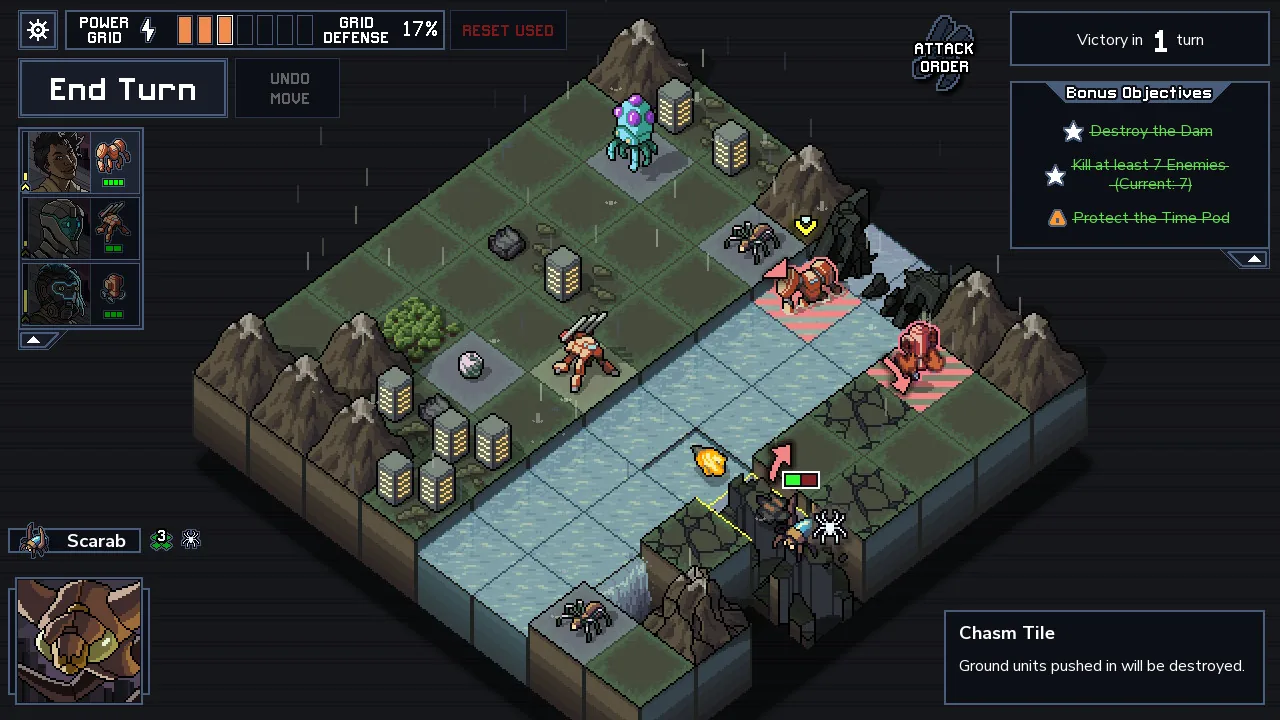
[Into the Breach](https://store.steampowered.com/app/590380/) · © Subset Games / Subset Games. All rights reserved.
1. A tooltip describes the tile under the pointer
- Do not make essential actions depend solely on hovering.
- [Into the Breach](https://store.steampowered.com/app/590380/)
## How it works
Actions without pressing buttons: pointer position, area entry, and dwell time.
## Variants
### Variants and applications
- Highlight on hover. Action: Move the pointer over an object. Application: Show interactivity, available target, object boundaries. Conditions: The highlighting must correspond to the actual hit area.
- Delayed prompt. Action: Leave the pointer over the element for a short time. Application: Characteristics of an item, team description, equipment comparison. Conditions: Give time to read and the opportunity to close the tooltip.
- Activation by exposure, dwell. Action: Hold the pointer in the area until the indicator is filled. Application: Click-free menu, accessible controls, answer selection. Conditions: Show progress; leaving the zone cancels the wait.
- Area entry trigger. Action: Cross the border of the active zone. Application: Open the panel, detect a trap, activate a section of the labyrinth. Conditions: Need a threshold or delay against random triggering.
- Area exit trigger. Action: Move the pointer outside the zone. Application: End preview, hide panel, break contact. Conditions: Nested elements must not cause false output.
- Reaction to proximity. Action: Bring the pointer closer to the object without necessarily hitting it. Application: Magnetic backlight, hot-cold search, soft opening of elements. Conditions: The distance is determined by the program, there is no separate proximity sensor.
- Research tool under cursor. Action: Move the pointer over the image or scene. Application: Magnifier, flashlight, scanner, eyedropper, local information disclosure. Conditions: The size of the tool area must be visible.
- Preview by moving inside an element. Action: Move the pointer along the card or strip. Application: Viewing video frames, object variants, animation stages. Conditions: Explicitly show the connection of the coordinate with the selected value.
- Reaction to immobility. Action: Do not move the mouse for a specified time. Application: Hide the cursor while viewing, show help, enable observation mode. Conditions: The immobility of the pointer does not prove the absence of the user.
- Position control without clicking. Action: Keep the pointer in a sector or at a certain distance from the center. Application: Steering, choosing a direction, adjusting the intensity of the effect. Conditions: A neutral zone and clear feedback are needed.
## Context and limits
Author's working classification for designing games and interactions. Options can overlap and combine; the list is not a generally accepted standard or proven exhaustive list. Application examples are conditional unless a specific verifiable observation is indicated nearby. Sources support individual techniques and technical limitations.
## Connected materials
## Sources and provenance
Original editorial design catalog consolidated from project discussions on 2026-10-20. Complete discussion item lists and contextual limitations are preserved; linked primary sources support specific techniques, not the entire classification. English translation was prepared with machine assistance and editorial review.
- [Into the Breach](https://store.steampowered.com/app/590380/) (id: source-668618d5d6a230d5)
CC-BY-4.0 · gamemechanics.pro contributors