---
key: mechanic/mouse--family-chords
type: mechanic
id: mouse--family-chords
lang: en
title: Combinations and modes
summary: >-
A button combination or selected mode changes the next click’s meaning. Day of
the Tentacle applies an item through a selected verb.
updatedAt: '2026-10-22'
status: active
url: 'https://gamemechanics.pro/en/knowledge/mechanic/mouse--family-chords/'
jsonUrl: >-
https://gamemechanics.pro/api/v1/knowledge/en/mechanic/mouse--family-chords.json
markdownUrl: >-
https://gamemechanics.pro/content/knowledge/en/mechanic/mouse--family-chords.md
aliases: []
tags:
- Mouse interactions
- Input and gestures
sourceIds:
- source-796ac91c3a695e59
sources:
- id: source-796ac91c3a695e59
title: Day of the Tentacle Remastered
url: 'https://store.steampowered.com/app/388210/'
verifiedAt: null
relations: []
placements:
- catalogId: mouse
id: family-chords
title: Mouse interactions
url: 'https://gamemechanics.pro/en/mechanics/mouse/#family-chords'
categoryIds:
- section-1
supersededBy: []
attributes:
preview:
updatedAt: '2026-10-22'
title: Combinations and modes
description: >-
A button combination or selected mode changes the next click’s meaning.
Day of the Tentacle applies an item through a selected verb.
image:
src: images/mechanics/adventure-day-of-the-tentacle-07.webp
width: 1440
height: 810
crop:
x: 180
'y': 0
width: 1080
height: 810
game: Day of the Tentacle Remastered
sourceUrl: 'https://store.steampowered.com/app/388210/'
originalUrl: >-
https://shared.akamai.steamstatic.com/store_item_assets/steam/apps/388210/ss_9eefffbc6bf66978cb5b8570665b09774d4f604a.1920x1080.jpg?t=1731602439
credit: Double Fine Productions / Shiny Shoe
rights: >-
Game imagery © its respective rights holders. Publisher-distributed
Steam screenshot; all rights reserved. Excluded from MIT and CC BY 4.0.
caption: The Use action and separate inventory items
alt: The Use action and separate inventory items
markers:
- x: 42
'y': 80
label: Item-use action
- x: 63
'y': 81
label: Inventory item
tips:
- Keep the active mode visible and provide a simple way to leave it.
examples:
- title: Day of the Tentacle Remastered
url: 'https://store.steampowered.com/app/388210/'
endsAt: null
provenance: >-
Original editorial design catalog consolidated from project discussions on
2026-10-20. Complete discussion item lists and contextual limitations are
preserved; linked primary sources support specific techniques, not the entire
classification. English translation was prepared with machine assistance and
editorial review.
license: CC-BY-4.0
codeLicense: MIT
attribution: gamemechanics.pro contributors
catalogKey: catalog/mouse
---
# Combinations and modes
id: mouse--family-chords
type: mechanic
key: mechanic/mouse--family-chords
lang: en
status: active
url: https://gamemechanics.pro/en/knowledge/mechanic/mouse--family-chords/
A button combination or selected mode changes the next click’s meaning. Day of the Tentacle applies an item through a selected verb.
## At a glance
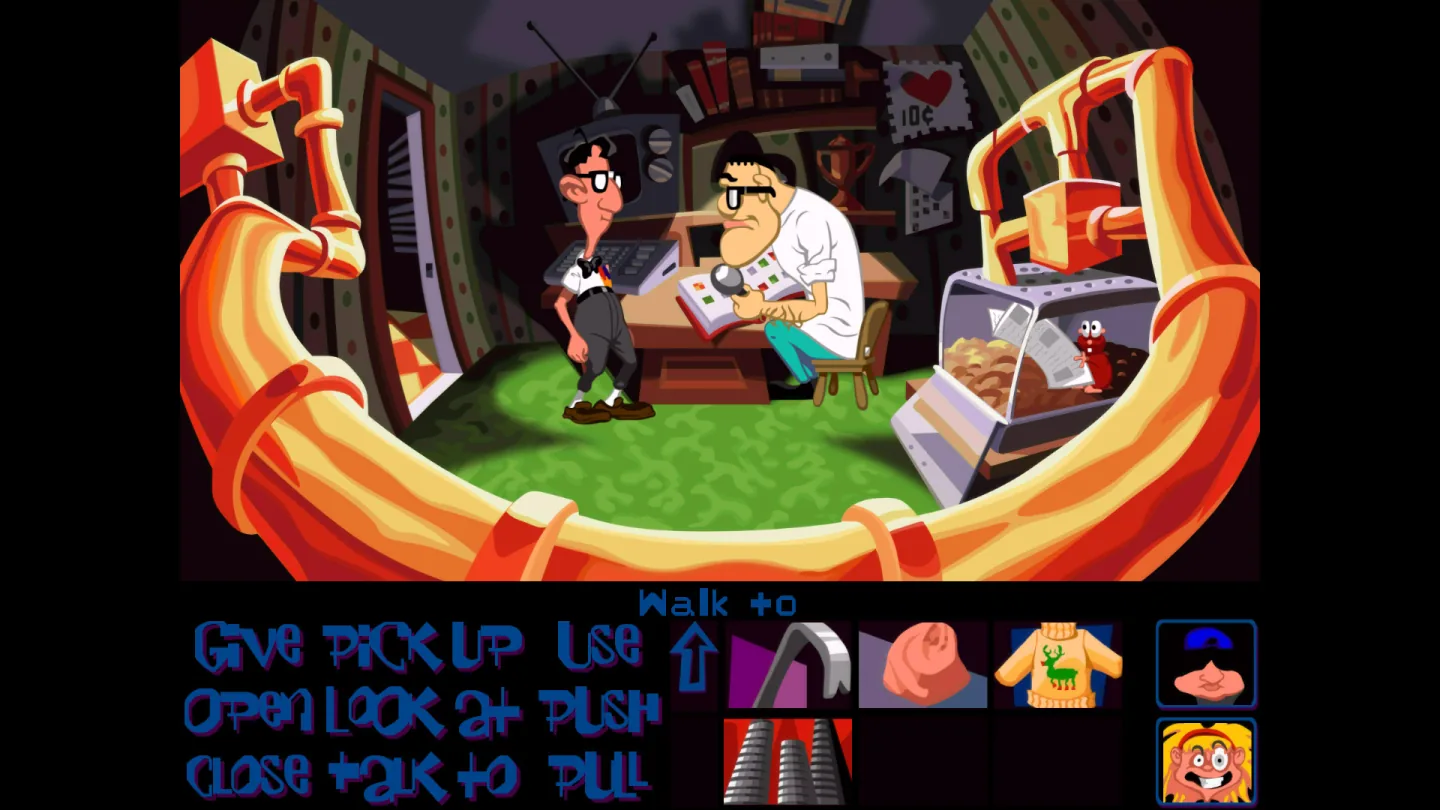
[Day of the Tentacle Remastered](https://store.steampowered.com/app/388210/) · Game imagery © its respective rights holders. Publisher-distributed Steam screenshot; all rights reserved. Excluded from MIT and CC BY 4.0.
1. Item-use action
2. Inventory item
- Keep the active mode visible and provide a simple way to leave it.
- [Day of the Tentacle Remastered](https://store.steampowered.com/app/388210/)
## How it works
Multiple signals form a single command or change the meaning of subsequent input.
## Variants
### Variants and applications
- Click modifier. Action: Hold Shift, Ctrl, Alt or Cmd and click. Usage: Alternate command, adding a choice, special order. Conditions: Purposes vary by platform; important commands must be detected.
- Modifier with movement. Action: Hold key while moving or dragging. Usage: Axis constraint, fine mode, temporarily disable snapping. Conditions: Display active constraint until action completes.
- Simultaneous pressing of buttons. Action: Press two buttons with a valid time overlap. Application: Special command, joint action of two hands, opening of adjacent cells. Conditions: Set a window of simultaneity and an alternative to a complex combination.
- A button as a modifier of another button. Action: Hold one button and press another. Application: Change fire while aiming, additional tool command. Conditions: Not to be confused with simultaneous pressing: the order is significant here.
- Rocker gesture. Action: Hold one button, press another; reverse order gives another command. Application: Back/forward, two linked actions, fast navigation. Conditions: Hidden combination requires training and reassignment.
- Keyboard movement with mouse. Action: Move with the keys, move the mouse independently. Application: Shooter, action, control of the character and the direction of the tool. Conditions: Provide for a player who is uncomfortable with simultaneous control of both hands.
- Holding a button with movement. Action: Press the mode button and move the mouse. Application: Rotate the camera instead of a pointer, panorama instead of a selection. Conditions: The pointer and tooltip should convey a new meaning to the movement.
- Mode until explicit exit. Action: Click to turn on the tool, then use it in a series of actions. Application: Construction, painting, measuring, assigning orders. Conditions: You need a visible active tool and a single exit command.
- Radial menu with release. Action: Press, point at a sector, release to select. Application: Quick selection of an item, emotion, squad command. Conditions: The center is convenient to use for cancellation; short click can show menu.
- Independent parallel actions. Action: Hold one button, use the other independently. Application: Defend and shoot, hold the grip and control the tool. Conditions: Check the combinations on the target mice and process all releases.
## Context and limits
Author's working classification for designing games and interactions. Options can overlap and combine; the list is not a generally accepted standard or proven exhaustive list. Application examples are conditional unless a specific verifiable observation is indicated nearby. Sources support individual techniques and technical limitations.
## Connected materials
## Sources and provenance
Original editorial design catalog consolidated from project discussions on 2026-10-20. Complete discussion item lists and contextual limitations are preserved; linked primary sources support specific techniques, not the entire classification. English translation was prepared with machine assistance and editorial review.
- [Day of the Tentacle Remastered](https://store.steampowered.com/app/388210/) (id: source-796ac91c3a695e59)
CC-BY-4.0 · gamemechanics.pro contributors