---
key: mechanic/keyboard--family-space
type: mechanic
id: keyboard--family-space
lang: en
title: Keyboard as a spatial surface
summary: >-
Key positions become a map of actions. The announced Keyboard Sports builds
its game space around the whole keyboard.
updatedAt: '2026-10-22'
status: active
url: 'https://gamemechanics.pro/en/knowledge/mechanic/keyboard--family-space/'
jsonUrl: >-
https://gamemechanics.pro/api/v1/knowledge/en/mechanic/keyboard--family-space.json
markdownUrl: >-
https://gamemechanics.pro/content/knowledge/en/mechanic/keyboard--family-space.md
aliases: []
tags:
- Physical keyboard interactions
- Space
sourceIds:
- source-2d8fd1f6427b91cb
sources:
- id: source-2d8fd1f6427b91cb
title: Keyboard Sports - Saving QWERTY (announced)
url: 'https://store.steampowered.com/app/700720/'
verifiedAt: null
relations: []
placements:
- catalogId: keyboard
id: family-space
title: Physical keyboard interactions
url: 'https://gamemechanics.pro/en/mechanics/keyboard/#family-space'
categoryIds:
- section-3
supersededBy: []
attributes:
preview:
updatedAt: '2026-10-22'
title: Keyboard as a spatial surface
description: >-
Key positions become a map of actions. The announced Keyboard Sports
builds its game space around the whole keyboard.
image:
src: images/mechanics/control-keyboard-sports-0.webp
width: 1440
height: 810
game: Keyboard Sports - Saving QWERTY (announced)
sourceUrl: 'https://store.steampowered.com/app/700720/'
originalUrl: >-
https://shared.akamai.steamstatic.com/store_item_assets/steam/apps/700720/ss_ce8309932b1d8f2c20bd60058d242cd14bc069e0.1920x1080.jpg?t=1787144101
credit: Triband
rights: >-
Imagery © Triband. Developer-distributed screenshot or frame; all rights
reserved. Excluded from MIT and CC BY 4.0.
caption: 'Keyboard Sports: an announced scene with a keyboard-shaped field'
alt: 'Keyboard Sports: an announced scene with a keyboard-shaped field'
markers:
- x: 43
'y': 75
label: The long Space area is part of the scene’s layout
tips:
- 'Account for ANSI, ISO and compact keyboard layouts.'
examples:
- title: Keyboard Sports - Saving QWERTY (announced)
url: 'https://store.steampowered.com/app/700720/'
endsAt: null
provenance: >-
Original editorial design catalog consolidated from project discussions on
2026-10-20. Complete discussion item lists and contextual limitations are
preserved; linked primary sources support specific techniques, not the entire
classification. English translation was prepared with machine assistance and
editorial review.
license: CC-BY-4.0
codeLicense: MIT
attribution: gamemechanics.pro contributors
catalogKey: catalog/keyboard
---
# Keyboard as a spatial surface
id: keyboard--family-space
type: mechanic
key: mechanic/keyboard--family-space
lang: en
status: active
url: https://gamemechanics.pro/en/knowledge/mechanic/keyboard--family-space/
Key positions become a map of actions. The announced Keyboard Sports builds its game space around the whole keyboard.
## At a glance
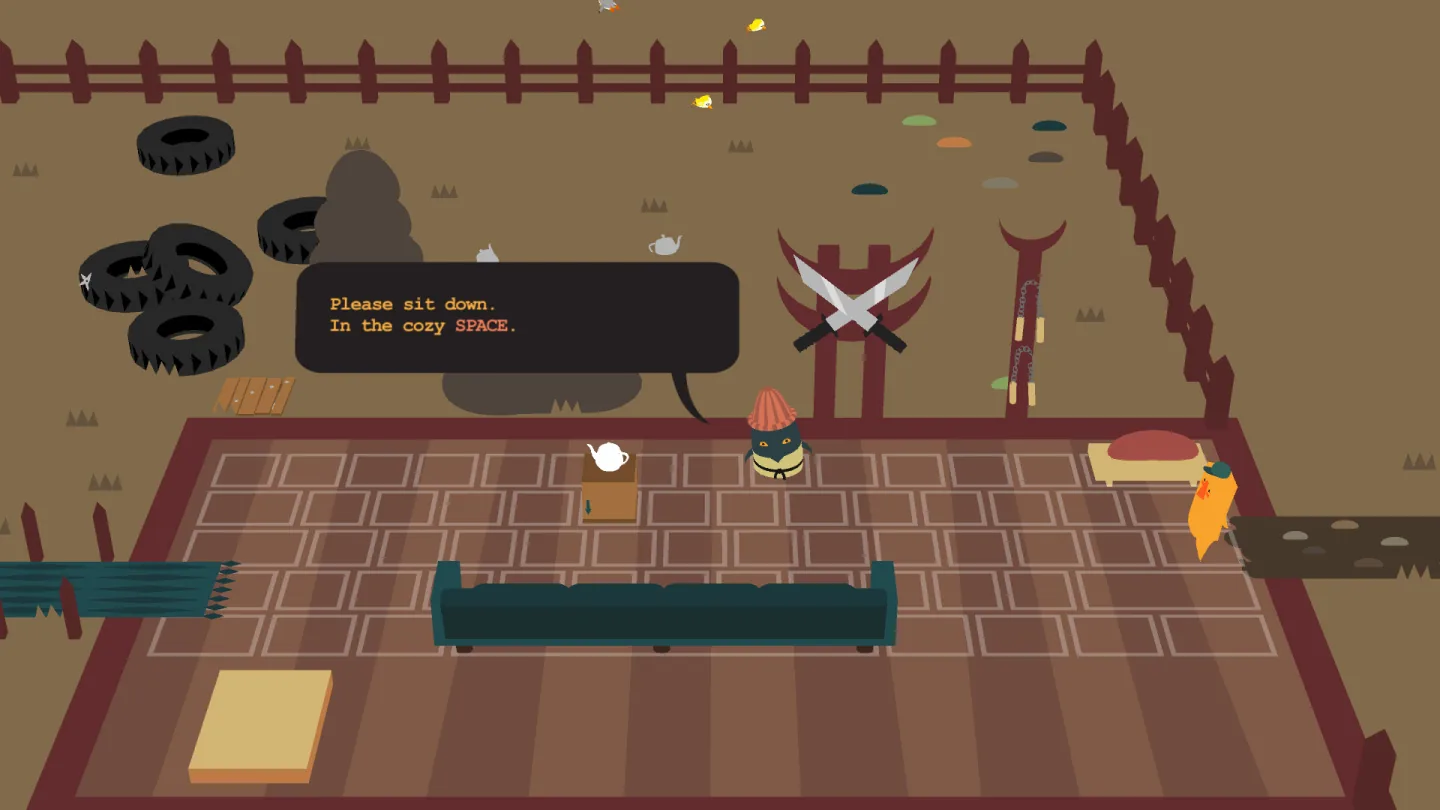
[Keyboard Sports - Saving QWERTY (announced)](https://store.steampowered.com/app/700720/) · Imagery © Triband. Developer-distributed screenshot or frame; all rights reserved. Excluded from MIT and CC BY 4.0.
1. The long Space area is part of the scene’s layout
- Account for ANSI, ISO and compact keyboard layouts.
- [Keyboard Sports - Saving QWERTY (announced)](https://store.steampowered.com/app/700720/)
## How it works
The physical layout of the keys becomes part of the playing field or interface.
## Variants
### Variants and applications
- Each key is a cell. Action: Objects are directly tied to physical keyboard positions. Application: Protect base keys, grow a garden, manage mini-map cells. Conditions: Geometry must be described for supported form factors. Equipment: Regular keyboard.
- Transitions between neighbors. Action: The next key must be adjacent to the previous one. Application: Finding a path, spreading fire, moving a snake across the keyboard. Conditions: The neighborhood is set by the author; the letter row has physical offsets. Equipment: Regular keyboard.
- Rows are like paths. Action: Horizontal rows or groups of keys represent individual lines. Application: Rhythmic tracks, floors of a building, rows of manufacturing machines. Conditions: Linking to rows may require a separate circuit for a non-standard keyboard. Equipment: Conventional keyboard.
- Columns are like a scale. Action: Vertical or conventionally vertical groups correspond to levels of value. Application: Pitch, destination floor, immersion depth, power level. Conditions: On a conventional keyboard, the columns are geometrically offset. Equipment: Conventional keyboard.
- Zones as separate devices. Action: Different sections of the keyboard control different subsystems. Application: Left and right engines, several musical instruments, dispatcher posts. Conditions: Circuits are needed for compact keyboards without part of the blocks. Equipment: Regular keyboard.
- Spatial drawing. Action: You need to press keys of a given shape sequentially or together. Application: Draw a rune, assemble a contour, repeat a symbol. Conditions: The program sees a set of events, and not the movement of a finger between the keys. Equipment: A regular keyboard.
- Distance between targets. Action: The value or difficulty depends on the distance between successively required keys. Application: Reach emergency buttons, take a short route for the hand. Conditions: The actual distance differs from device to device; This is an approximate model. Equipment: Regular keyboard.
- Transformation of space. Action: The key map is reflected, rotated in a conditional grid or rearranged. Application: Mirror room, perspective change, matching puzzle. Conditions: The game map is transformed; The position of the physical keyboard is not automatically detected. Hardware: Regular keyboard.
## Context and limits
Author's working classification for designing games and interactions. Options can overlap and combine; the list is not a generally accepted standard or proven exhaustive list. Application examples are conditional unless a specific verifiable observation is indicated nearby. Sources support individual techniques and technical limitations.
## Connected materials
## Sources and provenance
Original editorial design catalog consolidated from project discussions on 2026-10-20. Complete discussion item lists and contextual limitations are preserved; linked primary sources support specific techniques, not the entire classification. English translation was prepared with machine assistance and editorial review.
- [Keyboard Sports - Saving QWERTY (announced)](https://store.steampowered.com/app/700720/) (id: source-2d8fd1f6427b91cb)
CC-BY-4.0 · gamemechanics.pro contributors