---
key: mechanic/keyboard--family-sensors
type: mechanic
id: keyboard--family-sensors
lang: en
title: Analog Keys and Sensors
summary: >-
A specialised keyboard reports key travel as an analog value. Wootility maps
millimetres of travel to controller output through a response curve.
updatedAt: '2026-10-22'
status: active
url: 'https://gamemechanics.pro/en/knowledge/mechanic/keyboard--family-sensors/'
jsonUrl: >-
https://gamemechanics.pro/api/v1/knowledge/en/mechanic/keyboard--family-sensors.json
markdownUrl: >-
https://gamemechanics.pro/content/knowledge/en/mechanic/keyboard--family-sensors.md
aliases: []
tags:
- Physical keyboard interactions
- Special signal
sourceIds:
- source-7d74f6eee9cf4b07
sources:
- id: source-7d74f6eee9cf4b07
title: Wootility 5.4.2 (demo)
url: 'https://wooting.io/wootility'
verifiedAt: null
relations: []
placements:
- catalogId: keyboard
id: family-sensors
title: Physical keyboard interactions
url: 'https://gamemechanics.pro/en/mechanics/keyboard/#family-sensors'
categoryIds:
- section-9
supersededBy: []
attributes:
preview:
updatedAt: '2026-10-22'
title: Analog Keys and Sensors
description: >-
A specialised keyboard reports key travel as an analog value. Wootility
maps millimetres of travel to controller output through a response curve.
image:
src: images/mechanics/control-wootility-analog.webp
width: 1280
height: 720
crop:
x: 390
'y': 360
width: 860
height: 340
game: Wootility 5.4.2 (demo)
sourceUrl: 'https://wooting.io/wootility'
originalUrl: 'https://wootility.io/'
credit: Wooting
rights: >-
Imagery © Wooting. Developer-distributed screenshot or frame; all rights
reserved. Excluded from MIT and CC BY 4.0.
caption: 'Wootility demo: analog output depends on key travel'
alt: 'Wootility demo: analog output depends on key travel'
markers:
- x: 45
'y': 90
label: 'The horizontal axis measures travel in millimetres, not force'
tips:
- >-
Check the device and API; an ordinary keydown event contains no travel
depth.
examples:
- title: Wootility 5.4.2 (demo)
url: 'https://wooting.io/wootility'
endsAt: null
provenance: >-
Original editorial design catalog consolidated from project discussions on
2026-10-20. Complete discussion item lists and contextual limitations are
preserved; linked primary sources support specific techniques, not the entire
classification. English translation was prepared with machine assistance and
editorial review.
license: CC-BY-4.0
codeLicense: MIT
attribution: gamemechanics.pro contributors
catalogKey: catalog/keyboard
---
# Analog Keys and Sensors
id: keyboard--family-sensors
type: mechanic
key: mechanic/keyboard--family-sensors
lang: en
status: active
url: https://gamemechanics.pro/en/knowledge/mechanic/keyboard--family-sensors/
A specialised keyboard reports key travel as an analog value. Wootility maps millimetres of travel to controller output through a response curve.
## At a glance
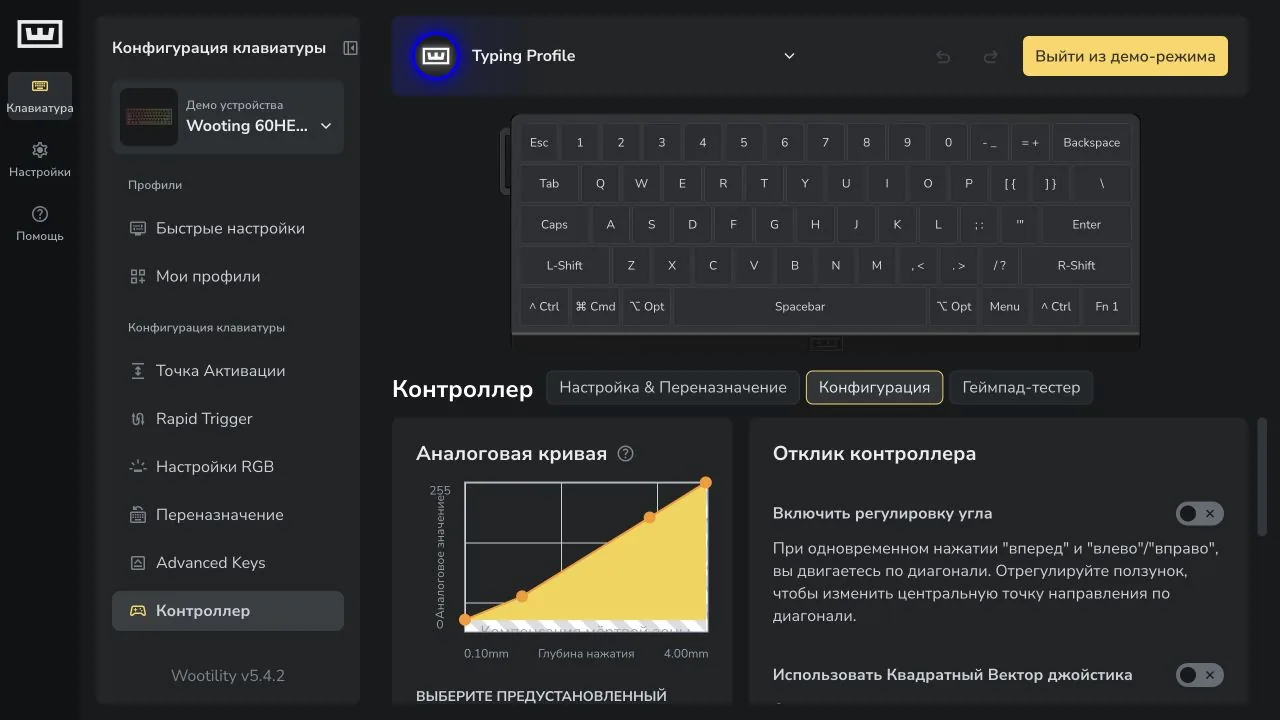
[Wootility 5.4.2 (demo)](https://wooting.io/wootility) · Imagery © Wooting. Developer-distributed screenshot or frame; all rights reserved. Excluded from MIT and CC BY 4.0.
1. The horizontal axis measures travel in millimetres, not force
- Check the device and API; an ordinary keydown event contains no travel depth.
- [Wootility 5.4.2 (demo)](https://wooting.io/wootility)
## How it works
These interactions require appropriate hardware and available data flow.
## Variants
### Variants and applications
- Key stroke depth. Action: Continuous position value sets the amount of action. Application: Smooth speed, throttle and brake, valve opening degree. Conditions: Requires analog keyboard and SDK or compatible controller mode. Hardware: Special device / SDK.
- Several levels of progress. Action: Different depth ranges involve different steps or actions. Application: Walking and running with one key, half press and full action, pull steps. Conditions: Thresholds need tolerances or hysteresis to keep the state from shaking. Hardware: Special device / SDK.
- Partial release. Action: A new action is allowed after a small reversal without a full return. Application: Repeated movements, note reactivation, sensitive command reset. Conditions: Possibility depends on the sensor, firmware and API; rapid trigger can work inside the keyboard. Hardware: Special device / SDK.
- Key speed. Action: The change in depth over time is used as an estimate of the speed of pressing or releasing. Application: Attack of a musical sound, inertia of a conventional instrument, expressive performance. Conditions: Quite frequent analog samples are needed; this is not a normal keydown/keyup interval. Hardware: Special device / SDK.
- Measured force. Action: The sensor measures the applied force and the rule uses its magnitude. Application: Grip compression, wrist pressure, musical expression. Conditions: The force sensor is a separate requirement; Measuring the stroke in itself does not provide strength. Equipment: Special device / SDK.
- Touch without triggering. Action: The sensor distinguishes the touch or proximity of a finger before a normal press. Application: Preview of a function, playing by touch, highlighting a finished instrument. Conditions: You need a keyboard or pad with the appropriate sensors. Equipment: Special device / SDK.
- Movement of the entire device. Action: An external or built-in sensor measures the tilt, rotation, or acceleration of the keyboard. Application: Tilt the platform, steer course, couple typing with gestures. Conditions: Inertial sensors are not included in standard keyboard events. Hardware: Additional channel.
- Acoustic reading. Action: The microphone analyzes the sounds of tapping as an additional input. Application: Rhythmic instrument, artistic experiment, recognition of a series of knocks. Conditions: The microphone requires access; the sound does not reliably identify a specific key. Equipment: Additional channel.
## Context and limits
Author's working classification for designing games and interactions. Options can overlap and combine; the list is not a generally accepted standard or proven exhaustive list. Application examples are conditional unless a specific verifiable observation is indicated nearby. Sources support individual techniques and technical limitations.
## Connected materials
## Sources and provenance
Original editorial design catalog consolidated from project discussions on 2026-10-20. Complete discussion item lists and contextual limitations are preserved; linked primary sources support specific techniques, not the entire classification. English translation was prepared with machine assistance and editorial review.
- [Wootility 5.4.2 (demo)](https://wooting.io/wootility) (id: source-7d74f6eee9cf4b07)
CC-BY-4.0 · gamemechanics.pro contributors