---
key: mechanic/keyboard--family-object
type: mechanic
id: keyboard--family-object
lang: en
title: Keyboard as a physical object
summary: >-
Physical key shapes and labels become puzzle material. The announced Keyboard
Sports connects a request to sit down with the long Space key.
updatedAt: '2026-10-22'
status: active
url: 'https://gamemechanics.pro/en/knowledge/mechanic/keyboard--family-object/'
jsonUrl: >-
https://gamemechanics.pro/api/v1/knowledge/en/mechanic/keyboard--family-object.json
markdownUrl: >-
https://gamemechanics.pro/content/knowledge/en/mechanic/keyboard--family-object.md
aliases: []
tags:
- Physical keyboard interactions
- Physical constraints
sourceIds:
- source-2d8fd1f6427b91cb
sources:
- id: source-2d8fd1f6427b91cb
title: Keyboard Sports - Saving QWERTY (announced)
url: 'https://store.steampowered.com/app/700720/'
verifiedAt: null
relations: []
placements:
- catalogId: keyboard
id: family-object
title: Physical keyboard interactions
url: 'https://gamemechanics.pro/en/mechanics/keyboard/#family-object'
categoryIds:
- section-4
supersededBy: []
attributes:
preview:
updatedAt: '2026-10-22'
title: Keyboard as a physical object
description: >-
Physical key shapes and labels become puzzle material. The announced
Keyboard Sports connects a request to sit down with the long Space key.
image:
src: images/mechanics/control-keyboard-sports-0.webp
width: 1440
height: 810
game: Keyboard Sports - Saving QWERTY (announced)
sourceUrl: 'https://store.steampowered.com/app/700720/'
originalUrl: >-
https://shared.akamai.steamstatic.com/store_item_assets/steam/apps/700720/ss_ce8309932b1d8f2c20bd60058d242cd14bc069e0.1920x1080.jpg?t=1787144101
credit: Triband
rights: >-
Imagery © Triband. Developer-distributed screenshot or frame; all rights
reserved. Excluded from MIT and CC BY 4.0.
caption: 'Keyboard Sports: the SPACE clue connects a word with a key’s shape'
alt: 'Keyboard Sports: the SPACE clue connects a word with a key’s shape'
markers:
- x: 36
'y': 40
label: The clue names Space and the scene presents a long seat
tips:
- Normal key events do not report keycap shapes or keyboard orientation.
examples:
- title: Keyboard Sports - Saving QWERTY (announced)
url: 'https://store.steampowered.com/app/700720/'
endsAt: null
provenance: >-
Original editorial design catalog consolidated from project discussions on
2026-10-20. Complete discussion item lists and contextual limitations are
preserved; linked primary sources support specific techniques, not the entire
classification. English translation was prepared with machine assistance and
editorial review.
license: CC-BY-4.0
codeLicense: MIT
attribution: gamemechanics.pro contributors
catalogKey: catalog/keyboard
---
# Keyboard as a physical object
id: keyboard--family-object
type: mechanic
key: mechanic/keyboard--family-object
lang: en
status: active
url: https://gamemechanics.pro/en/knowledge/mechanic/keyboard--family-object/
Physical key shapes and labels become puzzle material. The announced Keyboard Sports connects a request to sit down with the long Space key.
## At a glance
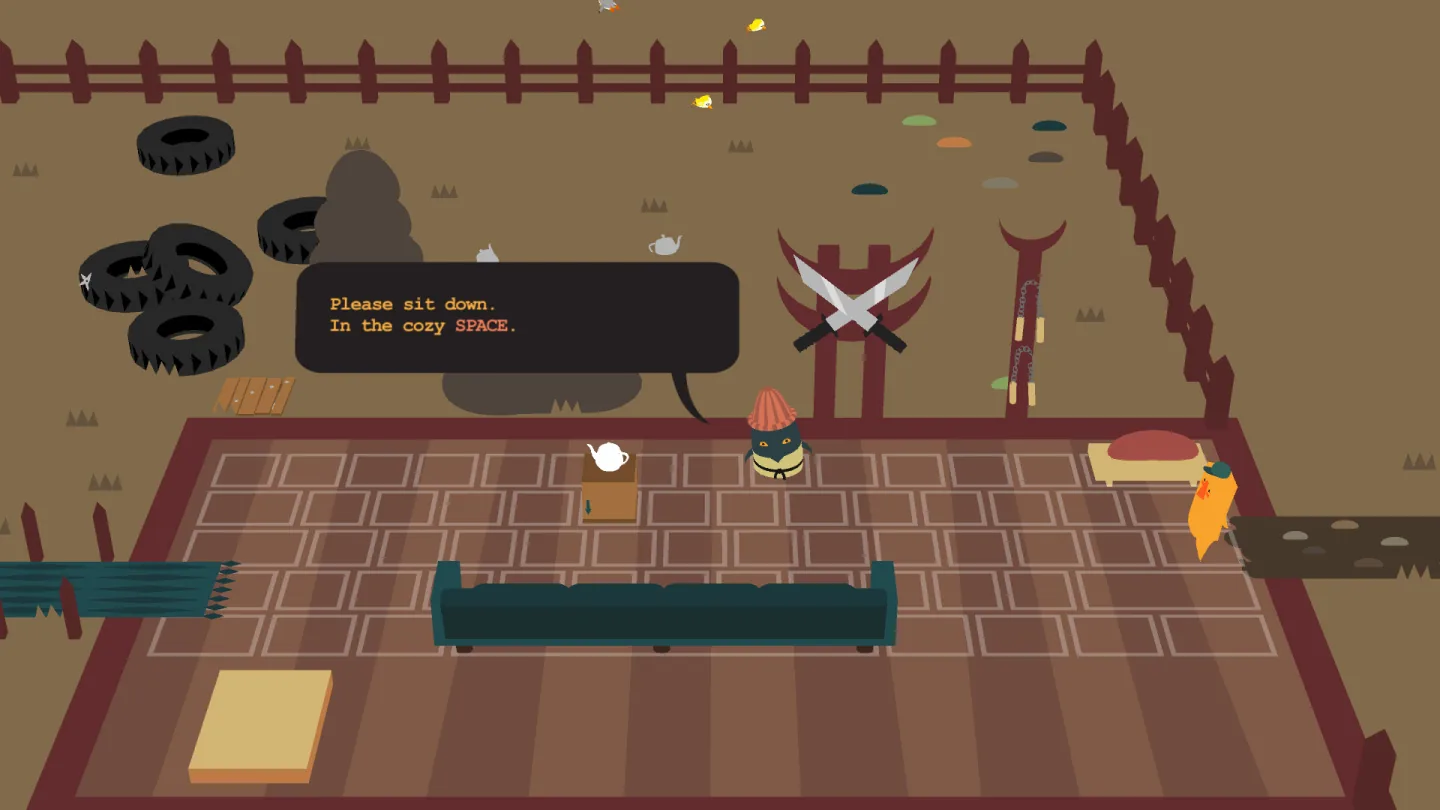
[Keyboard Sports - Saving QWERTY (announced)](https://store.steampowered.com/app/700720/) · Imagery © Triband. Developer-distributed screenshot or frame; all rights reserved. Excluded from MIT and CC BY 4.0.
1. The clue names Space and the scene presents a long seat
- Normal key events do not report keycap shapes or keyboard orientation.
- [Keyboard Sports - Saving QWERTY (announced)](https://store.steampowered.com/app/700720/)
## How it works
Shape, surface, signatures and placement become the material of the assignment.
## Variants
### Variants and applications
- Tactile landmarks. Action: Find positions by ridges, edges and spaces between blocks. Application: Mastering the home row, audio game, tactile search for a key position. Conditions: The presence of F/J ridges and digital landmark depends on the model. Equipment: Physical condition.
- Size and shape of keys. Action: Rule uses long, angled or freestanding keys. Application: Find "bridge" Space, select "door" Enter, panel shape puzzle. Conditions: ANSI, ISO, JIS and compact form factors vary. Hardware: Physical condition.
- Signatures as clues. Action: Inscriptions, symbols and pictograms on the keys are included in the solution. Application: Find the sign, read the code, match the name of the key with the action in the plot. Conditions: Signatures depend on the layout and replaced keycaps; The program itself does not read them. Equipment: Physical condition.
- Overlays and paper stencils. Action: Markings and slots are placed on or around the keys. Application: Educational console, board game with a digital part, simulated spaceship panel. Conditions: The stencil must match the specific geometry of the device. Equipment: Physical condition.
- Closed part of the surface. Action: A section of the keyboard is hidden from view or becomes inaccessible by rule. Application: Searching by touch, playing with limited resources, learning familiar positions. Conditions: Hiding and actual inaccessibility are usually not detected by the program. Equipment: Physical condition.
- Rotation and unusual placement. Action: The device is rotated or passed to the participant in a different orientation. Application: Change of point of view, local cooperation, stage puzzle. Conditions: A regular keyboard does not communicate its orientation; the rule is set manually. Equipment: Physical condition.
- Rearranging signatures or keycaps. Action: Physical designations change while maintaining the electrical positions of the keys. Application: Cipher machine, learning a new code, riddle about the discrepancy between the signature and the action. Conditions: The signal remains the signal of the switch position; Replacement suitable caps are needed. Equipment: Physical condition.
- Sound and feeling of pressing. Action: Clicks and tactile feedback are used as feedback by humans. Application: Percussion without a screen, ensemble on key sounds, working with eyes closed. Conditions: The computer does not measure sound and feel through normal keyboard events. Equipment: Physical condition.
## Context and limits
Author's working classification for designing games and interactions. Options can overlap and combine; the list is not a generally accepted standard or proven exhaustive list. Application examples are conditional unless a specific verifiable observation is indicated nearby. Sources support individual techniques and technical limitations.
## Connected materials
## Sources and provenance
Original editorial design catalog consolidated from project discussions on 2026-10-20. Complete discussion item lists and contextual limitations are preserved; linked primary sources support specific techniques, not the entire classification. English translation was prepared with machine assistance and editorial review.
- [Keyboard Sports - Saving QWERTY (announced)](https://store.steampowered.com/app/700720/) (id: source-2d8fd1f6427b91cb)
CC-BY-4.0 · gamemechanics.pro contributors