---
key: mechanic/keyboard--family-navigation
type: mechanic
id: keyboard--family-navigation
lang: en
title: Navigation and selection
summary: >-
Keys move focus or select an item directly. In NetHack item letters let
keyboard commands address particular inventory entries.
updatedAt: '2026-10-22'
status: active
url: 'https://gamemechanics.pro/en/knowledge/mechanic/keyboard--family-navigation/'
jsonUrl: >-
https://gamemechanics.pro/api/v1/knowledge/en/mechanic/keyboard--family-navigation.json
markdownUrl: >-
https://gamemechanics.pro/content/knowledge/en/mechanic/keyboard--family-navigation.md
aliases: []
tags:
- Physical keyboard interactions
- Interface
sourceIds:
- source-9a1664e49d0e8f50
- source-87856bbeffa16f0c
sources:
- id: source-9a1664e49d0e8f50
title: NetHack (menucolors)
url: 'https://commons.wikimedia.org/wiki/File:Nethack-inventory.png'
verifiedAt: null
- id: source-87856bbeffa16f0c
title: NetHack Guidebook
url: 'https://www.nethack.org/v343/Guidebook.html'
verifiedAt: null
relations: []
placements:
- catalogId: keyboard
id: family-navigation
title: Physical keyboard interactions
url: 'https://gamemechanics.pro/en/mechanics/keyboard/#family-navigation'
categoryIds:
- section-7
supersededBy: []
attributes:
preview:
updatedAt: '2026-10-22'
title: Navigation and selection
description: >-
Keys move focus or select an item directly. In NetHack item letters let
keyboard commands address particular inventory entries.
image:
src: images/mechanics/systems-nethack-inventory.webp
width: 644
height: 461
game: NetHack (menucolors)
sourceUrl: 'https://commons.wikimedia.org/wiki/File:Nethack-inventory.png'
originalUrl: >-
https://upload.wikimedia.org/wikipedia/commons/f/f5/Nethack-inventory.png
credit: 'NetHack developers; screenshot by Shen, 2006, with the menucolors patch'
rights: >-
NetHack General Public License. Converted to WebP on 2026-10-22.
License: https://www.nethack.org/common/license.html; bundled copy:
images/mechanics/nethack-license.txt. Source:
https://commons.wikimedia.org/wiki/File:Nethack-inventory.png
caption: 'NetHack: letter labels address inventory items'
alt: 'NetHack: letter labels address inventory items'
markers:
- x: 31
'y': 82
label: The letter k addresses the lamp in this inventory
tips:
- Keep focus visible and avoid unexpected key reassignment.
examples:
- title: NetHack Guidebook
url: 'https://www.nethack.org/v343/Guidebook.html'
endsAt: null
provenance: >-
Original editorial design catalog consolidated from project discussions on
2026-10-20. Complete discussion item lists and contextual limitations are
preserved; linked primary sources support specific techniques, not the entire
classification. English translation was prepared with machine assistance and
editorial review.
license: CC-BY-4.0
codeLicense: MIT
attribution: gamemechanics.pro contributors
catalogKey: catalog/keyboard
---
# Navigation and selection
id: keyboard--family-navigation
type: mechanic
key: mechanic/keyboard--family-navigation
lang: en
status: active
url: https://gamemechanics.pro/en/knowledge/mechanic/keyboard--family-navigation/
Keys move focus or select an item directly. In NetHack item letters let keyboard commands address particular inventory entries.
## At a glance
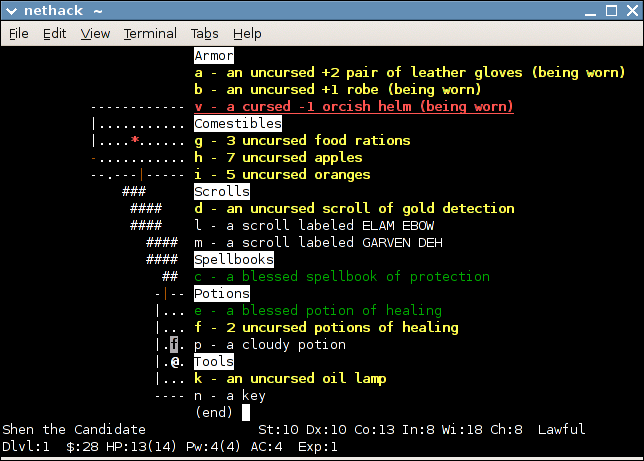
[NetHack (menucolors)](https://commons.wikimedia.org/wiki/File:Nethack-inventory.png) · NetHack General Public License. Converted to WebP on 2026-10-22. License: https://www.nethack.org/common/license.html; bundled copy: images/mechanics/nethack-license.txt. Source: https://commons.wikimedia.org/wiki/File:Nethack-inventory.png
1. The letter k addresses the lamp in this inventory
- Keep focus visible and avoid unexpected key reassignment.
- [NetHack Guidebook](https://www.nethack.org/v343/Guidebook.html)
## How it works
The keyboard moves focus, selects targets, and controls interface objects.
## Variants
### Variants and applications
- Sequential bypass. Action: Move to the next or previous available element. Application: Forms, dialogs, inventory, step-by-step inspection of objects. Conditions: Tab and Shift+Tab are expected in normal interfaces; maintain visible focus. Equipment: Regular keyboard.
- Spatial navigation. Action: Arrows move the selection to an adjacent element. Application: Item grids, trees, maps, field menus. Conditions: Directions must correspond to the visual structure. Equipment: Regular keyboard.
- Move to borders and pages. Action: Move directly to the beginning, end, or next screen of a list. Application: Large catalogs, magazines, maps and text documents. Conditions: Home, End, Page Up and Page Down may not be available as separate keys. Equipment: Regular keyboard.
- Direct selection by key. Action: The element is assigned a short index, letter or number. Application: Dialogue cues, quick slots, calling a group, selecting a tool. Conditions: The index must be visible next to the target. Equipment: Regular keyboard.
- Search by dial. Action: Entering letters moves the selection to a matching item or filters the list. Application: Long inventory, list of names, library navigation. Conditions: Consider input language and search prefix reset time. Equipment: Regular keyboard.
- Multiple choice. Action: Modifiers and navigation expand the range or change individual elements. Application: Controlling a squad, selecting files, editing a set of cells. Conditions: Separate moving focus from the selected state. Equipment: Regular keyboard.
- Object manipulation. Action: The key starts capturing, directions move or change the object, confirmation completes. Application: Available dragging, building, rearranging inventory, resizing. Conditions: Need clear confirmation, cancel and current mode. Equipment: Regular keyboard.
- Confirmation and cancellation. Action: Individual actions accept a selection, go back a step, or exit a mode. Applications: Menus, editors, command chains, ability targeting. Conditions: The expected roles of Enter, Space, and Escape depend on the component and platform. Equipment: Regular keyboard.
## Context and limits
Author's working classification for designing games and interactions. Options can overlap and combine; the list is not a generally accepted standard or proven exhaustive list. Application examples are conditional unless a specific verifiable observation is indicated nearby. Sources support individual techniques and technical limitations.
## Connected materials
## Sources and provenance
Original editorial design catalog consolidated from project discussions on 2026-10-20. Complete discussion item lists and contextual limitations are preserved; linked primary sources support specific techniques, not the entire classification. English translation was prepared with machine assistance and editorial review.
- [NetHack (menucolors)](https://commons.wikimedia.org/wiki/File:Nethack-inventory.png) (id: source-9a1664e49d0e8f50)
- [NetHack Guidebook](https://www.nethack.org/v343/Guidebook.html) (id: source-87856bbeffa16f0c)
CC-BY-4.0 · gamemechanics.pro contributors