---
key: mechanic/keyboard--family-modes
type: mechanic
id: keyboard--family-modes
lang: en
title: Modes and assignment of keys
summary: >-
A key’s assignment changes through settings or context. PowerToys can swap A
and B without changing the keyboard’s physical labels.
updatedAt: '2026-10-22'
status: active
url: 'https://gamemechanics.pro/en/knowledge/mechanic/keyboard--family-modes/'
jsonUrl: >-
https://gamemechanics.pro/api/v1/knowledge/en/mechanic/keyboard--family-modes.json
markdownUrl: >-
https://gamemechanics.pro/content/knowledge/en/mechanic/keyboard--family-modes.md
aliases: []
tags:
- Physical keyboard interactions
- Mapping signals to actions
sourceIds:
- source-719540110f02454c
sources:
- id: source-719540110f02454c
title: PowerToys Keyboard Manager
url: 'https://learn.microsoft.com/en-us/windows/powertoys/keyboard-manager'
verifiedAt: null
relations: []
placements:
- catalogId: keyboard
id: family-modes
title: Physical keyboard interactions
url: 'https://gamemechanics.pro/en/mechanics/keyboard/#family-modes'
categoryIds:
- section-2
supersededBy: []
attributes:
preview:
updatedAt: '2026-10-22'
title: Modes and assignment of keys
description: >-
A key’s assignment changes through settings or context. PowerToys can swap
A and B without changing the keyboard’s physical labels.
image:
src: images/mechanics/control-powertoys-remap.webp
width: 1440
height: 901
crop:
x: 0
'y': 266
width: 1440
height: 398
game: PowerToys Keyboard Manager
sourceUrl: 'https://learn.microsoft.com/en-us/windows/powertoys/keyboard-manager'
originalUrl: >-
https://learn.microsoft.com/en-us/windows/powertoys/images/keyboard-manager/keyboard-remap-a-b.png
credit: Microsoft
rights: >-
Imagery © Microsoft. Developer-distributed screenshot or frame; all
rights reserved. Excluded from MIT and CC BY 4.0.
caption: 'PowerToys: mutually remapping the A and B keys'
alt: 'PowerToys: mutually remapping the A and B keys'
markers:
- x: 38
'y': 47
label: Physical A sends B to the application
tips:
- Show the assigned action using the current layout and mode.
examples:
- title: PowerToys Keyboard Manager
url: 'https://learn.microsoft.com/en-us/windows/powertoys/keyboard-manager'
endsAt: null
provenance: >-
Original editorial design catalog consolidated from project discussions on
2026-10-20. Complete discussion item lists and contextual limitations are
preserved; linked primary sources support specific techniques, not the entire
classification. English translation was prepared with machine assistance and
editorial review.
license: CC-BY-4.0
codeLicense: MIT
attribution: gamemechanics.pro contributors
catalogKey: catalog/keyboard
---
# Modes and assignment of keys
id: keyboard--family-modes
type: mechanic
key: mechanic/keyboard--family-modes
lang: en
status: active
url: https://gamemechanics.pro/en/knowledge/mechanic/keyboard--family-modes/
A key’s assignment changes through settings or context. PowerToys can swap A and B without changing the keyboard’s physical labels.
## At a glance
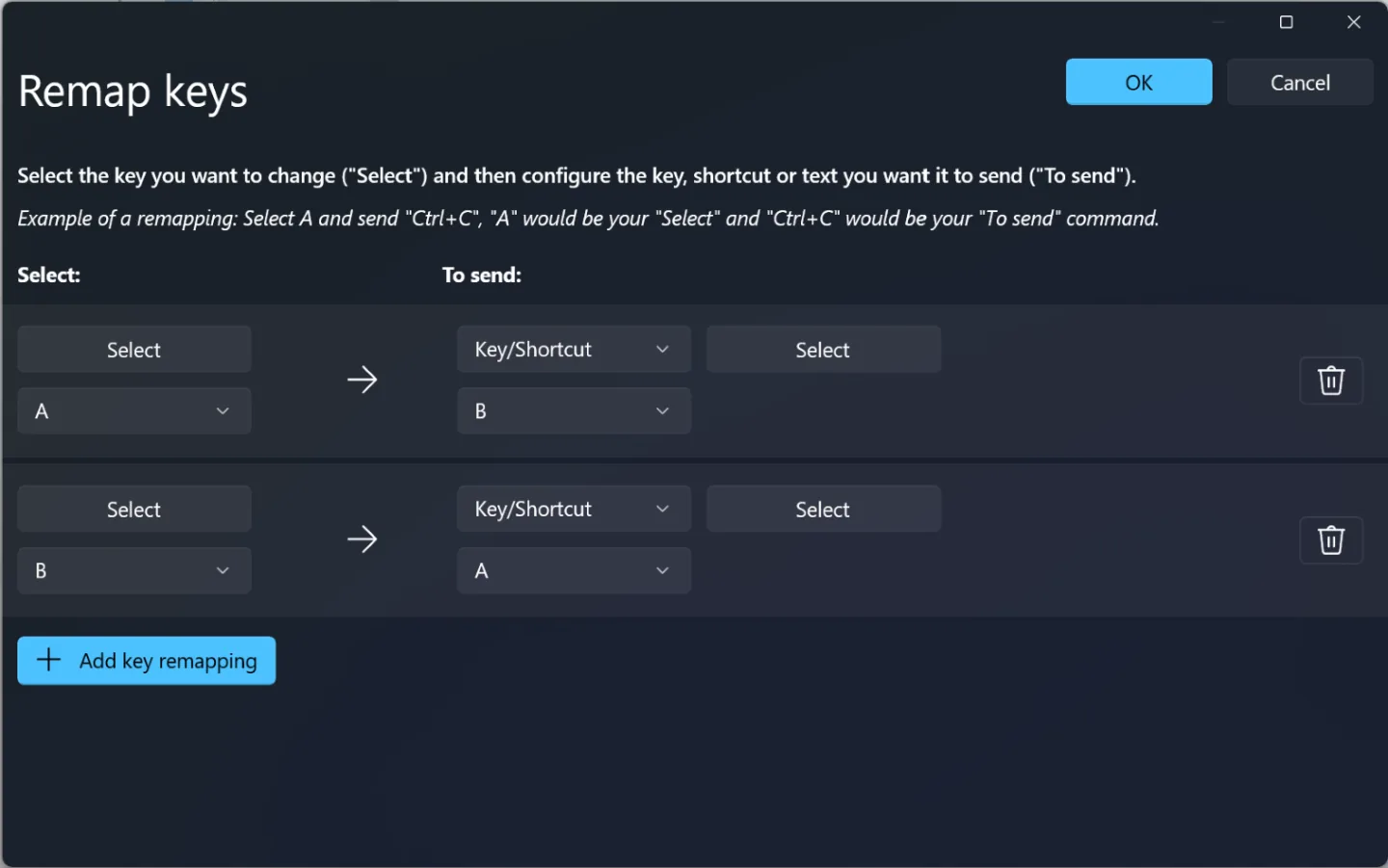
[PowerToys Keyboard Manager](https://learn.microsoft.com/en-us/windows/powertoys/keyboard-manager) · Imagery © Microsoft. Developer-distributed screenshot or frame; all rights reserved. Excluded from MIT and CC BY 4.0.
1. Physical A sends B to the application
- Show the assigned action using the current layout and mode.
- [PowerToys Keyboard Manager](https://learn.microsoft.com/en-us/windows/powertoys/keyboard-manager)
## How it works
The same physical input takes on a different meaning depending on the state.
## Variants
### Variants and applications
- Contextual action. Action: The meaning of a key is determined by an object, state or environment. Application: One button opens a door, picks up an item and starts a conversation. Conditions: Show the actual action before pressing. Equipment: Regular keyboard.
- Layer on hold. Action: A held key temporarily enables another set of assignments. Applications: Alternate ability panel, note octave, fine editing. Conditions: System Fn is frequently processed by the device; for the game layer, select an available key. Equipment: Regular keyboard.
- Fixed mode. Action: Pressing toggles a whole set of assignments until the next switch. Application: Construction mode, camera control, command and text editor mode. Conditions: Caps Lock or Num Lock can be taken into account when supporting the platform, but this is an OS state. Equipment: Regular keyboard.
- The command after the prefix. Action: A separate key temporarily switches the following presses to command mode. Application: Leader commands, accessing rarely used functions, selecting a school of magic. Conditions: Set a timeout and show an incomplete prefix. Equipment: Regular keyboard.
- Variable compliance. Action: Assignments change as the game progresses. Application: Cursed keys, panel rearrangement, test of ability to relearn controls. Conditions: New match requires a readable hint or an honestly assigned memory task. Equipment: Regular keyboard.
- Setting up controls like a mechanic. Action: The user himself assembles or rearranges assignments within the rule system. Application: Design a ship panel, optimize a workplace, assemble a robot controller. Conditions: Maintain the ability to restore a working circuit. Equipment: A regular keyboard.
- Distinguishing identically labeled keys. Action: The main Enter and Enter of the digital block or the left and right Shift act differently. Application: Two independent levers, musical registers, commands for different characters. Conditions: Distinction and availability of keys depend on the device and API. Equipment: Regular keyboard.
- Separate blocks as a function panel. Action: F-keys, number pad and available additional keys are given a separate role. Application: Soundpad, numeric keypad, instrument selection, sequencer transport. Conditions: Media keys and macro keys can be intercepted by the OS or issue normal remapped events. Hardware: Regular keyboard.
## Context and limits
Author's working classification for designing games and interactions. Options can overlap and combine; the list is not a generally accepted standard or proven exhaustive list. Application examples are conditional unless a specific verifiable observation is indicated nearby. Sources support individual techniques and technical limitations.
## Connected materials
## Sources and provenance
Original editorial design catalog consolidated from project discussions on 2026-10-20. Complete discussion item lists and contextual limitations are preserved; linked primary sources support specific techniques, not the entire classification. English translation was prepared with machine assistance and editorial review.
- [PowerToys Keyboard Manager](https://learn.microsoft.com/en-us/windows/powertoys/keyboard-manager) (id: source-719540110f02454c)
CC-BY-4.0 · gamemechanics.pro contributors