---
key: mechanic/keyboard--family-hybrids
type: mechanic
id: keyboard--family-hybrids
lang: en
title: Hybrids and embedded controllers
summary: >-
Keys combine with another controller. In AudioSwift the keyboard triggers
notes while the trackpad changes synthesizer parameters.
updatedAt: '2026-10-22'
status: active
url: 'https://gamemechanics.pro/en/knowledge/mechanic/keyboard--family-hybrids/'
jsonUrl: >-
https://gamemechanics.pro/api/v1/knowledge/en/mechanic/keyboard--family-hybrids.json
markdownUrl: >-
https://gamemechanics.pro/content/knowledge/en/mechanic/keyboard--family-hybrids.md
aliases: []
tags:
- Physical keyboard interactions
- Channel combination
sourceIds:
- source-fd215230c062deb7
sources:
- id: source-fd215230c062deb7
title: AudioSwift
url: 'https://audioswiftapp.com/'
verifiedAt: null
relations: []
placements:
- catalogId: keyboard
id: family-hybrids
title: Physical keyboard interactions
url: 'https://gamemechanics.pro/en/mechanics/keyboard/#family-hybrids'
categoryIds:
- section-11
supersededBy: []
attributes:
preview:
updatedAt: '2026-10-22'
title: Hybrids and embedded controllers
description: >-
Keys combine with another controller. In AudioSwift the keyboard triggers
notes while the trackpad changes synthesizer parameters.
image:
src: images/mechanics/control-audioswift-8.webp
width: 1024
height: 576
game: AudioSwift
sourceUrl: 'https://audioswiftapp.com/'
originalUrl: >-
https://www.dropbox.com/scl/fi/yqt0o62p84omwo9zdcacb/09-Utilities-MIDI-Keys.mp4?rlkey=3pmy5octl15j8klsneydy1dvl&st=c3vxluvv&raw=1
sourceFrameSeconds: 3
credit: Nigel Ríos; host apps and instruments retain their respective rights
rights: >-
Imagery © Nigel Ríos; host apps and instruments retain their respective
rights. Developer-distributed screenshot or frame; all rights reserved.
Excluded from MIT and CC BY 4.0.
caption: 'AudioSwift: keyboard and trackpad jointly control a synthesizer'
alt: 'AudioSwift: keyboard and trackpad jointly control a synthesizer'
markers:
- x: 46
'y': 70
label: The trackpad changes Vibrato during keyboard performance
tips:
- Separate input roles and retain control if one channel disconnects.
examples:
- title: AudioSwift
url: 'https://audioswiftapp.com/'
endsAt: null
provenance: >-
Original editorial design catalog consolidated from project discussions on
2026-10-20. Complete discussion item lists and contextual limitations are
preserved; linked primary sources support specific techniques, not the entire
classification. English translation was prepared with machine assistance and
editorial review.
license: CC-BY-4.0
codeLicense: MIT
attribution: gamemechanics.pro contributors
catalogKey: catalog/keyboard
---
# Hybrids and embedded controllers
id: keyboard--family-hybrids
type: mechanic
key: mechanic/keyboard--family-hybrids
lang: en
status: active
url: https://gamemechanics.pro/en/knowledge/mechanic/keyboard--family-hybrids/
Keys combine with another controller. In AudioSwift the keyboard triggers notes while the trackpad changes synthesizer parameters.
## At a glance
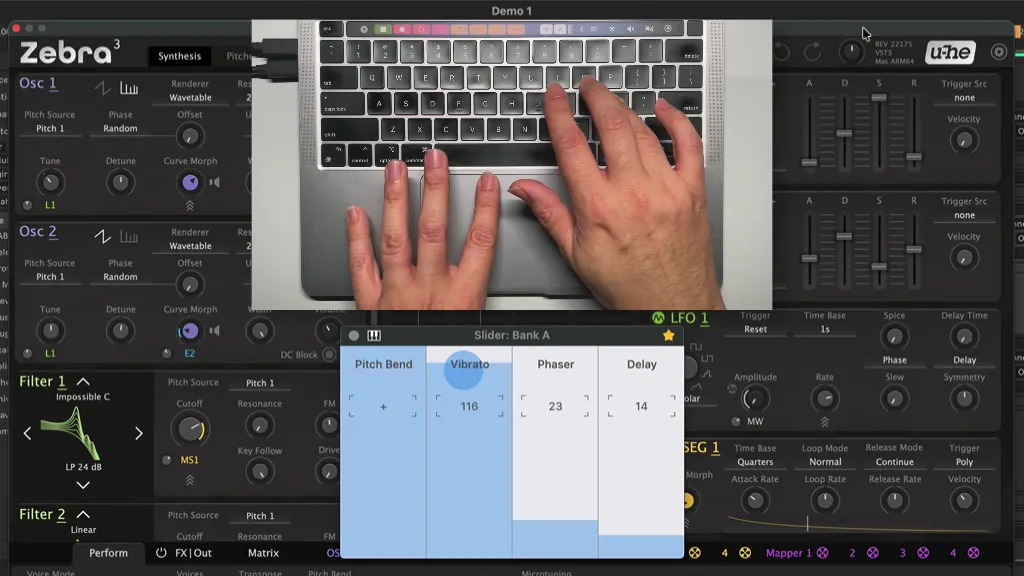
[AudioSwift](https://audioswiftapp.com/) · Imagery © Nigel Ríos; host apps and instruments retain their respective rights. Developer-distributed screenshot or frame; all rights reserved. Excluded from MIT and CC BY 4.0.
[Source recording](https://www.dropbox.com/scl/fi/yqt0o62p84omwo9zdcacb/09-Utilities-MIDI-Keys.mp4?rlkey=3pmy5octl15j8klsneydy1dvl&st=c3vxluvv&raw=1), 3 s
1. The trackpad changes Vibrato during keyboard performance
- Separate input roles and retain control if one channel disconnects.
- [AudioSwift](https://audioswiftapp.com/)
## How it works
Keys communicate with other input sources; the additional elements are not regular keys.
## Variants
### Variants and applications
- Keyboard and pointer. Action: Keys specify movement, mode or tool, mouse or trackpad selects a point. Application: Aiming, modified dragging, drawing and editing. Conditions: Need to determine the owner of the focus and joint interpretation of events. Equipment: Additional channel.
- Keyboard and voice. Action: Text or buttons select a parameter, voice gives a command or vice versa. Application: Dispatcher, stage play, crew management, multimodal editor. Conditions: A microphone, resolution and clear processing of unrecognized speech are needed. Equipment: Additional channel.
- Keyboard and touch screen. Action: Touch selects an object, keys control an action or modifier. Application: Drawing on a tablet with a keyboard, map control, musical instrument. Conditions: Consider the reachability of both devices and the state of the active window. Equipment: Additional channel.
- Keyboard and look. Action: Gaze selects the target, the key confirms or changes it. Application: Quick selection of objects, accessible controls, aiming in an experimental game. Conditions: Requires an eye tracker or a suitable camera and calibration. Equipment: Additional channel.
- Keyboard and body posture. Action: A camera or other sensor adds the position of the arms, head or body. Application: Check the crossing of hands, combine typing with movement, create stage acting. Conditions: Pose is not determined by the keyboard; The quality of external recognition needs to be checked. Equipment: Additional channel.
- Keyboard and gamepad or pedal. Action: Different channels are responsible for different parts of the control. Application: Keys select commands, the pedal holds the mode, the gamepad sets a continuous axis. Conditions: Priority rules and support for mixed input are needed. Equipment: Additional channel.
- Built-in encoder or wheel. Action: The additional rotary controller changes the value, the key confirms. Application: Frequency, scale, scrolling, step selection on the instrument panel. Conditions: Availability and accessibility of the encoder depends on the device and its interface. Hardware: Special device / SDK.
- Built-in touchpad, strip or mini-joystick. Action: An additional surface or pointer gives continuous control next to the keys. Applications: Camera positioning, audio modulation, cursor, expressive creative tool. Conditions: This is a separate channel within the housing; it should not be assumed on any keyboard. Hardware: Special device / SDK.
## Context and limits
Author's working classification for designing games and interactions. Options can overlap and combine; the list is not a generally accepted standard or proven exhaustive list. Application examples are conditional unless a specific verifiable observation is indicated nearby. Sources support individual techniques and technical limitations.
## Connected materials
## Sources and provenance
Original editorial design catalog consolidated from project discussions on 2026-10-20. Complete discussion item lists and contextual limitations are preserved; linked primary sources support specific techniques, not the entire classification. English translation was prepared with machine assistance and editorial review.
- [AudioSwift](https://audioswiftapp.com/) (id: source-fd215230c062deb7)
CC-BY-4.0 · gamemechanics.pro contributors