---
key: mechanic/keyboard--family-chords
type: mechanic
id: keyboard--family-chords
lang: en
title: Simultaneous presses
summary: >-
Several keys held together form one command. PowerToys can replace one
shortcut with another while preserving the intended action.
updatedAt: '2026-10-22'
status: active
url: 'https://gamemechanics.pro/en/knowledge/mechanic/keyboard--family-chords/'
jsonUrl: >-
https://gamemechanics.pro/api/v1/knowledge/en/mechanic/keyboard--family-chords.json
markdownUrl: >-
https://gamemechanics.pro/content/knowledge/en/mechanic/keyboard--family-chords.md
aliases: []
tags:
- Physical keyboard interactions
- Signals and timing
sourceIds:
- source-719540110f02454c
sources:
- id: source-719540110f02454c
title: PowerToys Keyboard Manager
url: 'https://learn.microsoft.com/en-us/windows/powertoys/keyboard-manager'
verifiedAt: null
relations: []
placements:
- catalogId: keyboard
id: family-chords
title: Physical keyboard interactions
url: 'https://gamemechanics.pro/en/mechanics/keyboard/#family-chords'
categoryIds:
- section-1
supersededBy: []
attributes:
preview:
updatedAt: '2026-10-22'
title: Simultaneous presses
description: >-
Several keys held together form one command. PowerToys can replace one
shortcut with another while preserving the intended action.
image:
src: images/mechanics/control-powertoys-shortcut.webp
width: 1440
height: 592
crop:
x: 0
'y': 169
width: 964
height: 218
game: PowerToys Keyboard Manager
sourceUrl: 'https://learn.microsoft.com/en-us/windows/powertoys/keyboard-manager'
originalUrl: >-
https://learn.microsoft.com/en-us/windows/powertoys/images/keyboard-manager/keyboard-remap-shortcut.png
credit: Microsoft
rights: >-
Imagery © Microsoft. Developer-distributed screenshot or frame; all
rights reserved. Excluded from MIT and CC BY 4.0.
caption: 'PowerToys: Alt+C is remapped to Ctrl+C'
alt: 'PowerToys: Alt+C is remapped to Ctrl+C'
markers:
- x: 18
'y': 48
label: Two keys form the source shortcut Alt+C
tips:
- Check chord availability and conflicts with system shortcuts.
examples:
- title: PowerToys Keyboard Manager
url: 'https://learn.microsoft.com/en-us/windows/powertoys/keyboard-manager'
endsAt: null
provenance: >-
Original editorial design catalog consolidated from project discussions on
2026-10-20. Complete discussion item lists and contextual limitations are
preserved; linked primary sources support specific techniques, not the entire
classification. English translation was prepared with machine assistance and
editorial review.
license: CC-BY-4.0
codeLicense: MIT
attribution: gamemechanics.pro contributors
catalogKey: catalog/keyboard
---
# Simultaneous presses
id: keyboard--family-chords
type: mechanic
key: mechanic/keyboard--family-chords
lang: en
status: active
url: https://gamemechanics.pro/en/knowledge/mechanic/keyboard--family-chords/
Several keys held together form one command. PowerToys can replace one shortcut with another while preserving the intended action.
## At a glance
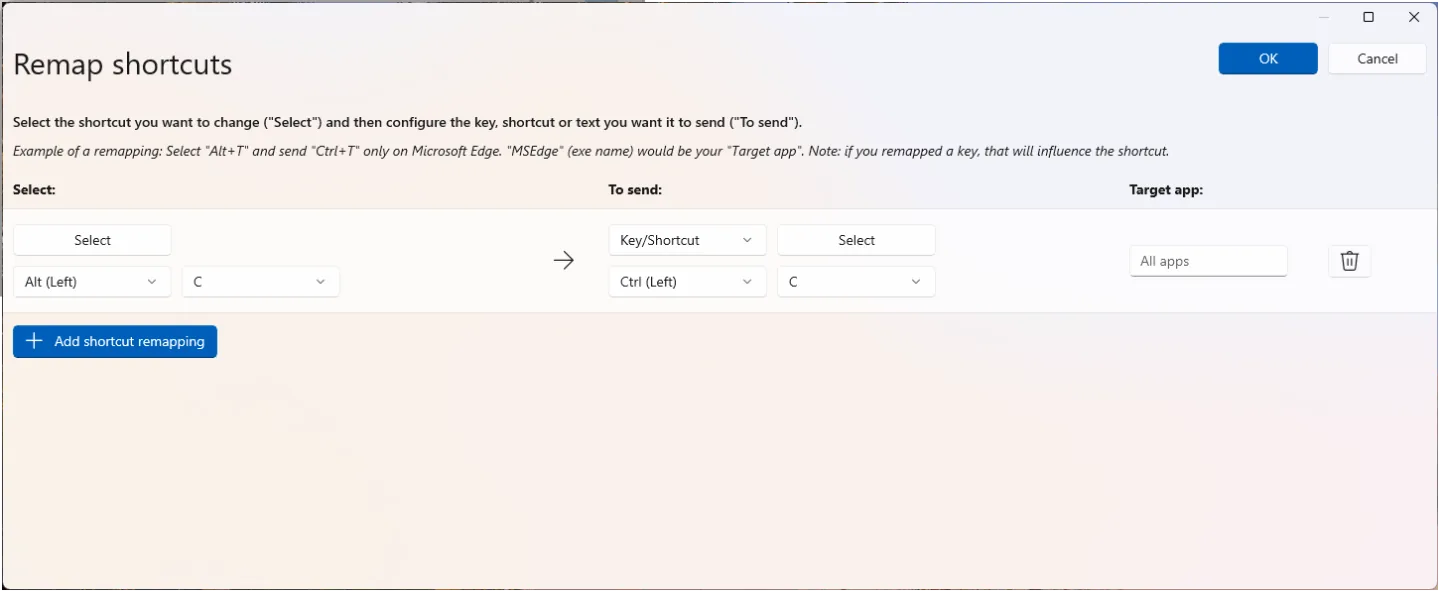
[PowerToys Keyboard Manager](https://learn.microsoft.com/en-us/windows/powertoys/keyboard-manager) · Imagery © Microsoft. Developer-distributed screenshot or frame; all rights reserved. Excluded from MIT and CC BY 4.0.
1. Two keys form the source shortcut Alt+C
- Check chord availability and conflicts with system shortcuts.
- [PowerToys Keyboard Manager](https://learn.microsoft.com/en-us/windows/powertoys/keyboard-manager)
## How it works
A chord here means a group of keys that together form one action.
## Variants
### Variants and applications
- Coincidence of started pressing. Action: Multiple keys must begin to be pressed within tolerance. Application: Simultaneous strike, synchronized opening of locks, musical chord. Conditions: Physically perfect simultaneity is not required; a measurable window is specified. Equipment: Regular keyboard.
- Joint retention. Action: The action is available as long as all the necessary keys are pressed. Application: Hold several seals, support the machine, collect a combination of ingredients. Conditions: The order of pressing may not matter. Equipment: Regular keyboard.
- Modifier and action. Action: One key modifies the meaning of another as long as it is held. Application: Run plus movement, alternative shot, change of tool step. Conditions: Any assigned key can act as a modifier. Equipment: Regular keyboard.
- Multi-level chord. Action: Two or more modifiers together with the main key select the action. Application: Expert commands, complex spells, a large set of tools. Conditions: Conflict checking and limiting the complexity of combinations are required. Equipment: Regular keyboard.
- Chord as a symbol. Action: Each combination of a small set of keys represents a character or a word. Application: Shorthand input, fictitious language, limited controller control. Conditions: This can be implemented on regular keys; a specialized wall keyboard is a separate device. Equipment: Regular keyboard.
- Accurate typing without extra keys. Action: Only the required set of keystrokes are accepted. Application: Collect binary code, play a constellation, pass a musical chord test. Conditions: You must clearly distinguish between “contains the required” and “matches exactly.” Equipment: A regular keyboard.
- Chord with release confirmation. Action: The set is assembled while holding, then fixed when the selected or all keys are released. Application: Select the composition of the spell, type a shorthand syllable, run a batch of commands. Conditions: You must determine which release completes the assembly. Equipment: A regular keyboard.
- Rolling chord. Action: The new key is pressed before the previous one is released; the intersection of states is important. Application: Interceptions on the rock, legato, holding a continuous power chain. Conditions: A simple sequence without intersection should differ in the result. Equipment: A regular keyboard.
## Context and limits
Author's working classification for designing games and interactions. Options can overlap and combine; the list is not a generally accepted standard or proven exhaustive list. Application examples are conditional unless a specific verifiable observation is indicated nearby. Sources support individual techniques and technical limitations.
## Connected materials
## Sources and provenance
Original editorial design catalog consolidated from project discussions on 2026-10-20. Complete discussion item lists and contextual limitations are preserved; linked primary sources support specific techniques, not the entire classification. English translation was prepared with machine assistance and editorial review.
- [PowerToys Keyboard Manager](https://learn.microsoft.com/en-us/windows/powertoys/keyboard-manager) (id: source-719540110f02454c)
CC-BY-4.0 · gamemechanics.pro contributors