---
key: mechanic/keyboard--family-accessibility
type: mechanic
id: keyboard--family-accessibility
lang: en
title: Accessible control schemes
summary: >-
Remapping preserves an action under a different motor input scheme. PowerToys
lets the user choose a more convenient key in place of the original.
updatedAt: '2026-10-22'
status: active
url: >-
https://gamemechanics.pro/en/knowledge/mechanic/keyboard--family-accessibility/
jsonUrl: >-
https://gamemechanics.pro/api/v1/knowledge/en/mechanic/keyboard--family-accessibility.json
markdownUrl: >-
https://gamemechanics.pro/content/knowledge/en/mechanic/keyboard--family-accessibility.md
aliases: []
tags:
- Physical keyboard interactions
- Adaptation
sourceIds:
- source-719540110f02454c
sources:
- id: source-719540110f02454c
title: PowerToys Keyboard Manager
url: 'https://learn.microsoft.com/en-us/windows/powertoys/keyboard-manager'
verifiedAt: null
relations: []
placements:
- catalogId: keyboard
id: family-accessibility
title: Physical keyboard interactions
url: 'https://gamemechanics.pro/en/mechanics/keyboard/#family-accessibility'
categoryIds:
- section-12
supersededBy: []
attributes:
preview:
updatedAt: '2026-10-22'
title: Accessible control schemes
description: >-
Remapping preserves an action under a different motor input scheme.
PowerToys lets the user choose a more convenient key in place of the
original.
image:
src: images/mechanics/control-powertoys-remap.webp
width: 1440
height: 901
crop:
x: 0
'y': 266
width: 1440
height: 398
game: PowerToys Keyboard Manager
sourceUrl: 'https://learn.microsoft.com/en-us/windows/powertoys/keyboard-manager'
originalUrl: >-
https://learn.microsoft.com/en-us/windows/powertoys/images/keyboard-manager/keyboard-remap-a-b.png
credit: Microsoft
rights: >-
Imagery © Microsoft. Developer-distributed screenshot or frame; all
rights reserved. Excluded from MIT and CC BY 4.0.
caption: 'PowerToys: mutually remapping the A and B keys'
alt: 'PowerToys: mutually remapping the A and B keys'
markers:
- x: 38
'y': 47
label: Physical A sends B to the application
tips:
- >-
Allow remapping of every action, including confirmation and
cancellation.
examples:
- title: PowerToys Keyboard Manager
url: 'https://learn.microsoft.com/en-us/windows/powertoys/keyboard-manager'
endsAt: null
provenance: >-
Original editorial design catalog consolidated from project discussions on
2026-10-20. Complete discussion item lists and contextual limitations are
preserved; linked primary sources support specific techniques, not the entire
classification. English translation was prepared with machine assistance and
editorial review.
license: CC-BY-4.0
codeLicense: MIT
attribution: gamemechanics.pro contributors
catalogKey: catalog/keyboard
---
# Accessible control schemes
id: keyboard--family-accessibility
type: mechanic
key: mechanic/keyboard--family-accessibility
lang: en
status: active
url: https://gamemechanics.pro/en/knowledge/mechanic/keyboard--family-accessibility/
Remapping preserves an action under a different motor input scheme. PowerToys lets the user choose a more convenient key in place of the original.
## At a glance
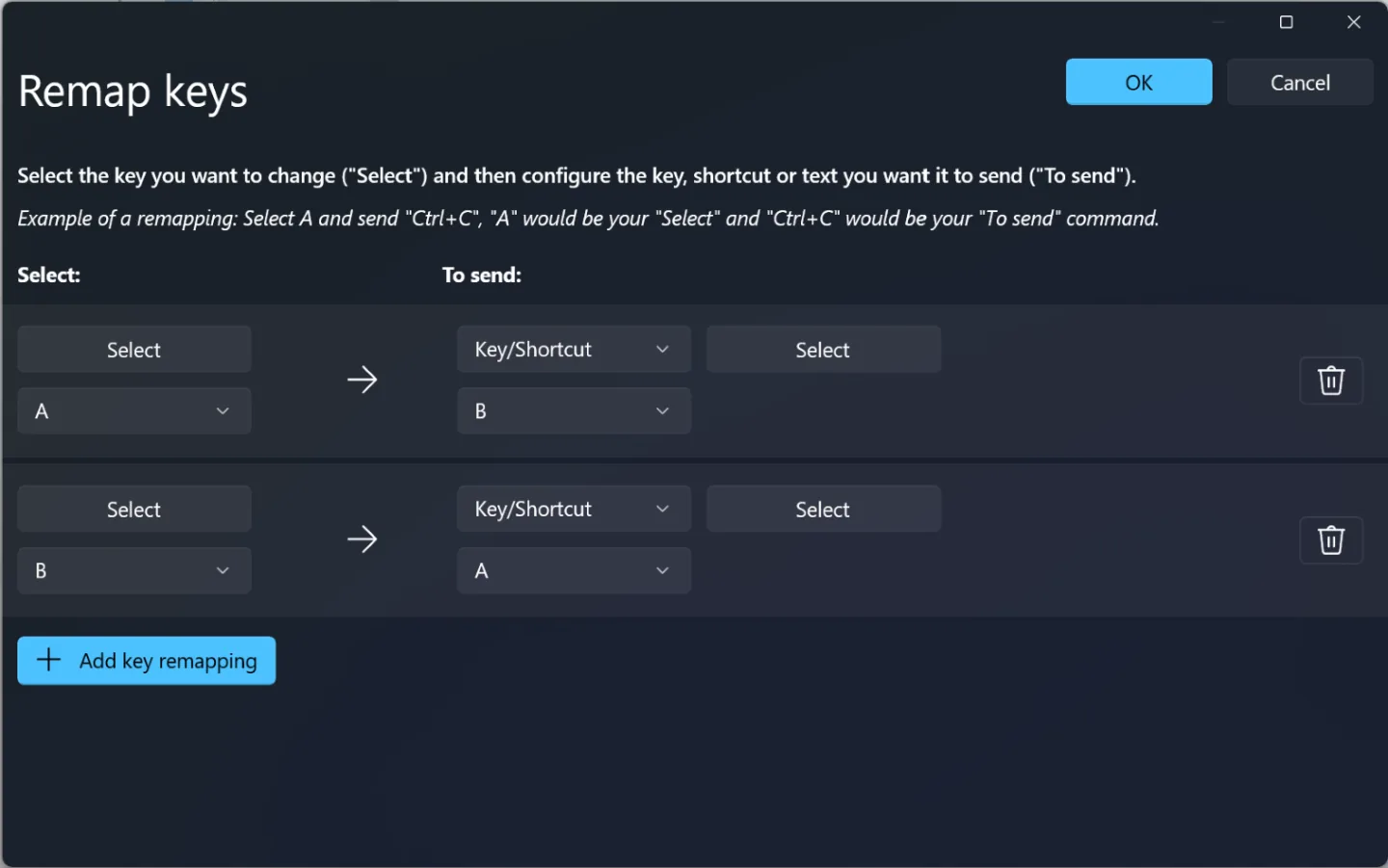
[PowerToys Keyboard Manager](https://learn.microsoft.com/en-us/windows/powertoys/keyboard-manager) · Imagery © Microsoft. Developer-distributed screenshot or frame; all rights reserved. Excluded from MIT and CC BY 4.0.
1. Physical A sends B to the application
- Allow remapping of every action, including confirmation and cancellation.
- [PowerToys Keyboard Manager](https://learn.microsoft.com/en-us/windows/powertoys/keyboard-manager)
## How it works
Input transformations help preserve the task across other motor abilities.
## Variants
### Variants and applications
- One key and scan. Action: The system highlights the options one by one, pressing selects the current one. Application: Menus, dialogues, turn-based games and tools with one accessible switch. Conditions: Scanning speed and cancellation method are configurable. Equipment: Regular keyboard.
- Multiple actions with one key. Action: Different durations, series and phases give different commands. Application: One-button adventure, compact controller, limited input tool. Conditions: The vocabulary of distinguishable gestures must be small and learnable. Equipment: Regular keyboard.
- Sequential modifiers. Action: The combination is entered in parts with the previously selected keys fixed. Application: Alternative to chords, one-hand control, complex editor commands. Conditions: The fixation must be shown and allowed to be reset. Equipment: Regular keyboard.
- Switch instead of holding. Action: The first press turns on the long action, the second turns it off. Application: Run, block, grab an object, record, temporary tool mode. Conditions: Keep a separate setting for actions where releasing itself is the meaning. Equipment: Regular keyboard.
- Hold instead of frequent presses. Action: Holding generates a limited series of accepted actions. Application: Alternative to mash mechanics, long scrolling, repeatable operation of the tool. Conditions: Frequency is set by the application and must be consistent with the rules of the game. Equipment: Regular keyboard.
- One-handed design. Action: All necessary actions are placed in an accessible compact area. Application: Control remapping, local mode with one participant, mobile workstation. Conditions: Test real-world combinations and reach on the user's device. Hardware: Regular keyboard.
- Sequence instead of simultaneity. Action: A chord or multiple streams are replaced by a chain, preserving the selected states. Application: Solo cooperative puzzle, step-by-step musical input, accessible control panel. Conditions: If synchronicity is the goal of the challenge, such a replacement changes its character. Equipment: Regular keyboard.
- Configurable temporal precision. Action: The user changes windows, durations, tempo and acceptable errors. Application: Training, rhythm games, different difficulty and access modes. Conditions: This is an interaction parameter; save the settings and explain the impact on the result. Equipment: Regular keyboard.
## Context and limits
Author's working classification for designing games and interactions. Options can overlap and combine; the list is not a generally accepted standard or proven exhaustive list. Application examples are conditional unless a specific verifiable observation is indicated nearby. Sources support individual techniques and technical limitations.
## Connected materials
## Sources and provenance
Original editorial design catalog consolidated from project discussions on 2026-10-20. Complete discussion item lists and contextual limitations are preserved; linked primary sources support specific techniques, not the entire classification. English translation was prepared with machine assistance and editorial review.
- [PowerToys Keyboard Manager](https://learn.microsoft.com/en-us/windows/powertoys/keyboard-manager) (id: source-719540110f02454c)
CC-BY-4.0 · gamemechanics.pro contributors